Yes, VisualGPT is free to start. We generated an image in its AI Image Editor without signing in, and a free Google login adds 10 daily credits that expire after 24 hours. Free images carry no watermark but are for personal use only. Paid plans start at $8 a month or $72 a year.
 VisualGPT on Toolfolio. Updated November 14, 2026. Prices checked on visualgpt.io/pricing with no account.
VisualGPT pricing at a glance


AI-driven platform for image creation and enhancement online
These are the prices on VisualGPT's official pricing page on November 14, 2026, in US dollars. Every plan shows a crossed-out list price ($10, $50, $200 and $600 a month) and a "% OFF" badge with a countdown timer. The numbers below are what the page actually charges.
| Plan | Monthly billing | Yearly billing | Credits each month | Up to (vendor estimate) |
|---|---|---|---|---|
| Free | $0 | $0 | 10 a day after login, valid 24 hours | Depends on the model |
| Starter | $8 a month | $72 a year ($6 a month) | 100 | 100 images or 12 videos |
| Basic | $19 a month | $180 a year ($15 a month) | 500 | 500 images or 65 videos |
| Pro (Most Popular) | $39 a month | $240 a year ($20 a month) | 2,000 | 2,000 images or 250 videos |
| Ultra | $89 a month | $720 a year ($60 a month) | 6,000 | 6,000 images or 750 videos |
| Enterprise | Contact sales | Contact sales | Custom | Custom |
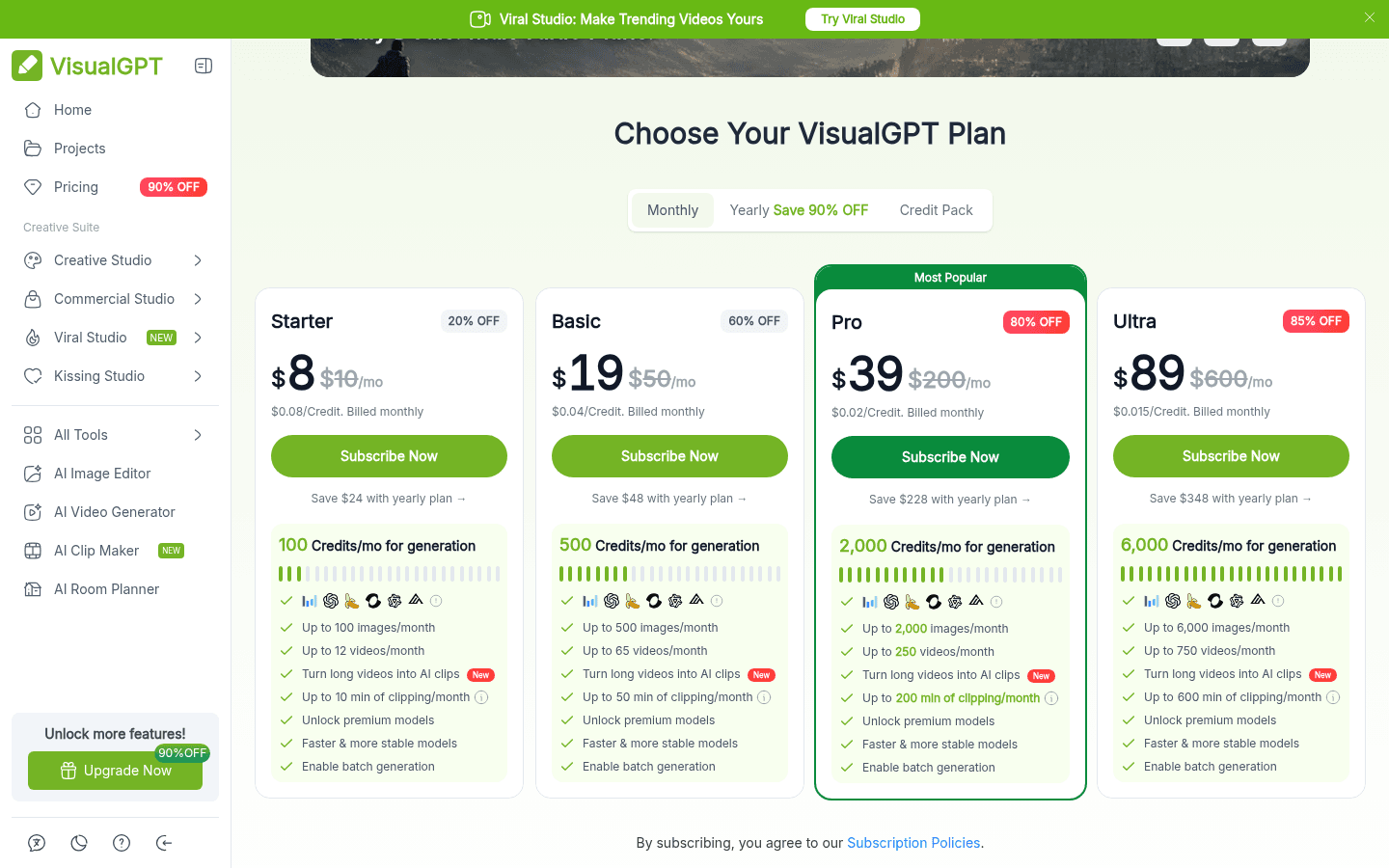
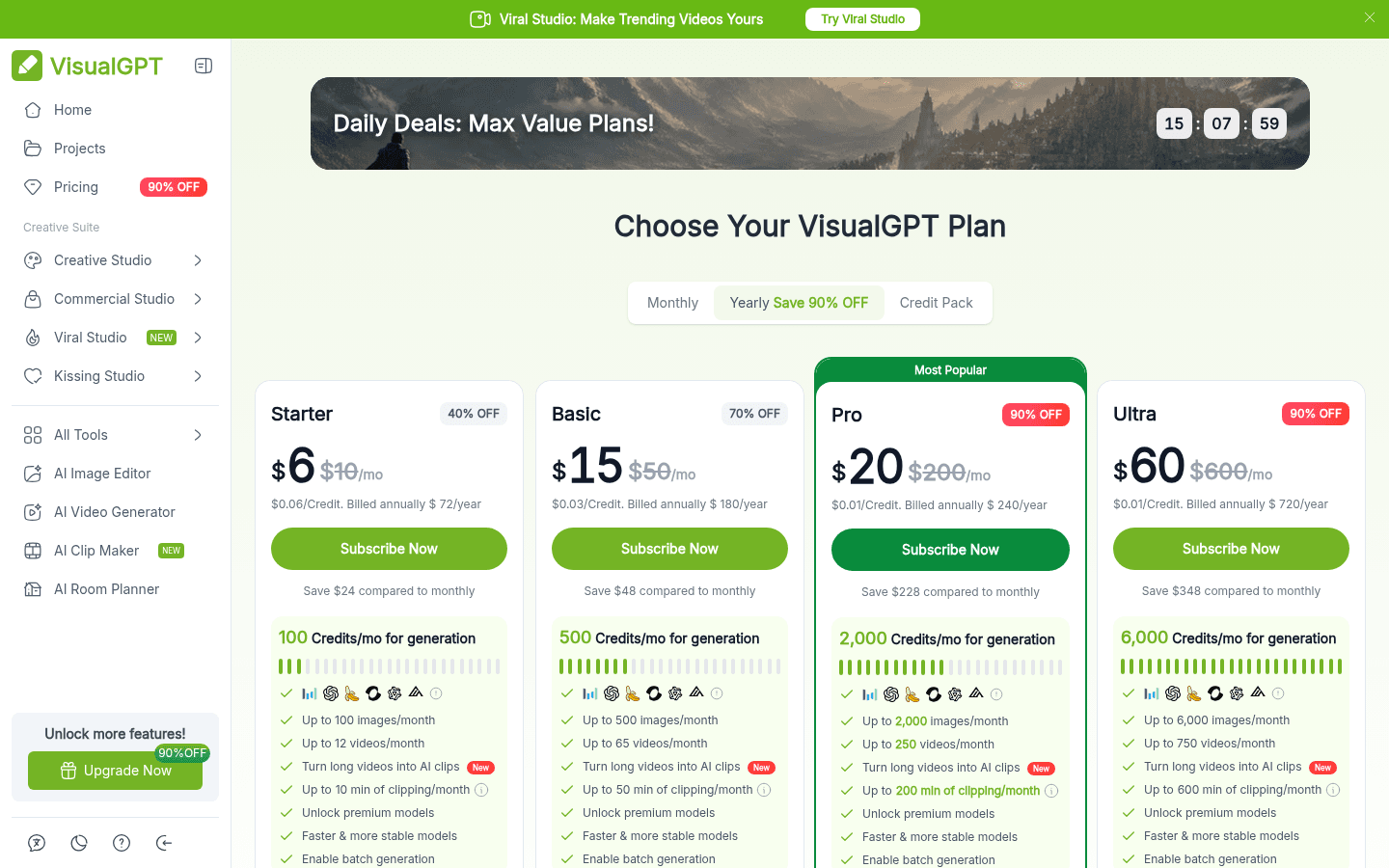
Paid plans also add clipping minutes for turning long videos into short clips (10, 50, 200 and 600 minutes a month), premium models, faster processing and batch generation.
What the free plan includes
VisualGPT's own "Compare All Plans" table lists what Free users get next to paid subscribers and credit pack buyers:
| Feature | Free | Subscription or credit pack |
|---|---|---|
| Daily credits | Limited | Unlimited |
| AI tools access | Yes | Yes |
| Batch editing | No | 10 images per task |
| History storage | 15 days | Unlimited |
| Download quality | Standard | High quality |
| Credit validity | 1 day | Monthly (subscription) or lifetime (packs) |
| Commercial use | No | Yes |
| No watermark | Yes | Yes |
| No ads | Yes | Yes |
| Processing priority, early access, priority support | No | Yes |
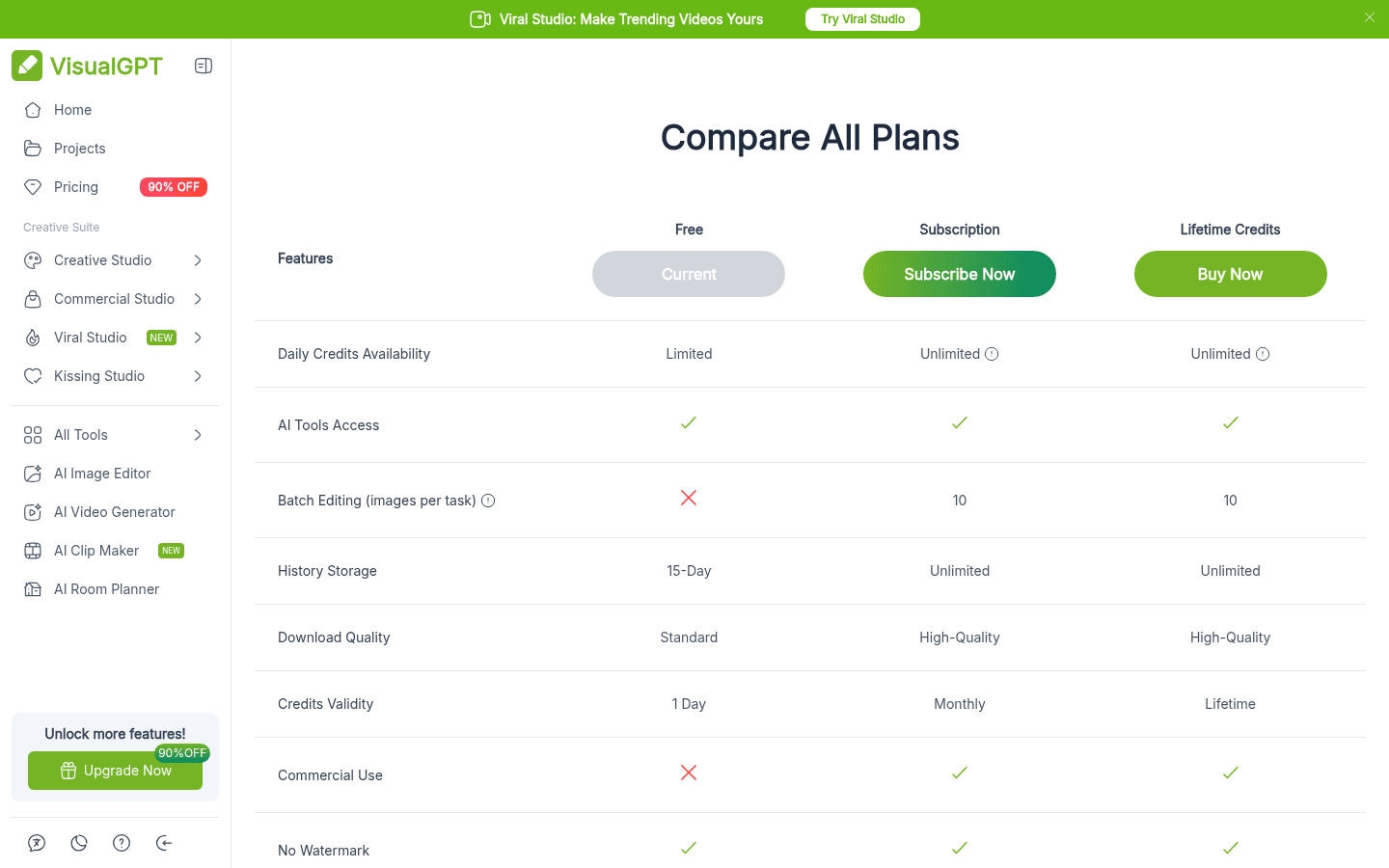
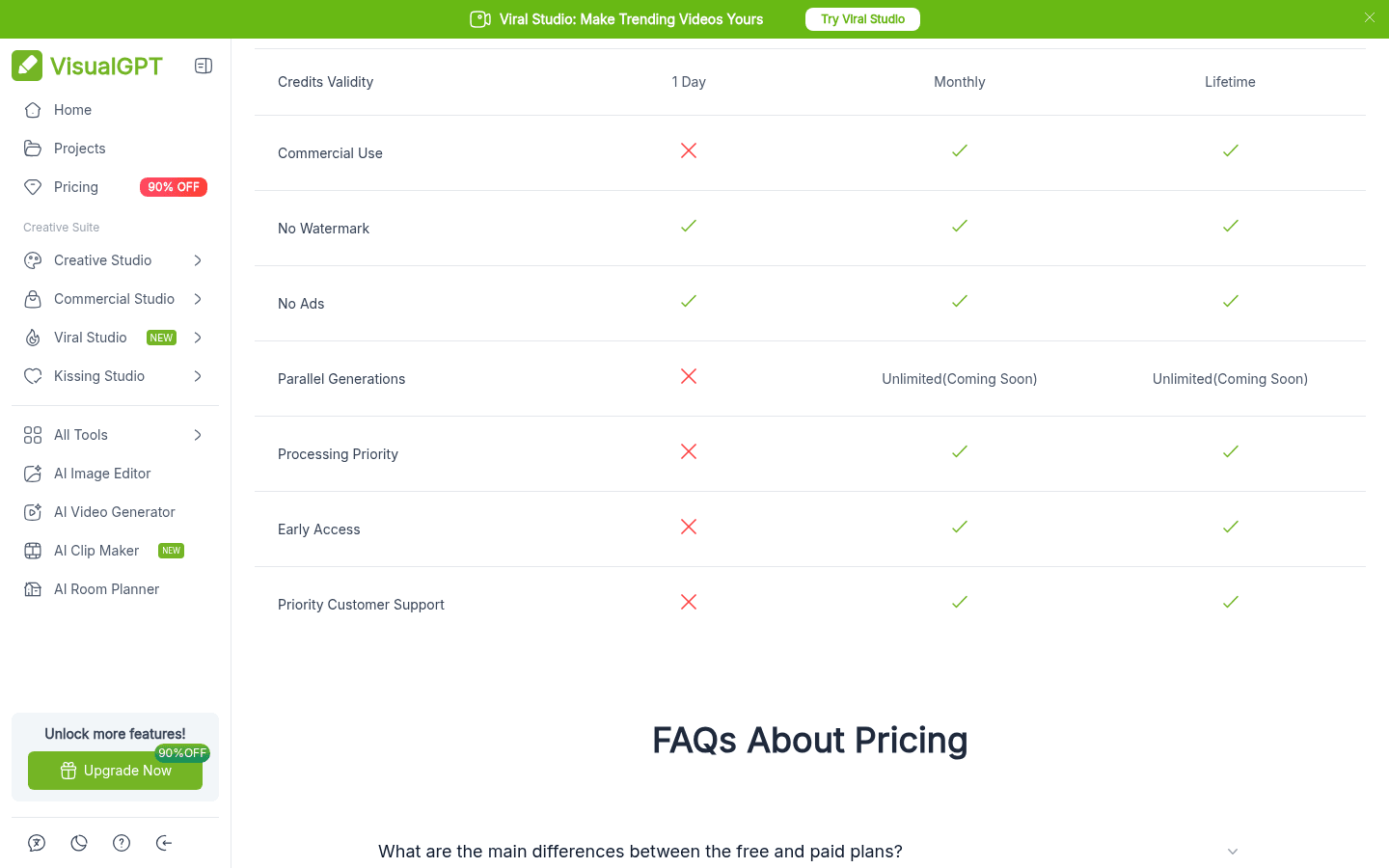
So the free plan is a real working account, not a time-boxed trial of Pro. The trade-offs are small daily credit amounts, standard resolution, files that disappear after 15 days, and no commercial license.
Can you use VisualGPT without signing up?
Yes, at least for a test. On November 14, 2026 we opened visualgpt.io/ai-image-editor in a fresh browser with no account, typed "A red apple on a white table" and pressed Generate. The task was accepted and showed "Ready in about 210 seconds".
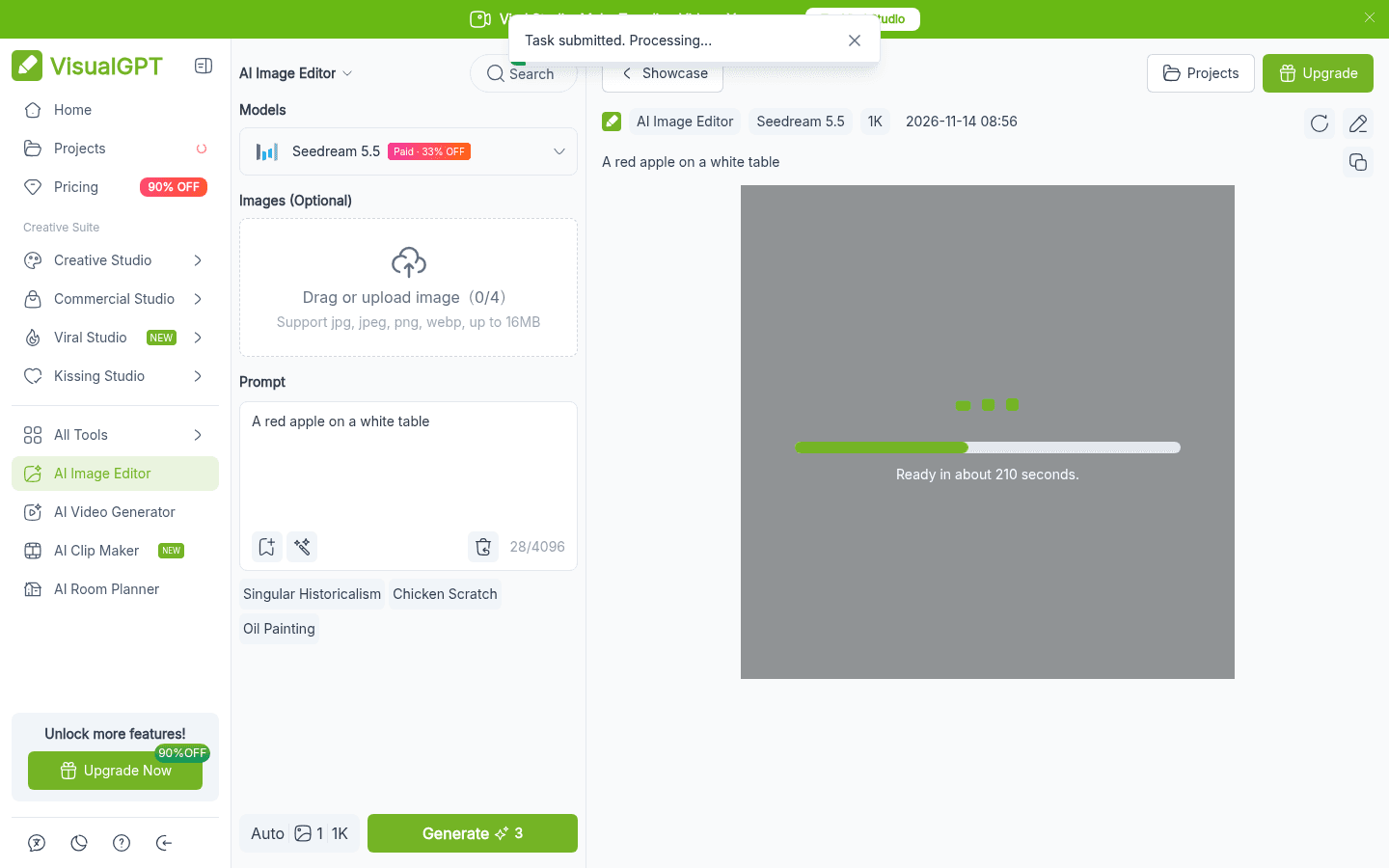
About four minutes later the image was ready, with a download button and a "Sign In for Free" prompt that says signing in saves your creations and unlocks the daily free bonus.
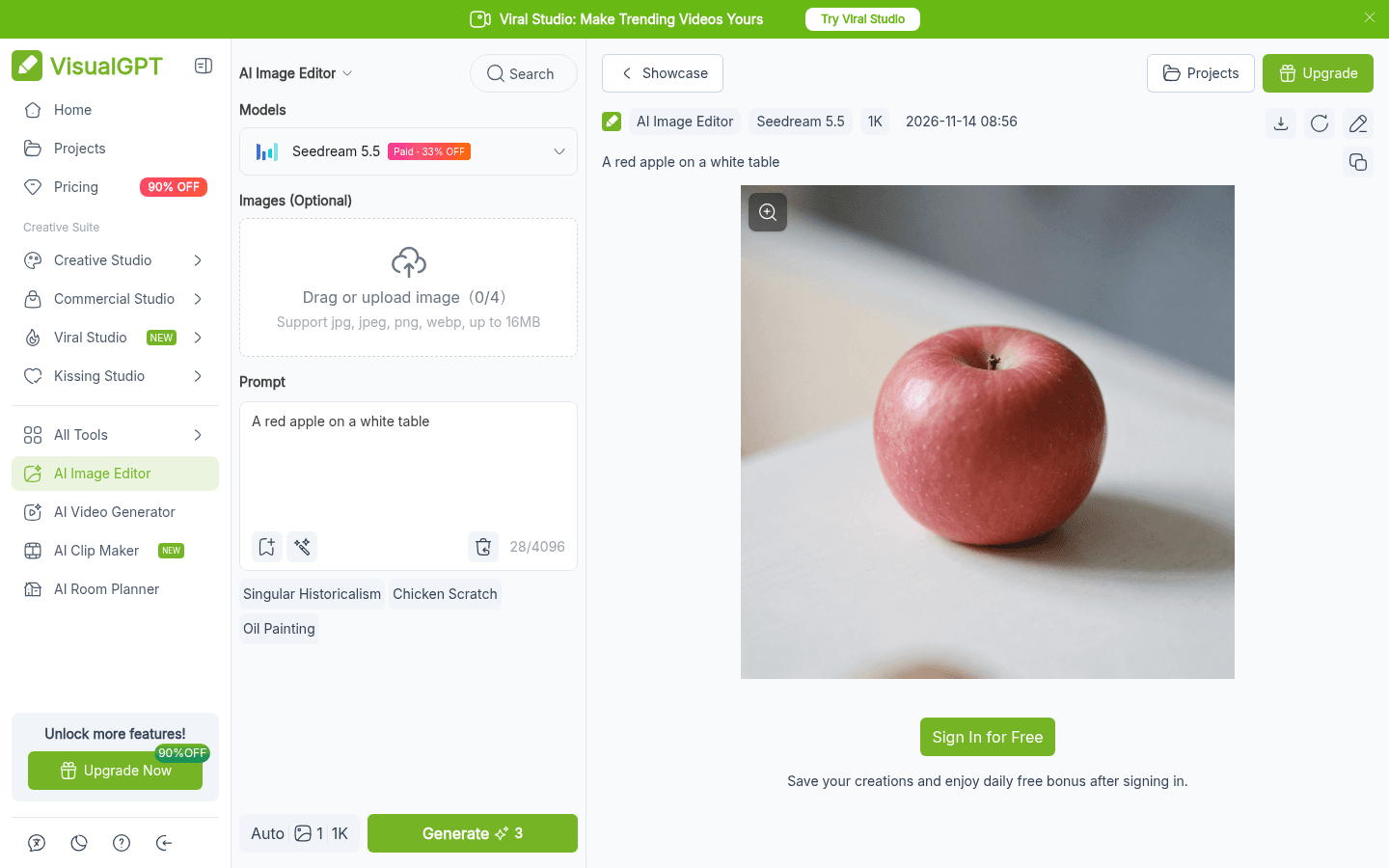
We did not test how many guest generations you get before VisualGPT asks you to log in, so treat the no-login mode as a quick try rather than a free plan you can rely on. The help center says login is Google only for now, and Yahoo or Outlook email sign-ups do not work.
How VisualGPT daily free credits work
According to the official Credits Usage Policies (last updated November 6, 2026) and the help center:
- 10 free credits a day, claimed manually after logging in.
- They expire after 24 hours and do not stack. Unused daily credits are simply gone.
- "Available to claim for 7 consecutive days" is how the policy table words it. The homepage FAQ, on the other hand, says you can start free "with no time limit". We could not confirm which wording is current without making an account.
- Sharing earns permanent credits. The help center says joining the daily sharing activity gives 5 credits that never expire.
- Blocked results still cost credits. If a generation is hidden by the automated content safety check, the policy says it still counts.
How far 10 credits go
Each model and tool costs a different number of credits. These rates are from the official credits policy on November 14, 2026:
| Task or model | Credits per image | Roughly how many with 10 free credits |
|---|---|---|
| Background remover, image upscaler | 1 | 10 |
| Object remover | 1 to 4 | 2 to 10 |
| Seedream 5.5 (default in the editor) | 3 at 1K, 6 at 2K (2 and 4 for paid members) | 3 at 1K |
| GPT Image 2.5, Low quality | 3 at 1K on the free plan (1 for members) | 3 |
| Nano Banana | 4 | 2 |
| Nano Banana Pro | 15 or 25 | 0 |
| Visual Card, Mind Map Maker, Flowchart and Infographic generators | Free | Not limited by credits |
The practical takeaway: the free tier is enough for a few background removals or two or three AI edits a day. Premium models like Nano Banana Pro are effectively paid only. If Nano Banana Pro is what you want, our guide on how to use Nano Banana Pro for free covers cheaper routes, including Google's own apps.
Credit packs vs subscriptions
If you only need VisualGPT now and then, one-time credit packs can beat a subscription, because pack credits never expire.
| Pack | Price | Per credit |
|---|---|---|
| 200 credits | $20 | $0.10 |
| 1,000 credits | $39 | $0.04 |
| 2,000 credits (Most Popular) | $59 | $0.03 |
| 3,000 credits | $89 | $0.03 |
| 5,000 credits | $149 | $0.03 |
| 10,000 credits | $299 | $0.03 |
| 50,000 credits | $999 | $0.02 |
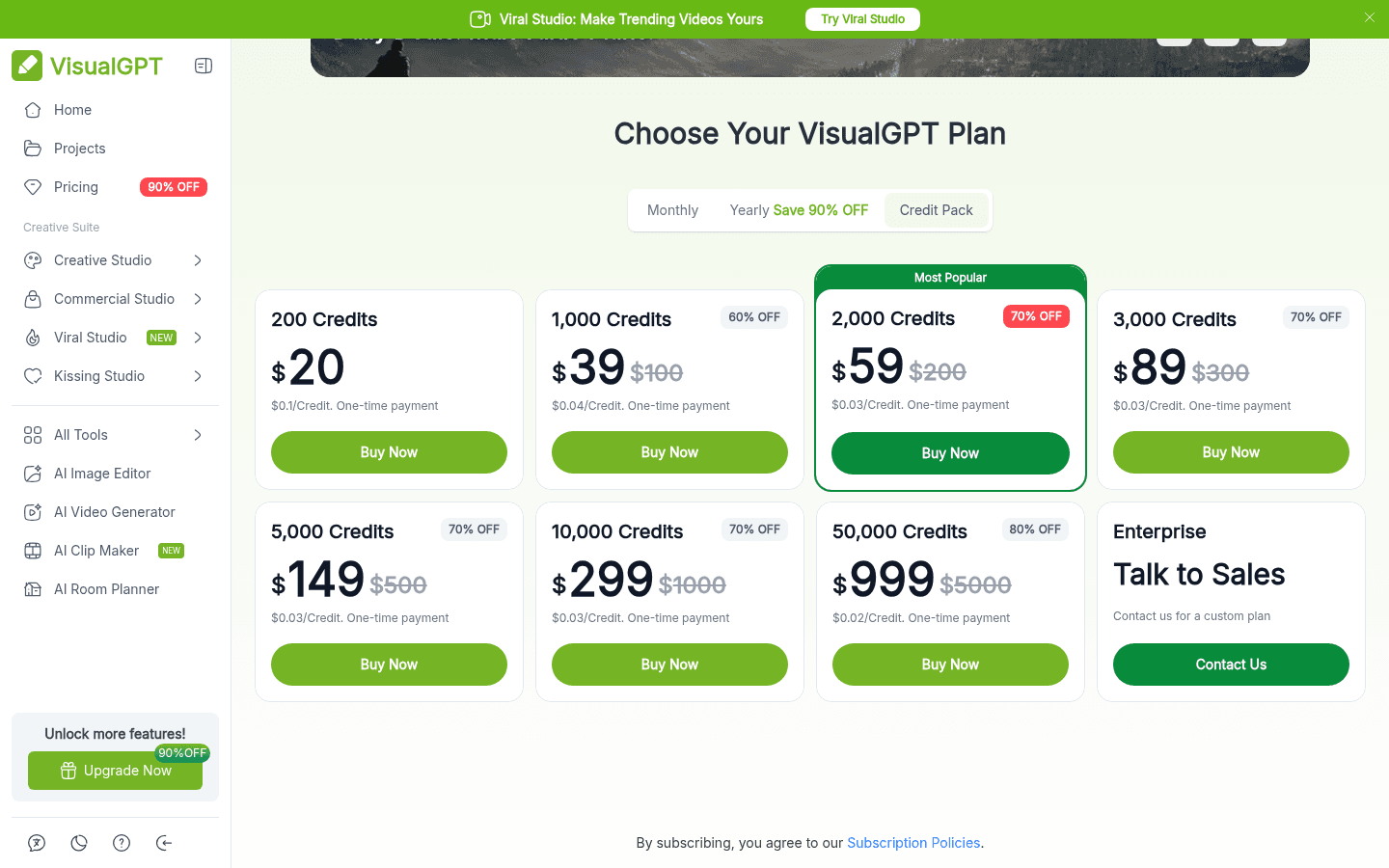
Two rules make this choice matter:
- Subscription credits expire every month, even on yearly plans. The subscription policy says unused credits do not roll over, whether you pay monthly or annually. A yearly Starter plan gives you 100 credits a month, not 1,200 up front.
- Subscription credits are spent first. If you hold both, VisualGPT uses your monthly credits before touching pack credits.
A $39 pack of 1,000 lifetime credits costs less than five months of Starter and never resets, which is why it is the safer buy for occasional use.
Can you use free VisualGPT images commercially?
Not under the free plan. The homepage FAQ says images made on the free plan are for personal, non-commercial use, and commercial rights apply to images made with an eligible paid subscription or Lifetime Credits. Those rights stay valid after you cancel. The pricing comparison table matches this, marking Commercial Use as unavailable on Free.
One inconsistency to know about: a separate FAQ on the pricing page says "every image you create on VisualGPT comes with full commercial rights." We would follow the stricter homepage and table wording until VisualGPT clarifies it.
Refunds and cancellation
- Monthly plans auto-renew and can be cancelled any time from My Subscriptions. You keep the plan until the period ends, then drop back to Free with your data kept.
- Yearly plans do not auto-renew. You pay once and the plan simply ends.
- Refunds are narrow. The subscription policy allows a refund only within 24 hours of the first purchase and only if no credits were used. It excludes renewals, repeat purchases and "promotional or discounted purchases."
Every plan was shown with a discount badge on November 14, 2026, so assume a purchase is final and test on the free tier first.
Is VisualGPT safe to use?
VisualGPT is a web app, so there is nothing to install, and payment goes through Stripe checkout according to the pricing page. The site footer names ZINGKODE LTD as the company behind it. There is no dedicated mobile app; the help center says to use the website on your phone.
The main things to watch are about money, not malware: credits that expire monthly, a strict refund window, and the gap between the "no sign-up, completely free" headline and the 10-credit daily allowance. If you only need a quick edit, the guest mode and free credits are low risk.
Free alternatives to VisualGPT
| Tool | Free option | Good for |
|---|---|---|
 Creen AI | Free generations on select models, no login required | Image and video generation in one place. See is Creen AI free |
 Nano Banana | Free in Google's Gemini app with daily limits | Prompt-based photo edits |
 Photopea | Free in the browser with ads | Manual, Photoshop-style editing when you need full control |
 Pikzels | Free tier for YouTube thumbnails | Creators who mostly need thumbnails |
Check each tool's own page for current limits, since free tiers change often.
Who should pay for VisualGPT?
- A few edits a week: stay free. Use guest mode or the 10 daily credits and download anything you want to keep within 15 days.
- Occasional product photos for a store: buy the 1,000-credit pack for $39. Credits never expire and you get commercial rights.
- Regular catalog or ad work: Pro at $240 a year ($20 a month) has the lowest per-credit price, but remember the 2,000 credits reset every month.
- Heavy video work: budget carefully. VisualGPT's own estimate is 12 videos a month on Starter, so video burns credits quickly.
FAQ
Is VisualGPT free?
Yes. You can generate in the AI Image Editor without logging in, and a free Google login gives you 10 credits a day that expire after 24 hours. Paid plans start at $8 a month, or $72 a year billed annually.
Is VisualGPT free without sign up?
For a quick test, yes. We generated a 1K image with Seedream 5.5 on November 14, 2026 with no account. Saving your history and claiming daily credits needs a Google sign-in, and we did not measure how many guest generations are allowed.
How much does VisualGPT cost?
Monthly billing is $8 (Starter), $19 (Basic), $39 (Pro) and $89 (Ultra). Yearly billing is $72, $180, $240 and $720 a year. One-time credit packs start at $20 for 200 credits.
How many free credits does VisualGPT give?
10 credits per day after you log in. They are valid for 24 hours and do not accumulate. Sharing once a day earns 5 extra permanent credits, according to the help center.
Do VisualGPT free images have a watermark?
No. VisualGPT's plan comparison ticks No Watermark and No Ads for the Free plan. Free downloads are standard quality, and high-quality downloads are a paid feature.
Can I use VisualGPT images for commercial purposes?
Only with an eligible paid subscription or Lifetime Credits. VisualGPT's homepage says free-plan images are for personal, non-commercial use.
Do VisualGPT credits expire?
Daily free credits expire after 24 hours. Subscription credits expire at the end of each monthly cycle, even on yearly plans. Credit pack (lifetime) credits never expire.
Is VisualGPT safe?
It runs in the browser with nothing to install, payments go through Stripe, and the company listed is ZINGKODE LTD. The risks are mostly financial: strict refunds and monthly credit expiry.
Can I get a refund from VisualGPT?
Only within 24 hours of your first purchase and only if you have not used any credits. Renewals and discounted or promotional purchases are excluded, and requests go to VisualGPT support by email with a reason.
Does VisualGPT have an app?
No. The help center says there is no dedicated app, and the website is optimized for mobile browsers.
Sources and verification notes
- visualgpt.io/pricing (Monthly, Yearly and Credit Pack tabs, Compare All Plans table and pricing FAQ), checked November 14, 2026.
- visualgpt.io/credits-usage-policies (last updated November 6, 2026), visualgpt.io/subscription-policies and visualgpt.io/help-center, checked November 14, 2026.
- visualgpt.io homepage FAQ and visualgpt.io/ai-image-editor, checked November 14, 2026, including one guest generation with no account.
- Not verified: how many guest generations are allowed before login is required, whether daily credits really stop after 7 days, and output quality on any model other than Seedream 5.5. We did not create an account or buy a plan.