


LTX Studio is free to try, but not free to keep using. A new account gets 800 one-time credits that never reset, exports carry a watermark, and the free license is personal use only. Paid plans start at $15 per month, and commercial use begins on the $35 Standard plan.
LTX Studio, Creen AI and ArtCraft on Toolfolio. Updated November 4, 2026.
Is LTX Studio free?
Partly. LTX Studio is the AI video and storyboarding platform from Lightricks, and it has a Free plan listed at $0 forever on its pricing page. In practice that plan is a trial:
- 800 credits, one time. LTX's help center says free credits "don't expire, but won't reset or renew either. Once used, you'll need a paid plan to continue creating."
- Personal use only. The pricing page describes the Free plan as "For personal projects only. Cannot be used for business, marketing, or paid work."
- Watermark and lower resolution. Free exports include a watermark and are capped at a lower resolution. Every paid plan is watermark free.
- Not guaranteed everywhere. LTX notes that "not all regions offer free credits, and availability varies by account."
So the honest answer to "is LTX Studio free" is: you can test it for free, but regular or commercial use needs a subscription.
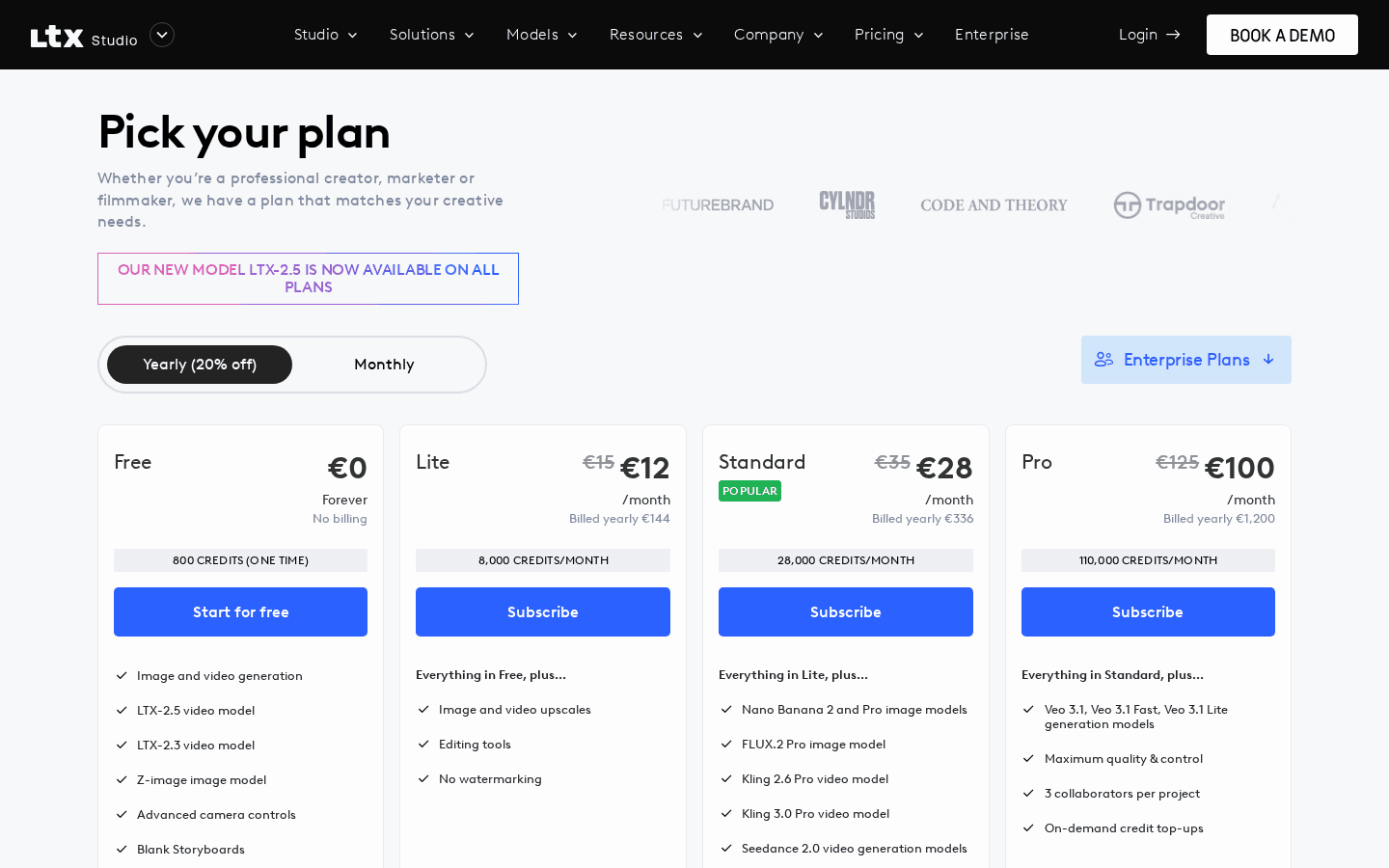
LTX Studio pricing in 2026
These are the plans listed on ltx.io/studio/pricing on November 4, 2026. Yearly billing saves 20%.
| Plan | Monthly price | Billed yearly | Credits | License |
|---|---|---|---|---|
| Free | $0 | $0 | 800 one time | Personal use only |
| Lite | $15/mo | $12/mo ($144/yr) | 8,000 per month | Personal use only |
| Standard | $35/mo | $28/mo ($336/yr) | 28,000 per month | Commercial use |
| Pro | $125/mo | $100/mo ($1,200/yr) | 110,000 per month | Commercial use |
| Enterprise | Custom | Custom | Custom | Commercial use |
What each paid tier adds, according to the pricing page:
- Lite adds upscales, editing tools and no watermarking, but keeps the personal use license.
- Standard is the first plan with a commercial use license. It also lets you buy extra credits and unlocks third party models such as Nano Banana 2 and Pro, FLUX.2 Pro, Kling 2.6 and 3.0 Pro, Seedance 2.0 and ChatGPT Images 2.0, plus Elements, AI Storyboards and Pitch Decks.
- Pro adds Google's Veo 3.1 models, up to 3 collaborators per project and on demand credit top ups.
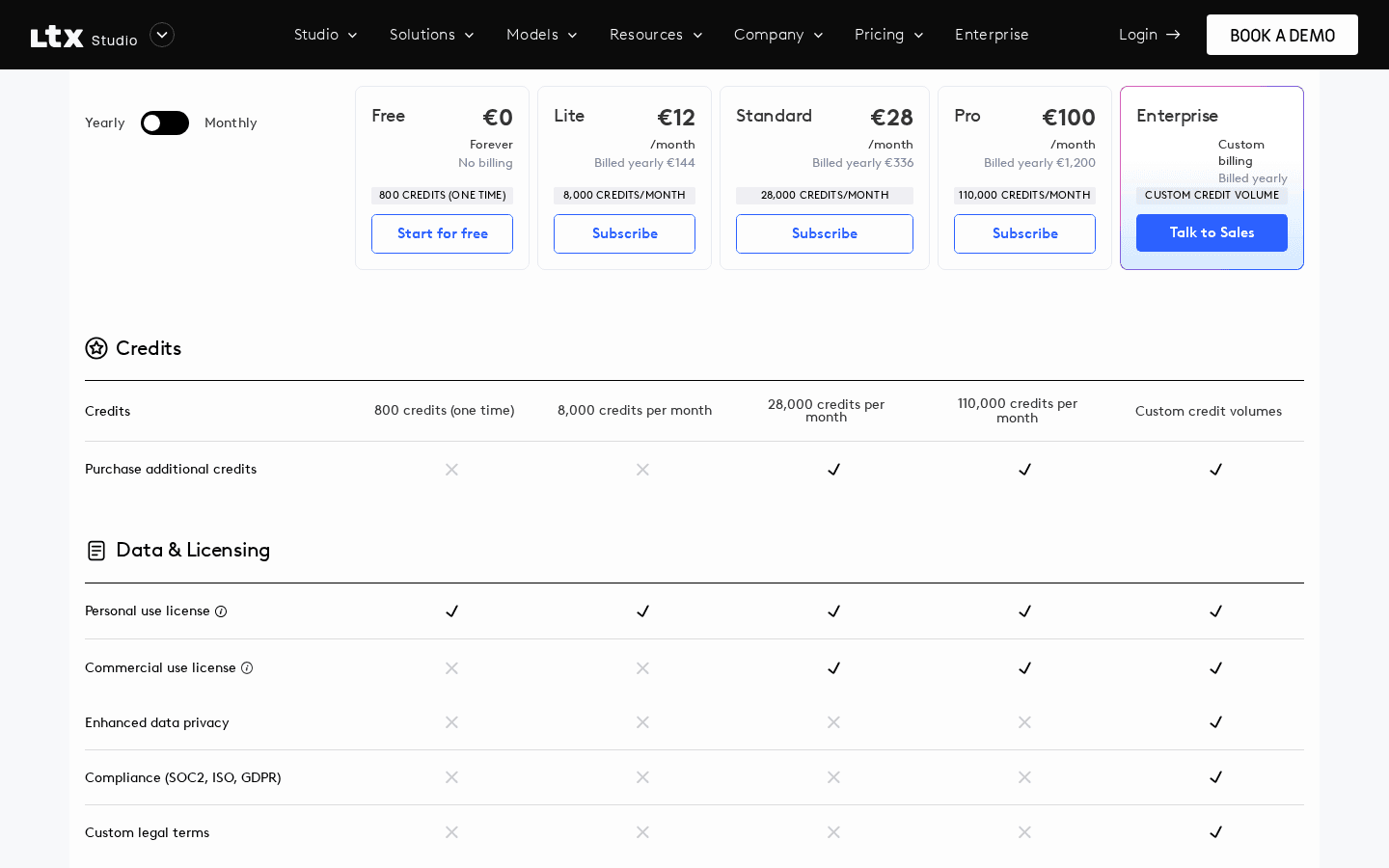
- Enterprise adds unlimited collaborators, SSO, SOC2, ISO and GDPR compliance, enhanced data privacy where your inputs are not used for training, and custom LTX model training.
LTX's own LTX-2.5 video model is available on every plan, including Free.
How LTX Studio credits work
Credits are LTX Studio's unit of compute. They used to be called "computing seconds," and the FAQ still uses both names. The help center explains that "longer clips, higher resolutions, and Pro models consume more," and your balance updates live at the top of the app.
A few rules worth knowing before you pay:
- Paid credits reset monthly. Each paid plan gets a fresh monthly allowance at the start of the billing cycle.
- Upgrading replaces free credits. If you upgrade before spending your 800 free credits, the leftover free credits are replaced by the plan's monthly allowance.
- Extra credits start on Standard. The pricing page lists "Can purchase extra credits" from Standard up, and Pro adds on demand top ups.
- Shots are short. Generated shots run roughly 3 to 20 seconds depending on the model, so a longer video is built from many shots, each costing credits.
LTX does not publish a fixed "credits per clip" table on the pricing page, because the cost depends on the model, resolution and length you choose. Watch the balance in the app while you test on the free credits to get a feel for your real burn rate.
Can you use LTX Studio for commercial use?
Only on Standard, Pro or Enterprise. The Free and Lite plans both carry a personal use license.
LTX's FAQ defines personal use as content you post on your own social profiles and personal website, with no promotion of a business, product or service and no sponsored or partner content. Commercial use covers anything that promotes a business, sponsored content, work made with third parties, and "any use where you are paid or compensated for the content produced using LTX Studio."
That means freelancers, agencies, YouTubers running sponsorships and brands should budget for at least the Standard plan at $35 per month, or $28 per month billed yearly.
Watermarks, refunds and cancelling
- Watermark: Free plan exports are watermarked. Lite and above export without a watermark.
- Refunds: LTX says refunds are "typically granted for requests made within 14 days of payment, provided that usage does not exceed 1200 credits."
- Cancelling: Go to Manage account in Account Settings and click Cancel Plan. Your plan stays active until the end of the current billing period.
- Changing plans: Upgrades apply immediately with prorated billing. Downgrades take effect at the end of the billing cycle.
The free way to use LTX: LTX Desktop and open weights
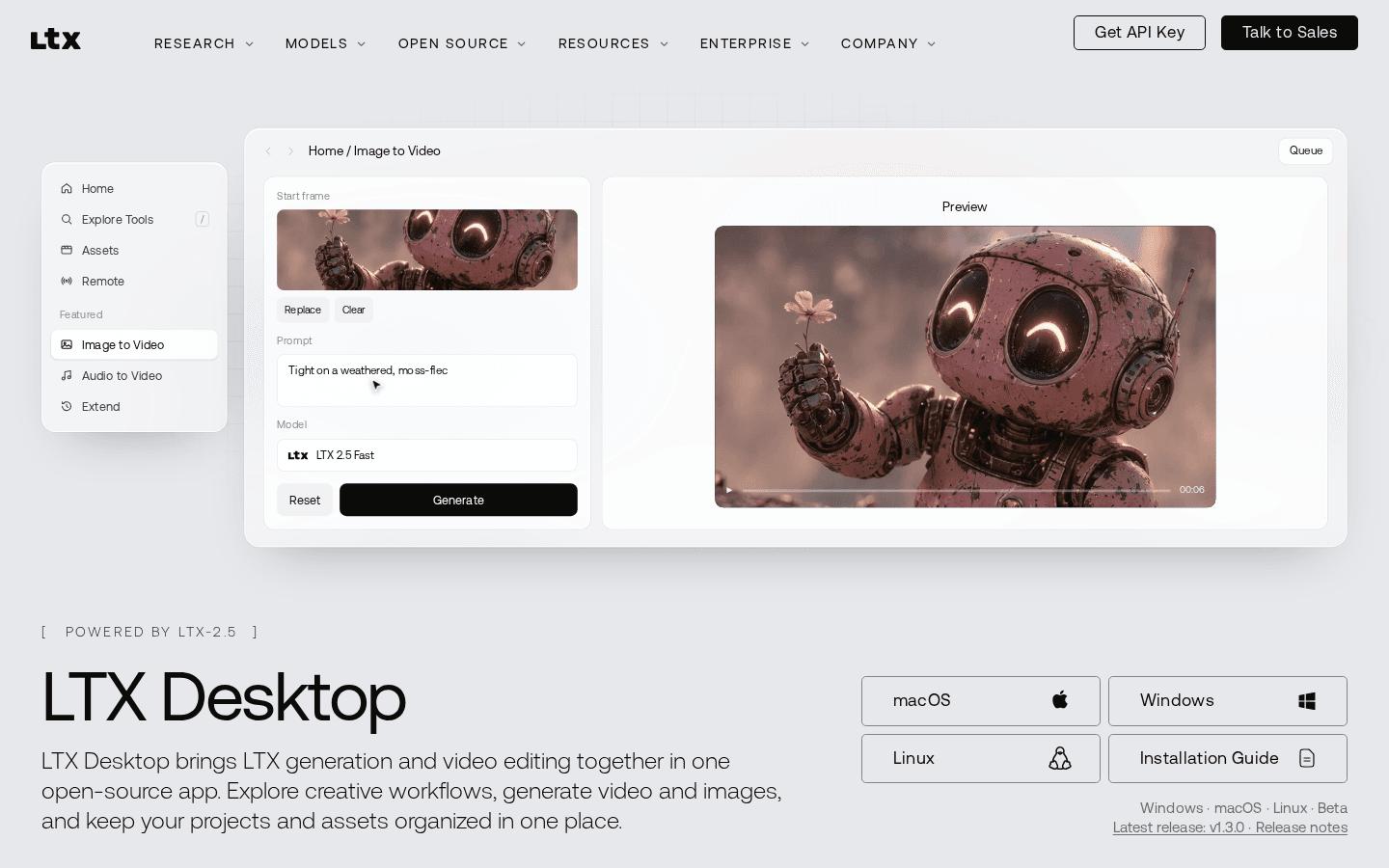
If you want LTX video generation without paying per clip, Lightricks also offers LTX Desktop, a separate open source app for Windows, macOS and Linux (version 1.3.0, still labeled beta on November 4, 2026).
- The app is free and open source under Apache 2.0.
- Local generation has no per generation fees, because it runs on your own hardware.
- The hardware bar is high. LTX lists an NVIDIA GPU with 24GB or more of VRAM (32GB recommended) and 100GB or more of free disk space on Windows and Linux, or macOS 26 or later on a Mac.
- The model weights have their own license. The LTX Model License is free for commercial use for companies under $10M in annual revenue. Above that, you need a commercial license from LTX.
Developers have a third option, the LTX API, which is billed per second of output video. On docs.ltx.io/pricing, text to video with ltx-2-3-fast at 720p costs $0.03 per second, and ltx-2-5-fast at 720p costs $0.09 per second. Higher resolutions and Pro models cost more.
LTX Studio vs alternatives on price
| Tool | Free option | Paid from | Best for |
|---|---|---|---|
| LTX Studio | 800 one-time credits, personal use, watermark | $15/mo ($12/mo yearly) | Storyboards and multi shot AI films in the browser |
| LTX Desktop | Free open source app, runs locally | Your own GPU | Unlimited local generation if you have the hardware |
| Creen AI | Free daily generations on select models | Paid upgrade, price not shown on its public pages | Trying many video and image models in one tab |
| ArtCraft | Free, open source studio | $8/mo billed yearly ($10 monthly) for 1,000 credits | Controllable AI image and video scenes |
Creen AI is a browser based generator that says it runs 40+ models, including Sora 2, Veo 3.1, Seedance 2.0 and Kling V3, with free daily generations on select models. ArtCraft is free and open source, with optional subscriptions starting at $8 per month billed yearly for 1,000 credits per month. Read our ArtCraft explainer for how its free apps and paid credits fit together.
Which LTX Studio plan should you pick?
- Just curious: Stay on Free and spend the 800 credits to see if the storyboard workflow suits you.
- Hobby videos without a watermark: Lite at $15 per month, or $12 billed yearly.
- Client work, ads or monetized channels: Standard at $35 per month, or $28 billed yearly. It is the cheapest plan with a commercial license.
- Heavy use or Veo 3.1 access: Pro at $125 per month, or $100 billed yearly.
- You own a 24GB+ NVIDIA GPU: Try LTX Desktop first. It costs nothing to run locally.
FAQ
Does LTX Studio cost money?
LTX Studio has a free plan with 800 one-time credits, so you can try it without paying. After those credits are used, you need a paid plan. Plans cost $15, $35 or $125 per month, or 20% less billed yearly, and Enterprise is custom.
How much does it cost to generate a video?
In LTX Studio, each generation spends credits, and longer clips, higher resolutions and Pro models use more. LTX does not publish a fixed per clip price for the app. Through the LTX API, video costs from $0.03 per second (ltx-2-3-fast, 720p) up to $0.39 per second for ltx-2-5-pro at 4K.
Is LTX Studio open-source?
No. LTX Studio, the web app, is a commercial subscription product. LTX Desktop is open source under Apache 2.0, and the LTX-2.5 model weights are open under the LTX Model License, which is free for commercial use under $10M in annual revenue.
How to use LTX desktop for free?
Download LTX Desktop for Windows, macOS or Linux from ltx.io/ltx-desktop and generate locally. Local generation has no per generation fees, but you need an NVIDIA GPU with 24GB or more of VRAM and 100GB of disk, or a Mac on macOS 26 or later. You may need a Hugging Face sign in to download gated model weights.
How much is LTX Studio pricing compared to alternatives?
LTX Studio starts at $15 per month for Lite and $35 per month for the first commercial plan. ArtCraft starts at $8 per month billed yearly, and LTX Desktop is free if you have a powerful GPU. Creen AI offers free daily generations on select models.
Prices, credits and licenses were checked on LTX's official pricing page, help center, FAQ and docs on November 4, 2026 and can change. Toolfolio is not affiliated with LTX Studio or Lightricks.