


21st.dev Magic MCP, now called the 21st MCP, is an MCP server that lets AI coding agents like Cursor, Claude Code and Codex search 21st.dev's library of 12,000+ React and Tailwind components, install them into your project and generate new UI. Search is free, free accounts get 2 component installs a day, and paid plans start at $6 a month.
21st.dev on Toolfolio. Updated November 2, 2026.
What is 21st.dev Magic MCP?
21st.dev is a large community registry of React, Tailwind CSS and shadcn/ui style components, templates and themes. Its MCP server connects that library to the AI agent in your editor. Instead of browsing the site, copying code and pasting it into a chat, you ask your agent for "a pricing table with a monthly and yearly toggle" and it searches 21st, picks a real component, writes it into your project and installs the dependencies.
21st describes it this way on its setup page: "Connect Cursor, Claude Code, Devin, or any MCP client to the 21st catalog: search 12,000+ React components and install them without leaving your editor."
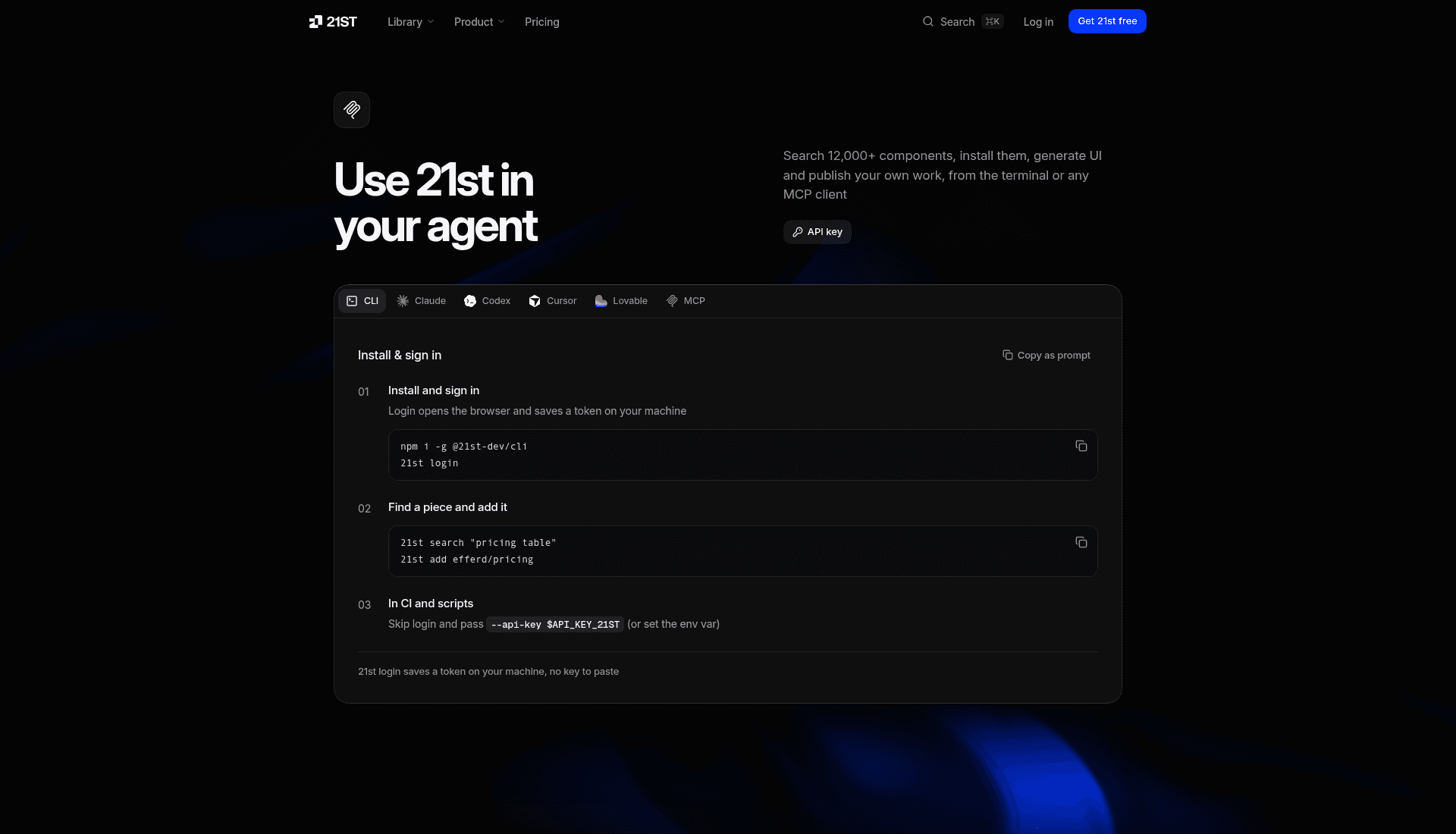
MCP stands for Model Context Protocol, the open standard AI apps use to call outside tools. (Some older blog posts expand it as "Microservice Communication Protocol". That is wrong.) The original GitHub repo still carries its old tagline: "It's like v0, but in your Cursor / Claude Code / Windsurf."
Magic MCP vs 21st MCP: what changed
If you are following a tutorial from 2025, the names will not match what you see today. Here is what changed, according to the 21st-dev/magic-mcp README and the npm package:
- Magic MCP is now the 21st MCP. The npm package
@21st-dev/magicsays it directly: "Magic MCP is now the 21st MCP." The 21st setup page FAQ answers "Is this the Magic MCP?" with "Yes, under its new name, 21st MCP." - One hosted server. Version 0.2.0 turned
@21st-dev/magicinto a thin proxy that forwards every call to the hosted server athttps://21st.dev/api/mcp. The old magic.21st.dev backend was retired. - Old configs still work, old keys do not. A config that runs
npx -y @21st-dev/magic@latestkeeps working, but the README says legacy Magic API keys were reset, so you need a new key from 21st.dev/mcp. - New tool names. The old tools map to new ones (see the table below).
- No more
/uicommands. Old guides tell you to type/uior/21. The README explains these "were a convention of the legacy tools' descriptions, not the protocol." Now you just describe what you need in plain language. - Magic Chat is now 21st AI. The old 21st.dev/magic page redirects to 21st.dev/ai.
One naming trap: Magic UI (magicui.design) is a separate component library with its own MCP server. It is not made by 21st.
| Old Magic MCP tool | New 21st MCP tool |
|---|---|
21st_magic_component_builder | generate |
21st_magic_component_inspiration | get_inspiration |
21st_magic_component_refiner | generate |
logo_search | search_logo |
What the 21st MCP tools do
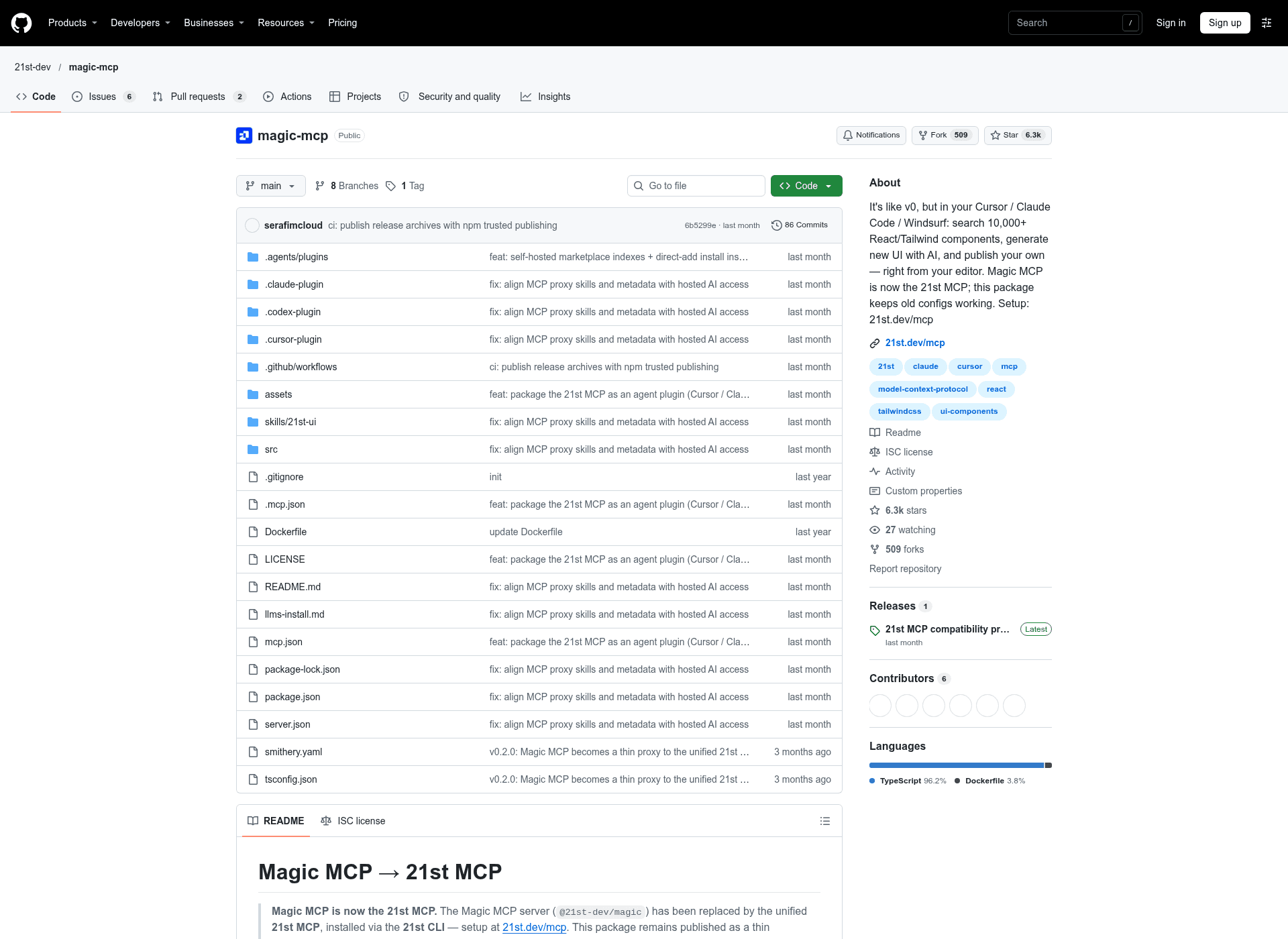
21st lists these as its core tools. It notes this is "a representative slice," and your MCP client gets the full current list from the server itself.
| Tool | What it does | Cost |
|---|---|---|
search | Searches components, themes and templates, returns metadata | Free on every plan |
get_component | Retrieves a component's code by id so the agent can install it | Counts toward the free plan's 2 a day |
get_inspiration | Search reranked against your project's design context (stack, tokens, past decisions) | Not priced separately on the setup page |
search_logo | Finds brand and UI logos as SVG | Free, no retrieval limit |
generate | Drafts new UI from a prompt with 21st AI, in variants | Uses AI credits (Builder + AI) |
The README also lists iterate_generation for refining a generation.
Which clients work with the 21st MCP?
| Client | How it connects | Needs an API key? |
|---|---|---|
| Cursor | CLI command or ~/.cursor/mcp.json | Yes |
| Claude Code | claude mcp add, .mcp.json or plugin | Yes |
| Claude Desktop | OAuth sign-in | No |
| Codex | codex mcp add or ~/.codex/config.toml | Yes (bearer token) |
| Lovable | OAuth sign-in | No |
| VS Code, Windsurf, Cline and other clients | Streamable HTTP config pointing at https://21st.dev/api/mcp | Yes |
The 21st CLI's init command takes cursor, claude, codex, vscode or devin as the client, and windsurf still works as an alias for devin.
Before you start: get a 21st API key
Every setup below needs a 21st API key, except Claude Desktop and Lovable, which sign in with OAuth.
- Sign in at 21st.dev/mcp and create a key. Keys start with
21st_sk_. - Most clients send the key as an
x-api-keyheader.Authorization: Bearerworks too. - The setup commands use
$API_KEY_21STas a placeholder. Swap it for your key. If you are signed in, the 21st page fills your key into every command for you.
The CLI command npx @21st-dev/cli@latest init writes the config with a placeholder. It does not create a key for you.
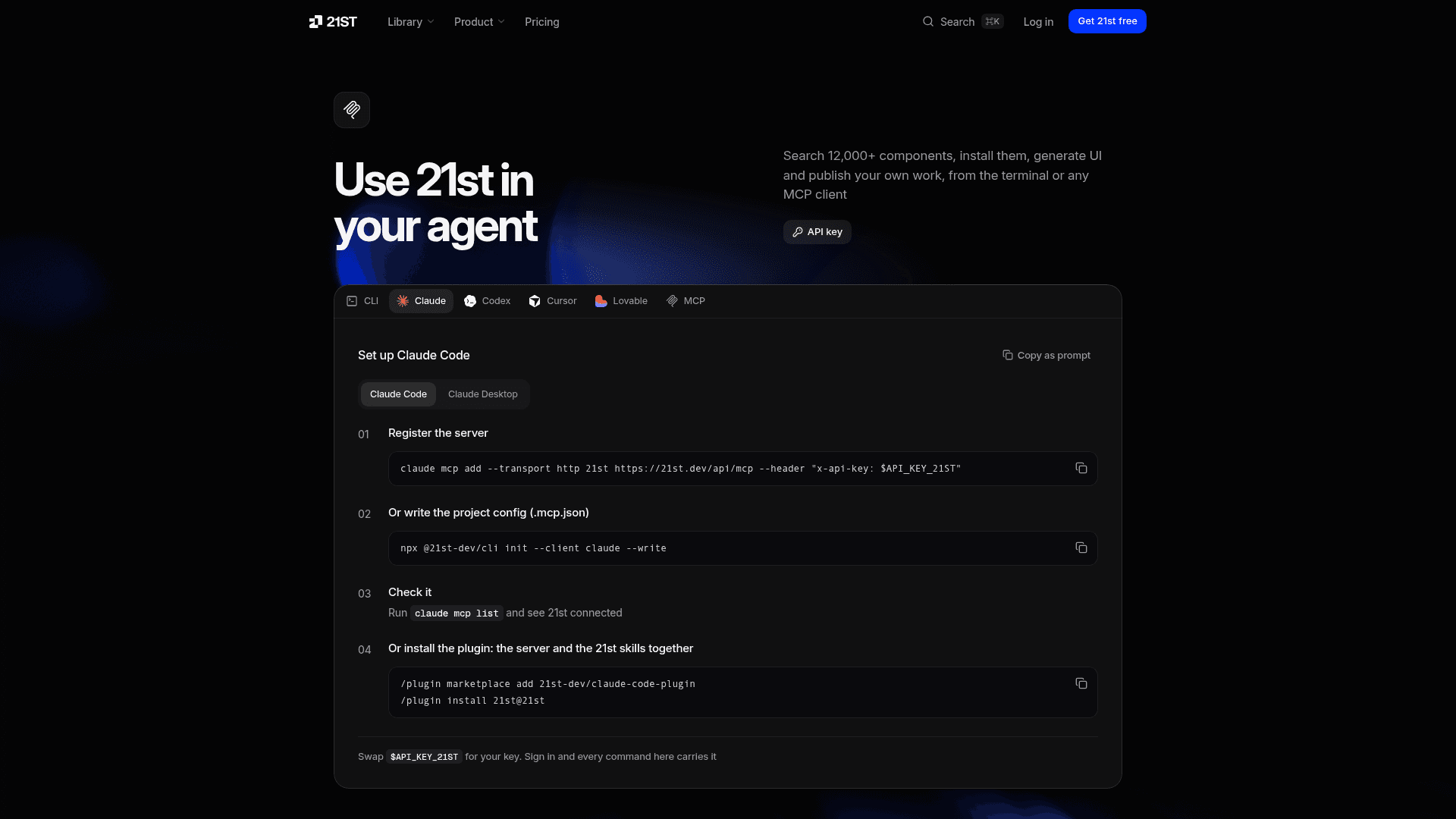
How to set up 21st MCP in Cursor
These steps come from the Cursor tab on 21st.dev/mcp.
Option 1: from the terminal
npx @21st-dev/cli init --client cursor --write
This writes the 21st server into your Cursor MCP config.
Option 2: edit ~/.cursor/mcp.json by hand
{
  "mcpServers": {
    "21st": {
      "url": "https://21st.dev/api/mcp",
      "headers": {
        "x-api-key": "$API_KEY_21ST"
      }
    }
  }
}
Check it: open Cursor Settings, then MCP, and confirm 21st shows as connected.
The magic-mcp repo on GitHub also ships a Cursor plugin package that bundles the server with a 21st UI skill, if you prefer plugins to config files.
How to set up 21st MCP in Claude Code
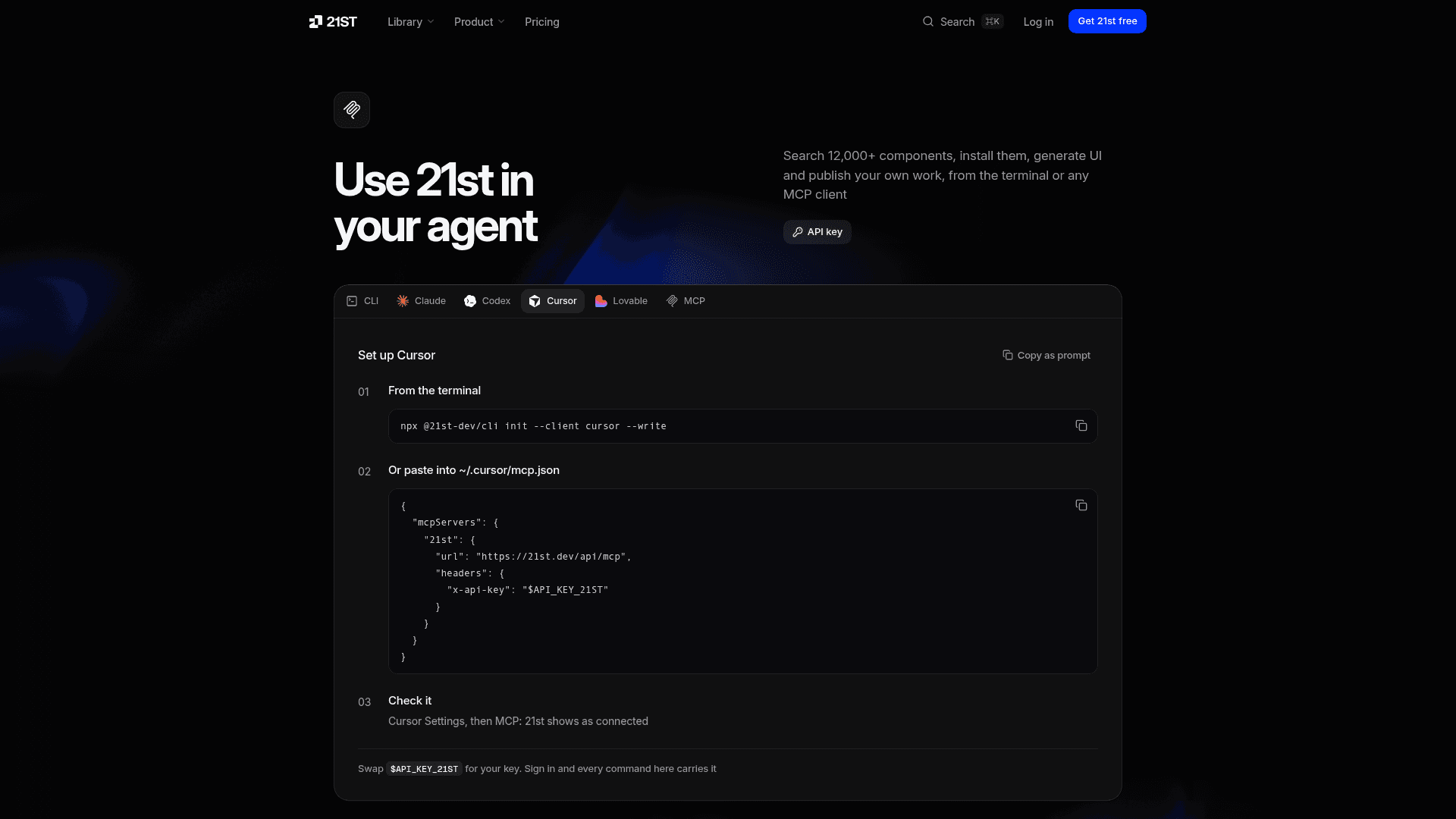
These steps come from the Claude Code tab on 21st.dev/mcp.
Option 1: register the server
claude mcp add --transport http 21st https://21st.dev/api/mcp --header "x-api-key: $API_KEY_21ST"
Option 2: write a project config (.mcp.json)
npx @21st-dev/cli init --client claude --write
Check it: run claude mcp list and look for 21st as connected.
Option 3: install the plugin (the server plus the 21st skills)
/plugin marketplace add 21st-dev/claude-code-plugin
/plugin install 21st@21st
Setup for Codex, VS Code, Windsurf and other clients
Codex:
export API_KEY_21ST=your_key
codex mcp add 21st --url https://21st.dev/api/mcp --bearer-token-env-var API_KEY_21ST
There is also a Codex plugin: codex plugin marketplace add 21st-dev/codex-plugin.
Any other MCP client (VS Code, Windsurf, Cline and others that support streamable HTTP) uses the same JSON block as Cursor, pointed at https://21st.dev/api/mcp with your key in the x-api-key header. Once connected, the tools list should show search and get_component.
Still on the old package? This legacy config still works because it forwards to the same server. You will need a new key.
npx -y @21st-dev/magic@latest API_KEY="your_key"
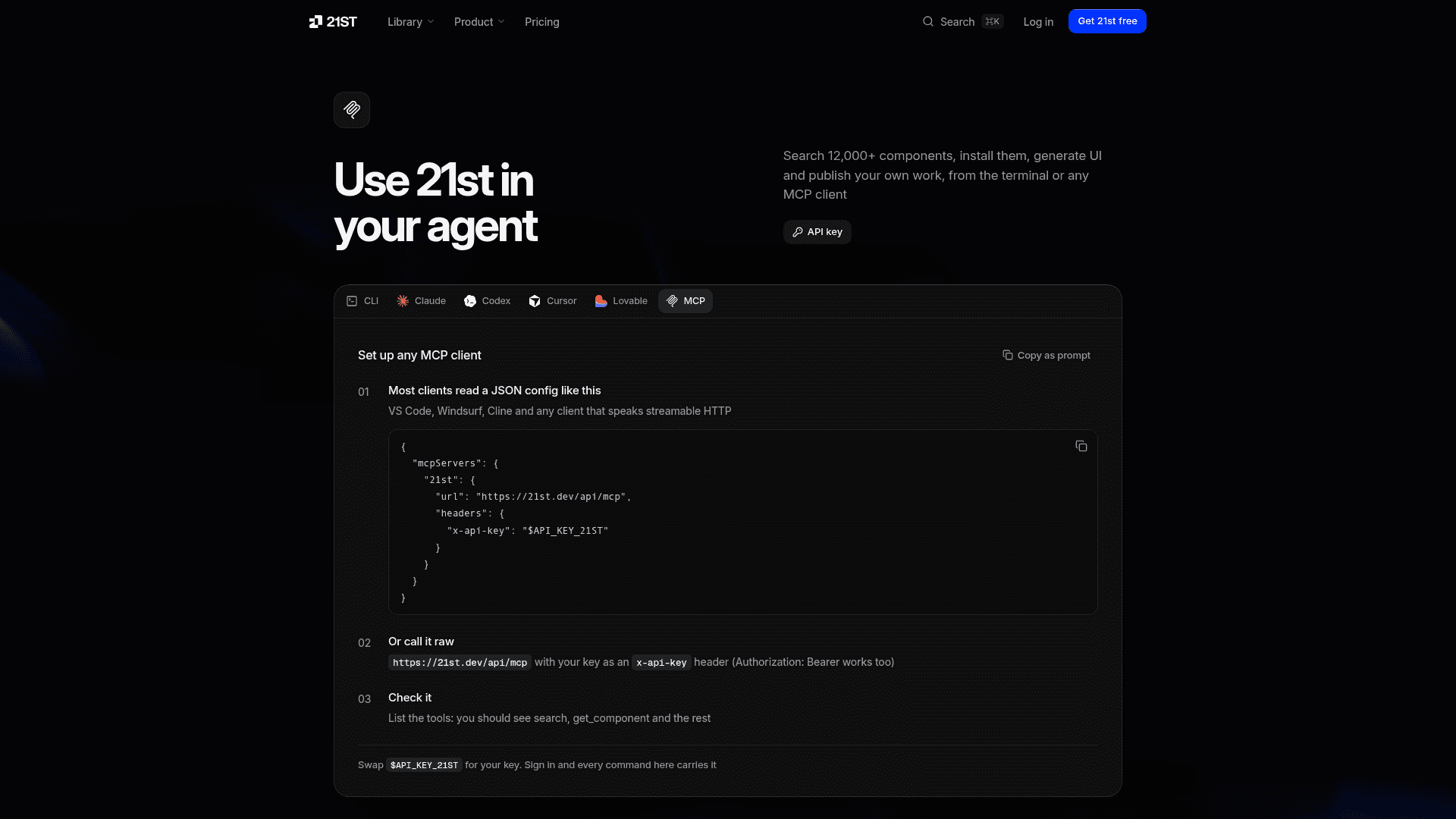
How to use 21st MCP with your AI agent
You do not need special commands. Once the server is connected, ask your agent in plain language. The 21st setup page shows prompts like these:
- "Add a pricing table from 21st." The agent runs
search, thenget_component, and writes the file. - "Sketch three pricing tables with 21st AI." This uses
generateand spends AI credits. - "Show me three directions for this page." This runs a 21st skill for design exploration.
- "Audit this page and fix what is clearly broken." This runs the 21st UI review skill.
21st offers agent skills you install once with npx @21st-dev/cli install-skill. They tell your agent which 21st tools to run and when. The same CLI works on its own in the terminal: 21st search "pricing table", 21st add efferd/pricing or 21st generate "a pricing table" --variants 3.
Is 21st.dev free? Pricing and free limits
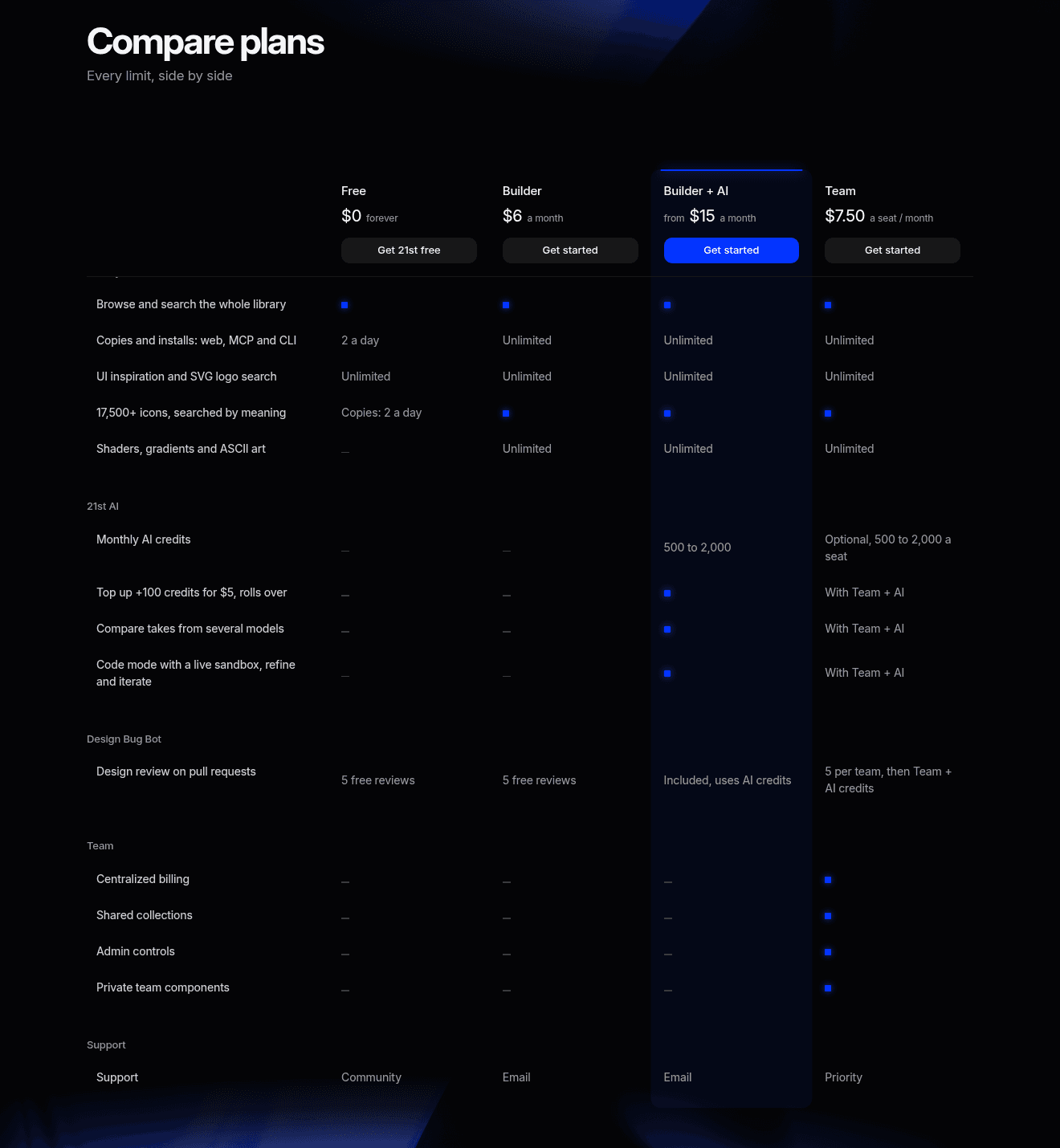
Yes, 21st.dev has a free plan, but it has daily limits. Searching from your agent is free on every plan. The limit applies to retrieving component code.
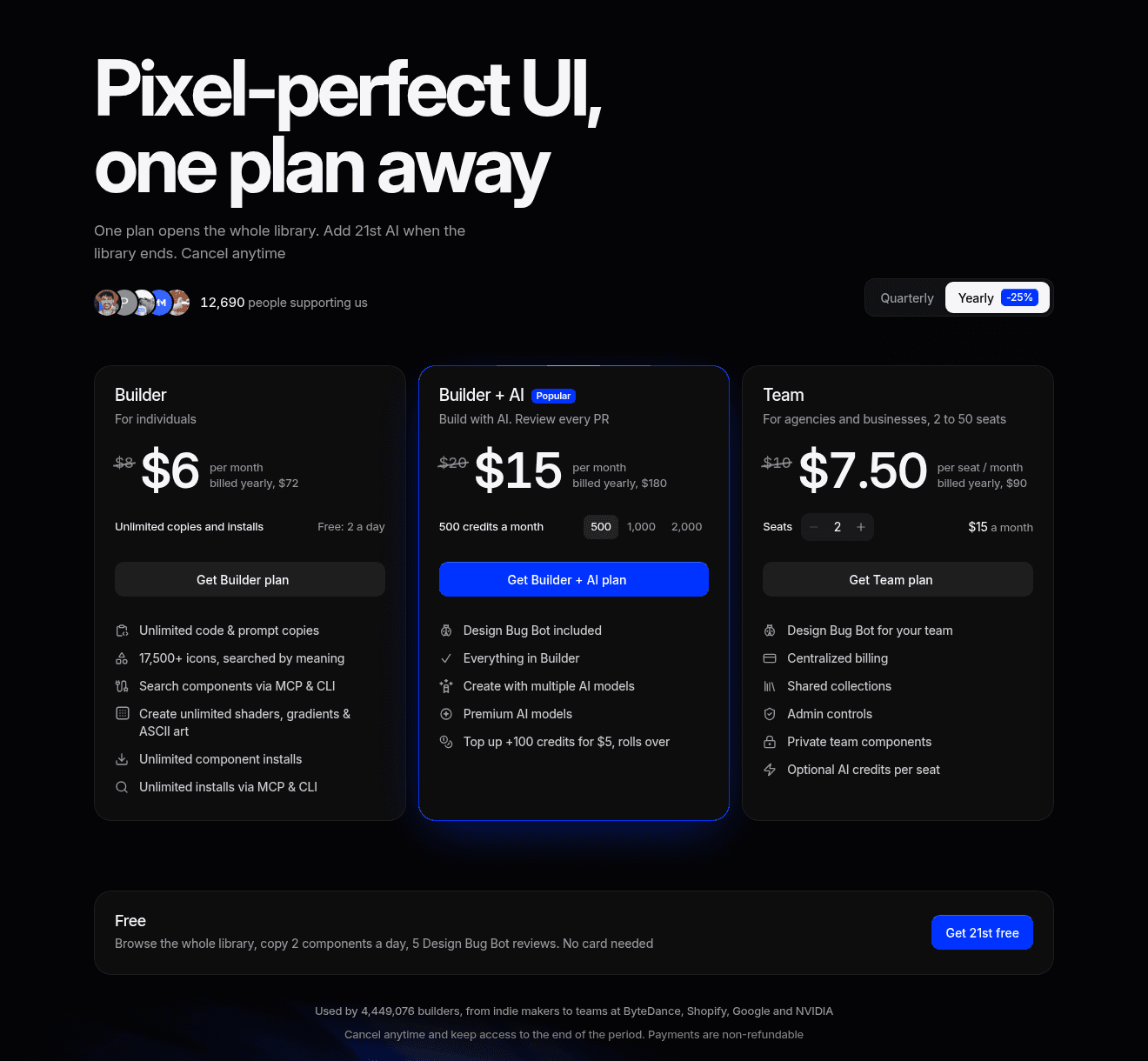
| Plan | Price (billed yearly) | Price (billed quarterly) | What you get |
|---|---|---|---|
| Free | $0 | $0 | Browse the whole library, 2 copies or installs a day across web, MCP and CLI, unlimited UI inspiration and SVG logo search, 5 Design Bug Bot reviews, no card needed |
| Builder | $6/month ($72/year) | $8/month | Unlimited copies and installs, including MCP and CLI, plus shaders, gradients and ASCII art. No AI credits |
| Builder + AI | $15, $30 or $60/month | $20, $40 or $80/month | Everything in Builder plus 500, 1,000 or 2,000 AI credits a month for 21st AI |
| Team | $7.50/seat/month ($90/seat/year) | Not listed | 2 to 50 seats, shared collections, admin controls, private team components, priority support. Team + AI from $18.75/seat |
A few details from the pricing page that matter for MCP users:
- Free installs are shared. The 2 a day count covers the website, the MCP server and the CLI together.
- AI generation needs Builder + AI. The free plan and Builder include no AI credits, so the
generatetool spends credits from Builder + AI. - Top-ups: 100 extra credits cost $5 and roll over.
- Billing: you can cancel anytime, payments are non-refundable, upgrades apply immediately and downgrades apply at the end of the period.
Some third-party pages, and a Reddit thread titled "So 21st dev is no longer free," say 21st has no free tier. The official pricing page on November 2, 2026 still lists a $0 Free plan with the daily limit.
21st MCP alternatives and related tools
The 21st MCP is a good fit if you already code with an agent and want real, human-made components rather than UI generated from scratch. Other tools take different routes:
- MagicPath is an AI design platform for creating and customizing UI on a canvas before you write code.
- Rork builds cross-platform mobile apps with React Native from prompts, if your target is an app instead of a web page.
- v0 by Vercel generates UI from text prompts in its own web app.
- shadcn/ui is the open component base that many 21st components build on.
For other MCP servers built for design and marketing work, see our list of the best MCP servers for designers, creators and marketers. For more options, see our lists of the best vibe coding tools for mobile apps, the best Lovable alternatives and the best Figma Make alternatives. If you want another example of connecting Claude to a design tool, read how to connect Claude to Canva.
FAQ
What is 21st.dev Magic MCP?
It is the MCP server from 21st.dev that lets AI coding agents search, install and generate React and Tailwind UI components from inside your editor. It was renamed the 21st MCP in 2026 and now runs from one hosted endpoint, https://21st.dev/api/mcp. Old Magic MCP configs keep working through the @21st-dev/magic proxy.
What does Magic MCP do?
It gives your agent tools to search the 21st library (search), pull a component's code (get_component), find design inspiration (get_inspiration), find SVG logos (search_logo) and generate new UI with 21st AI (generate). Your agent then writes the component into your project and installs its dependencies.
Is 21st dev free?
There is a free plan. It lets you browse and search everything and copy or install 2 components a day across the website, MCP and CLI. Unlimited installs start with Builder at $6 a month billed yearly, and AI generation starts with Builder + AI at $15 a month billed yearly.
How much does 21st dev cost?
Builder is $6 a month billed yearly or $8 billed quarterly. Builder + AI is $15, $30 or $60 a month billed yearly for 500, 1,000 or 2,000 credits. Team is $7.50 per seat per month billed yearly, with Team + AI from $18.75 per seat.
Do I need an API key for the 21st MCP?
Yes, for Cursor, Claude Code, Codex, VS Code, Windsurf and most other clients. You create it at 21st.dev/mcp after signing in. Claude Desktop and Lovable sign in with OAuth instead, so no key is needed there.
Does the 21st MCP still use /ui commands?
No. The /ui and /21 triggers belonged to the old Magic MCP tool descriptions. With the 21st MCP you ask in normal language, like "add a pricing table from 21st."
Is 21st dev open source?
Partly. The magic-mcp proxy repo is open source under the ISC license, the @21st-dev/cli package is MIT licensed, and the original 21st registry code on GitHub (serafimcloud/21st) is MIT licensed. The hosted service, AI features and paid plans are run by 21st. Each component on the site lists its own source and license.
What does 21st dev do?
21st.dev is a marketplace and registry of React and Tailwind components, templates, themes and shaders made by design engineers. You can preview components live, copy a prompt or install command, use the CLI or MCP server from your AI agent, and generate new UI with 21st AI.
How we checked this guide
We did not create a 21st account, generate an API key or run the MCP server for this guide, so we are not describing hands-on results. The setup steps come from the Cursor, Claude Code, Codex and MCP tabs and the FAQ on 21st.dev/mcp, the 21st-dev/magic-mcp README on GitHub and the npm pages for @21st-dev/magic (version 0.2.3) and @21st-dev/cli. Prices and limits come from 21st.dev/pricing, and the 21st AI and changelog pages filled in the details, all checked on October 30, 2026. We re-checked the pricing page, the setup page and the npm and GitHub listings on November 2, 2026, and nothing had changed. We also reviewed Google's results and People Also Ask questions for "21st dev mcp", "magic mcp", "is 21st dev free", "21st dev pricing", "21st.dev magic mcp cursor" and "what is 21st dev". Prices, limits and setup commands can change, so check 21st.dev before you buy.
Details checked November 2, 2026. Toolfolio is not affiliated with 21st.