No. Crayo AI has no free plan and no free trial for its AI clipping editor. The cheapest plan, Hobby, costs $29 a month, $19 a month billed quarterly or $16.58 a month billed yearly. What is free: 12 no-signup browser video tools. Crayo does not offer refunds. Checked November 21, 2026.

 OpusClip and

What is Crayo AI?
Crayo gives you four ways to clip:
- AutoClip. Upload one video and the AI does everything in one pass: moments, framing, captions and titles.
- Find Viral Moments + Video Editor. The AI scores the best moments, and you edit them by hand.
- Find Viral Moments + Edit with AI. The AI finds the moments, you keep the ones you like, and the AI applies a creator style.
- Clip Cutter + Edit with AI. You cut the moments yourself, and the AI handles captions, framing and style.
Every plan also includes the older faceless video workflows Crayo was known for (Reddit story videos and fake text videos), plus AI voiceovers, AI images, a voice changer, face swap, a subtitle remover, a speech enhancer and a YouTube and TikTok downloader. Crayo, Inc. says it has 3.5 million users. For AI story videos, Crayo now points people to a separate product called Clippie.
Is Crayo AI free?
No. The Crayo editor and every AI feature need a paid plan. Crayo says so itself on its comparison hub: "Crayo has no free plan and no trial. The entry plan is Hobby at $29 a month or $199 a year for 250 clips." Its pricing page lists only three paid plans: Hobby, Clipper and Pro.
You can create an account for free, and the iPhone app is a free download, but generating and exporting videos needs a plan on both the web and the app.
What you can use for free on crayo.ai
Crayo has a set of
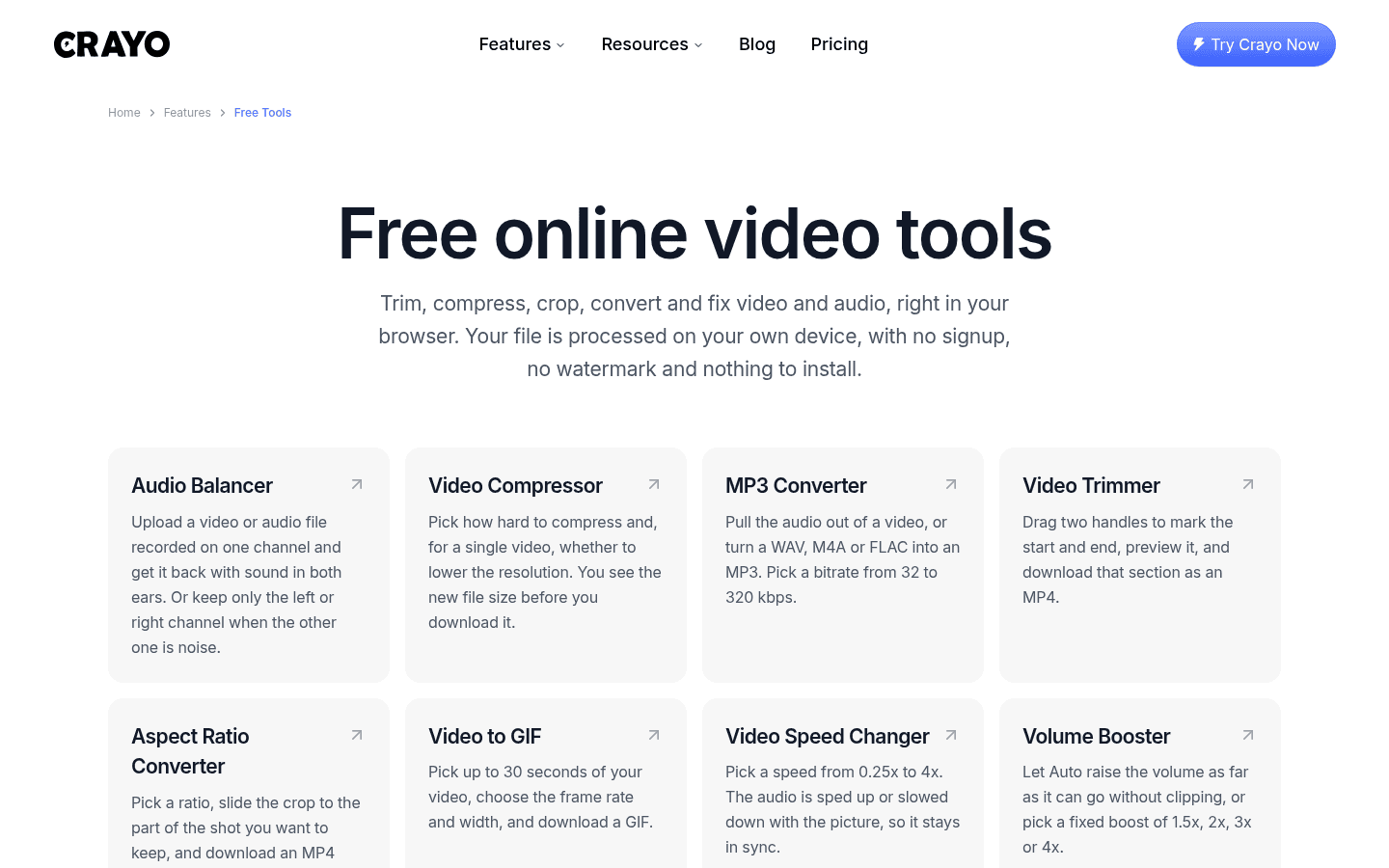
| Free Crayo tool | What it does |
|---|---|
| Video Trimmer | Cut a section and download it as an MP4 |
| Aspect Ratio Converter | Crop a video to 9:16 for TikTok, Reels or Shorts, or to other ratios |
| Video Compressor | Shrink a file and see the new size before you download |
| MP3 Converter | Pull audio out of a video, or convert WAV, M4A or FLAC to MP3 (32 to 320 kbps) |
| Video to GIF | Turn up to 30 seconds of video into a GIF |
| Video Speed Changer | 0.25x to 4x, with the audio kept in sync |
| Volume Booster | Auto boost, or a fixed 1.5x, 2x, 3x or 4x |
| Video Merger | Join clips into one MP4 |
| MP4 Converter | Convert MOV, WebM, MKV and more to MP4 |
| Video Reverser | Play a video backwards, with or without audio |
| Mute Video | Remove the sound without re-encoding |
| Audio Balancer | Fix audio recorded on one channel |
These are handy utilities, but none of them uses AI. They do not find moments, add captions or reframe speakers. For that, you need a paid plan or one of the free alternatives below.
Does Crayo have a free trial?
No. Crayo's own FAQ answers "Does Crayo have a free plan?" with "No. Crayo has no free plan and no trial." If a coupon or video promises a "Crayo free trial", treat it with care, because the official site does not offer one.
Crayo AI pricing in 2026
AI-powered design tool for creative content.
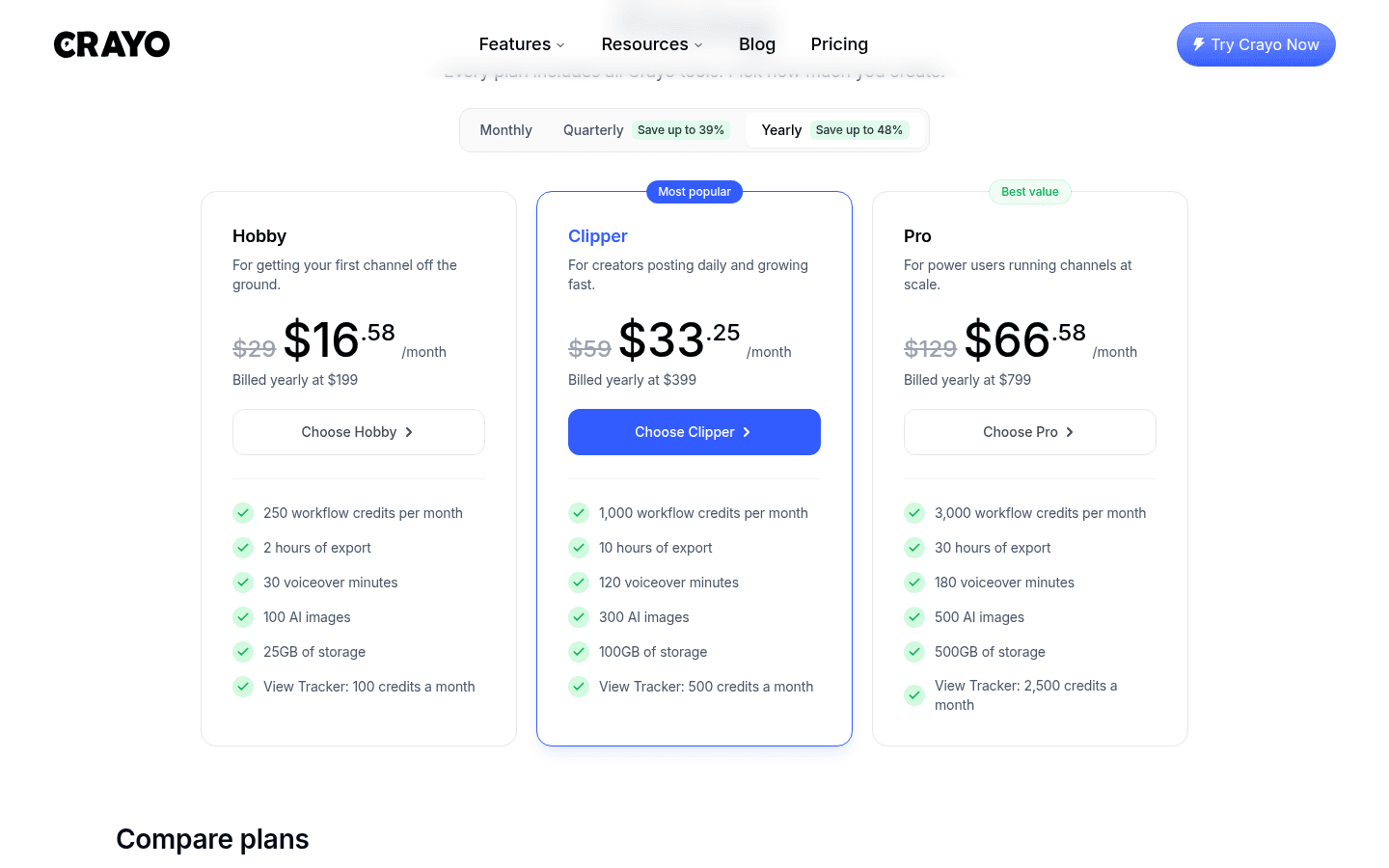
Crayo sells three plans, and every plan includes all Crayo tools. The plans differ in how much you can make: workflow credits, export hours, voiceover minutes, AI images, storage and View Tracker credits.
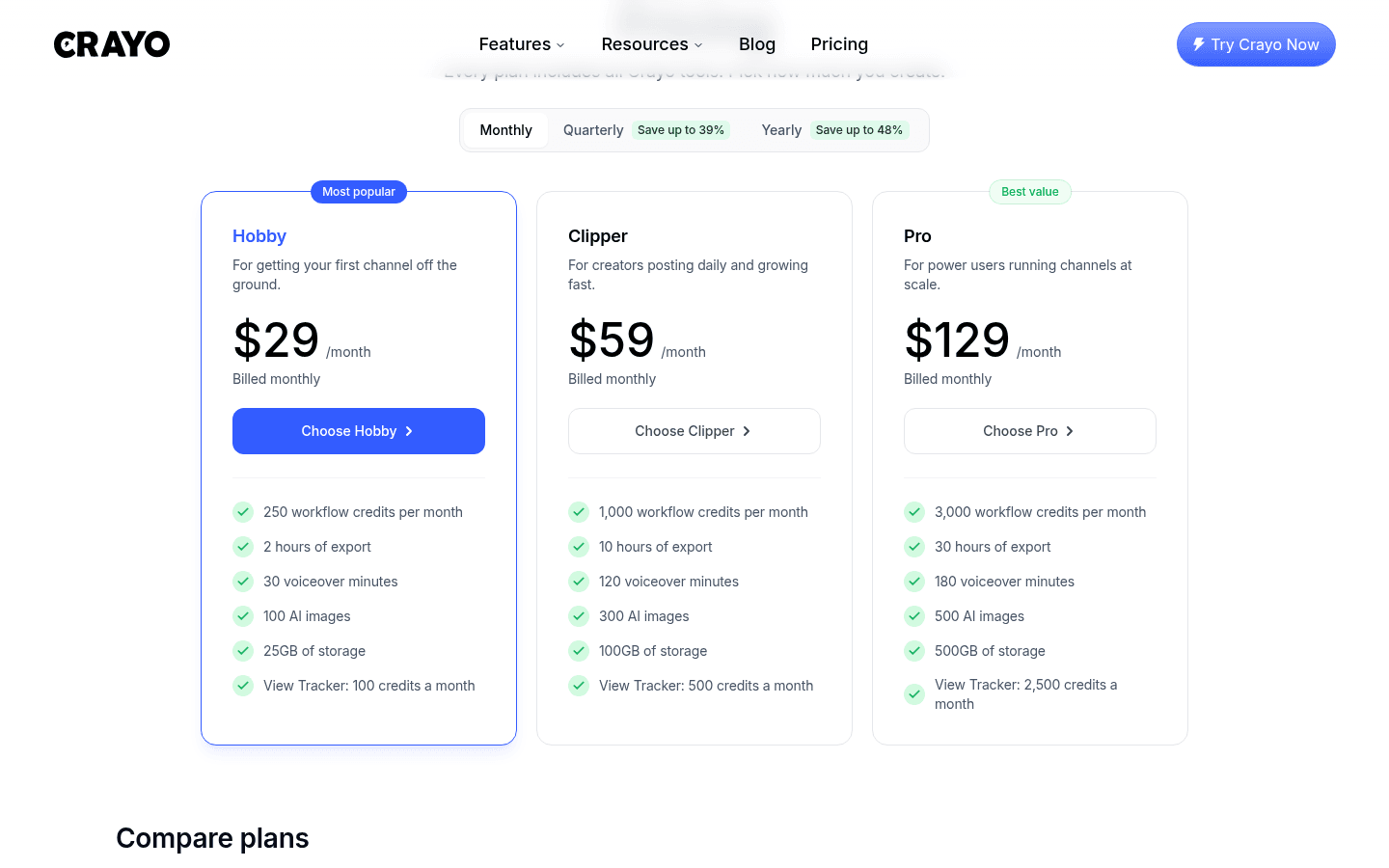
| Plan | Monthly | Quarterly | Yearly | Workflow credits | Export | Voiceover | AI images | Storage |
|---|---|---|---|---|---|---|---|---|
| Hobby | $29/mo | $19/mo ($57 every 3 months) | $16.58/mo ($199 a year) | 250 a month | 2 hours | 30 min | 100 | 25GB |
| Clipper | $59/mo | $39/mo ($117 every 3 months) | $33.25/mo ($399 a year) | 1,000 a month | 10 hours | 120 min | 300 | 100GB |
| Pro | $129/mo | $79/mo ($237 every 3 months) | $66.58/mo ($799 a year) | 3,000 a month | 30 hours | 180 min | 500 | 500GB |
View Tracker credits are 100, 500 and 2,500 a month on Hobby, Clipper and Pro.
Why you see $19 instead of $29
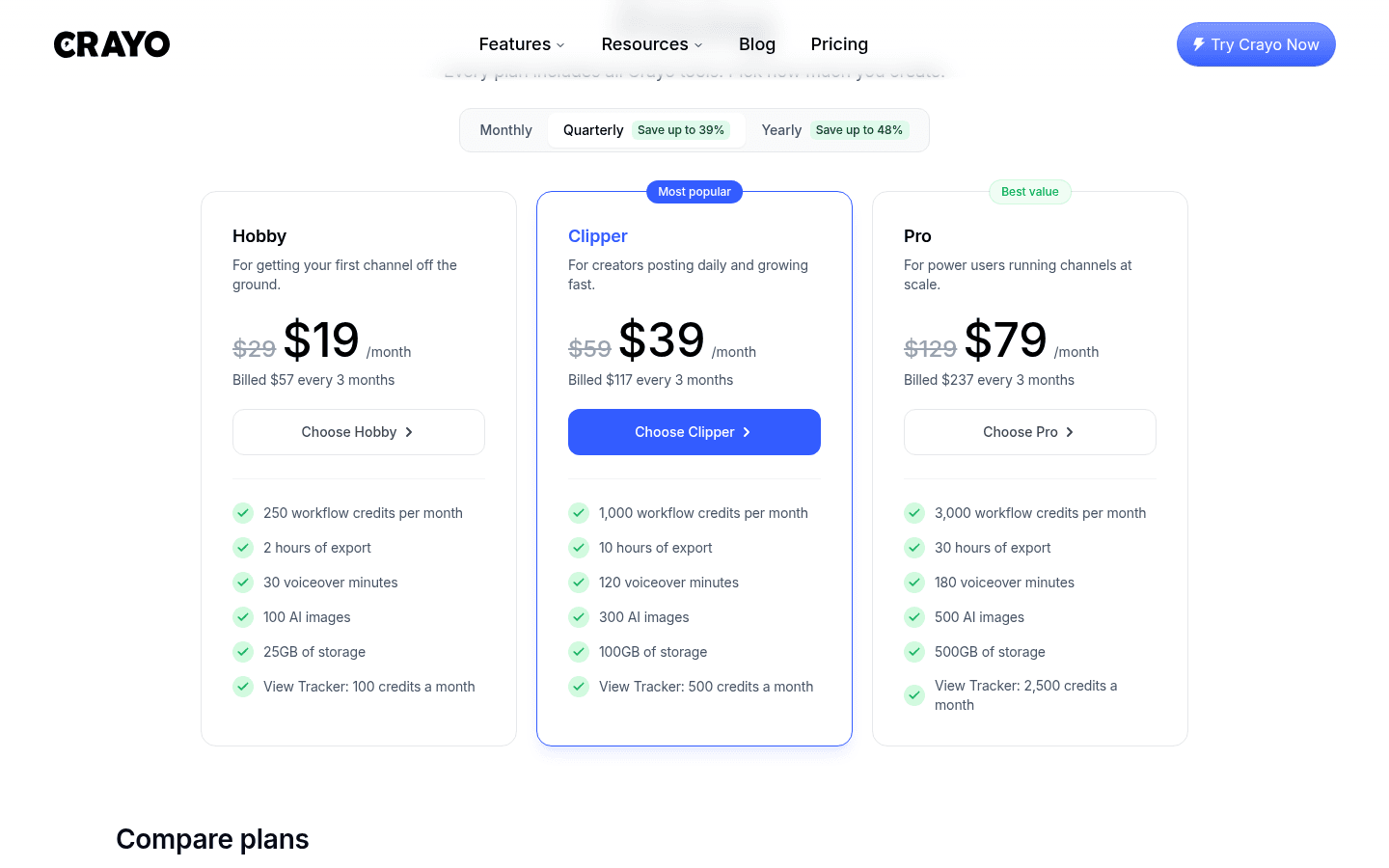
Crayo's pricing page opens on the Quarterly toggle, so the first prices you see are $19, $39 and $79 a month. Those prices are billed every three months ($57, $117 or $237 up front). On a true month-to-month plan, Hobby is $29, Clipper $59 and Pro $129. That is why many reviews, and even Google's AI Overview, quote "$19 a month" for Hobby.
How much you save on quarterly and yearly billing
| Plan | 12 months paid monthly | 12 months paid quarterly | 1 year paid yearly | Yearly saving |
|---|---|---|---|---|
| Hobby | $348 | $228 | $199 | 43% |
| Clipper | $708 | $468 | $399 | 44% |
| Pro | $1,548 | $948 | $799 | 48% |
Because Crayo has no refunds, a yearly plan is a big commitment. If you have never used Crayo, the quarterly Hobby plan ($57) is the cheapest way to try it for real.
Crayo workflow credits, explained
Workflow credits are what you spend on AI clips. Crayo's pricing FAQ defines them like this:
- AutoClip: 1 credit per clip it makes.
- AI Video Editor: 1 credit per clip.
- Find Viral Moments: 1 credit per moment it finds.
- Cutting clips by hand: free, no credits used.
Export hours are a separate limit. They cap the total length of finished video you can export each month. Crayo's example: with 2 hours (Hobby), you could export 120 one-minute clips.
How many clips do you get per plan?
| Plan | Credits a month | Cost per AI clip (paid monthly) | Cost per AI clip (paid yearly) |
|---|---|---|---|
| Hobby | 250 | about $0.12 | about $0.07 |
| Clipper | 1,000 | about $0.06 | about $0.03 |
| Pro | 3,000 | about $0.04 | about $0.02 |
These are best cases where you use every credit. If Find Viral Moments returns moments you throw away, those still cost a credit each.
Do Crayo credits roll over?
No. Plan credits refill every month on every billing term (monthly, quarterly or yearly), and unused credits do not roll over. Crayo also sells one-time credit top-ups, and Crayo says top-up credits never expire. Top-up prices are not listed on the public pricing page.
Crayo's no-refund policy
Crayo's
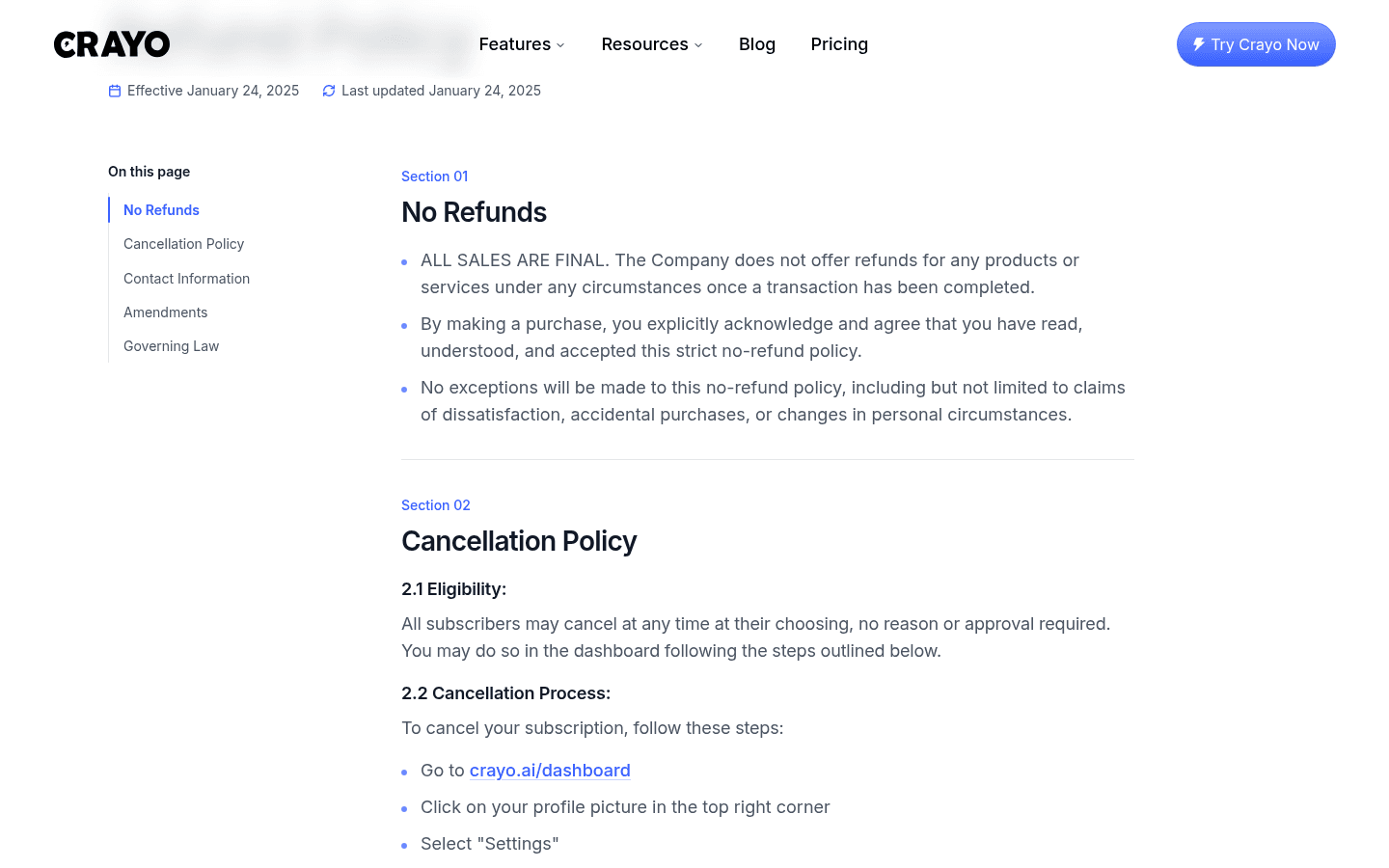
- "ALL SALES ARE FINAL." Crayo does not refund any product or service once a transaction is complete.
- No exceptions, including dissatisfaction, accidental purchases or changes in personal circumstances.
- The pricing FAQ repeats it: "We do not offer refunds. You can cancel anytime and keep your plan until the end of the billing period."
That makes the "no free trial" part matter more. With most AI clippers you can test the output for free or get your money back in the first weeks. With Crayo, your first payment is your test.
How to cancel your Crayo subscription
Crayo's refund policy lists these steps for plans bought on the web:
- Go to crayo.ai/dashboard.
- Click your profile picture in the top right corner.
- Select Settings.
- Press the red Cancel button.
Your plan stays active until the end of the current billing cycle, and Crayo says no further payments are taken. If you bought your plan in the iPhone app, it is managed in your Apple subscriptions instead.
Free alternatives to Crayo AI
If you want to test AI clipping before paying, these tools let you start for free. All prices below are from each vendor's own pricing page.
| Tool | Free option | Watermark on free | Cheapest paid plan | Refunds |
|---|---|---|---|---|
| Crayo | No free plan, 12 free non-AI browser tools | No AI output without a plan | $29/mo, or $16.58/mo yearly | No refunds |
| OpusClip | Free forever: 60 credits a month | Yes | Starter $15/mo (monthly only) | Not checked |
| Vizard | Free: 60 credits a month | No | Creator $29/mo, or $14.50/mo yearly | Not checked |
| Klap | Free trial on 1 video, no card | Downloads need a paid plan | Basic $29/mo, or $14.50/mo yearly | First month refundable |
OpusClip free plan
OpusClip has a Free forever plan with 60 credits a month, and one credit equals one minute of video processing. Free clips render up to 1080p with auto reframe and AI captions, but they carry a watermark, you cannot edit them, and they stop being exportable after 3 days.
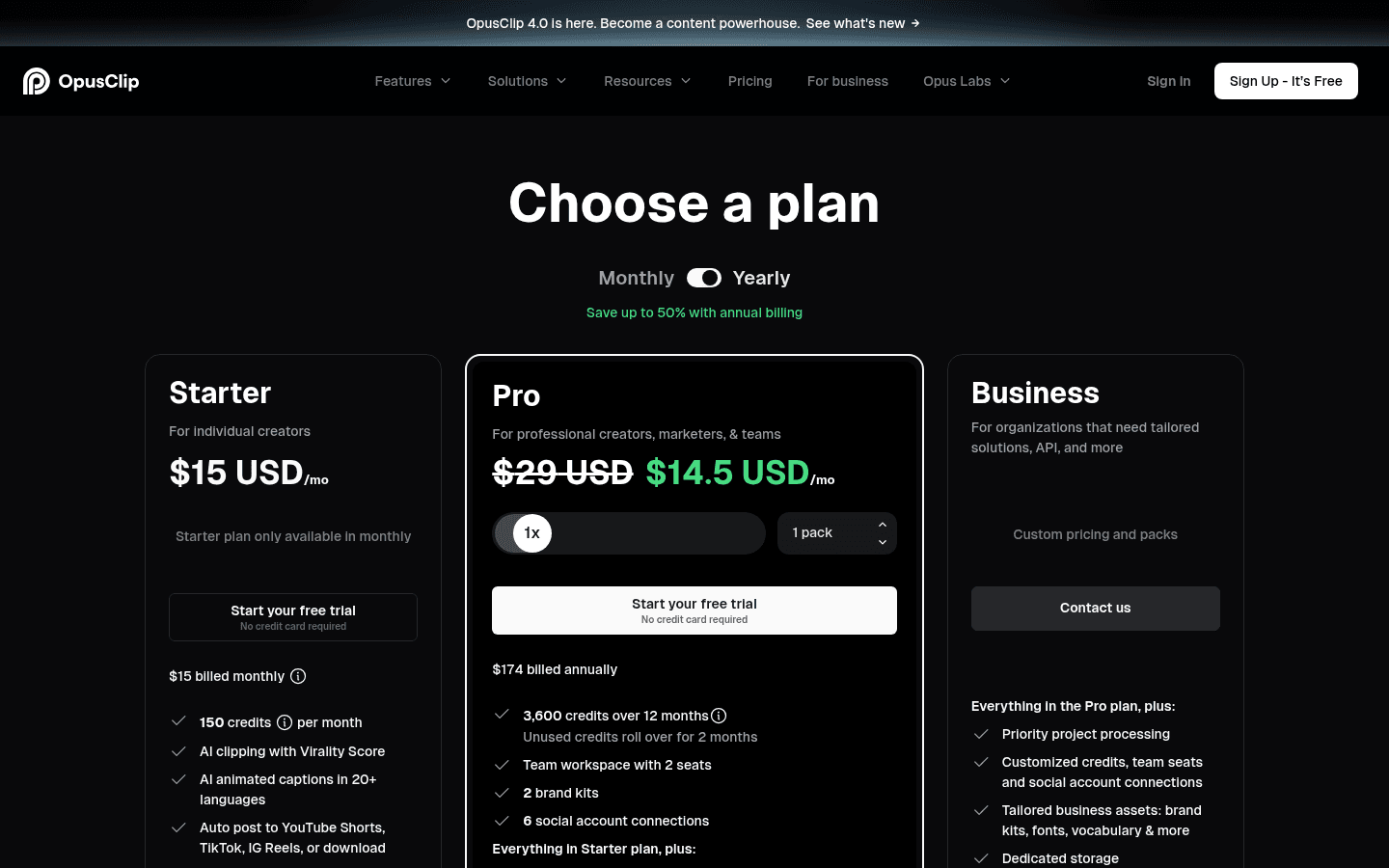
Paid plans start with Starter at $15 a month (150 credits, monthly only). Pro is $29 a month, or $14.50 a month billed yearly ($174 for 3,600 credits), and unused Pro credits roll over for 2 months. OpusClip also shows "Start your free trial, no credit card required" buttons on both paid plans. Note the different meter: OpusClip charges per minute you upload, while Crayo charges per clip it makes.
Vizard free plan
Vizard's Free plan gives you 60 credits a month with no watermark, which is rare for a free AI clipper. The limits are 720p export, 3-day storage, uploads up to 60 minutes, exports up to 10 minutes and one connected social account.
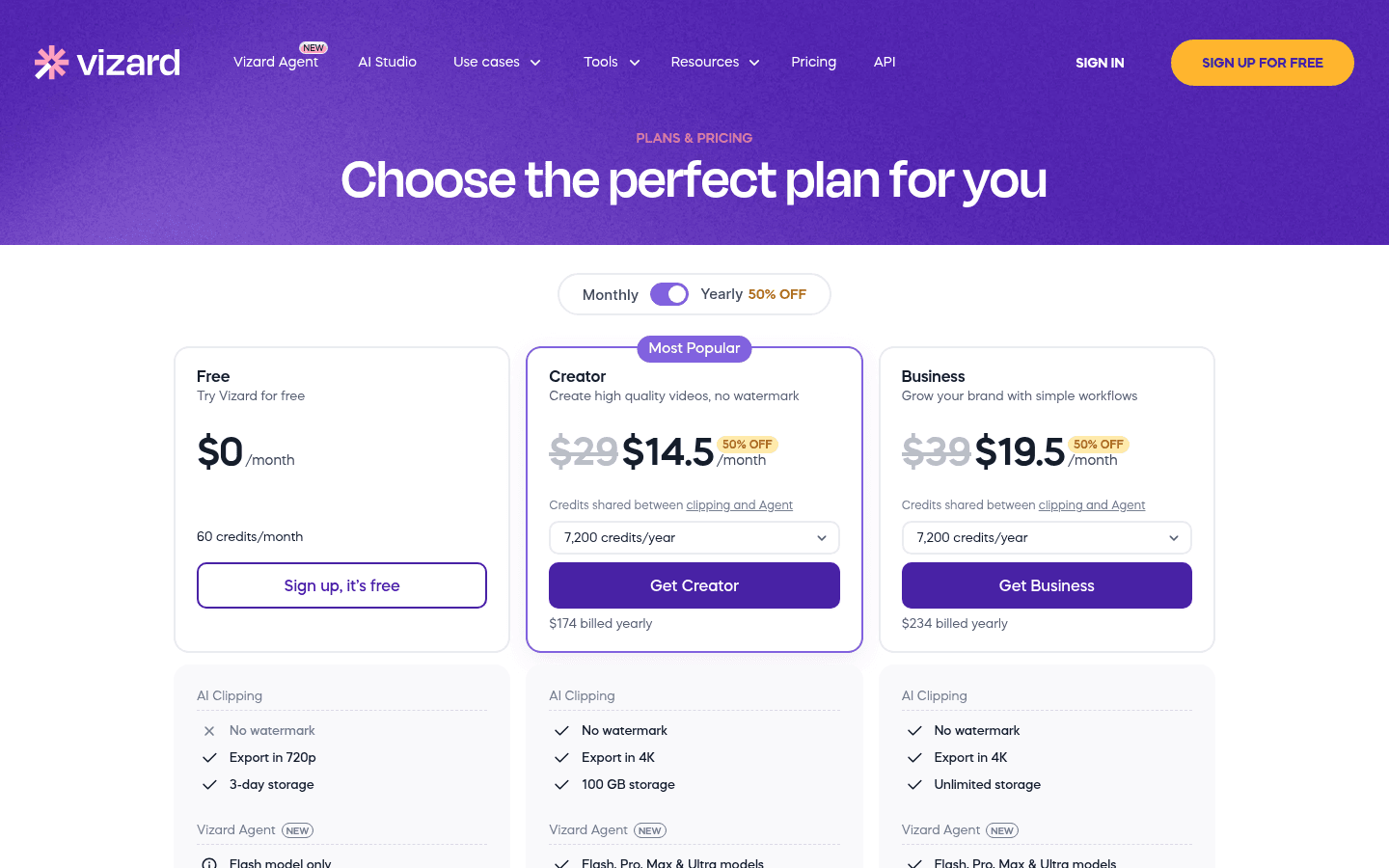
Creator costs $29 a month, or $14.50 a month billed yearly ($174), with 4K export, 100GB storage and credits shared between clipping and the Vizard Agent. Business is $39 a month, or $19.50 billed yearly ($234). Paid credits roll over for 2 months.
Klap free trial
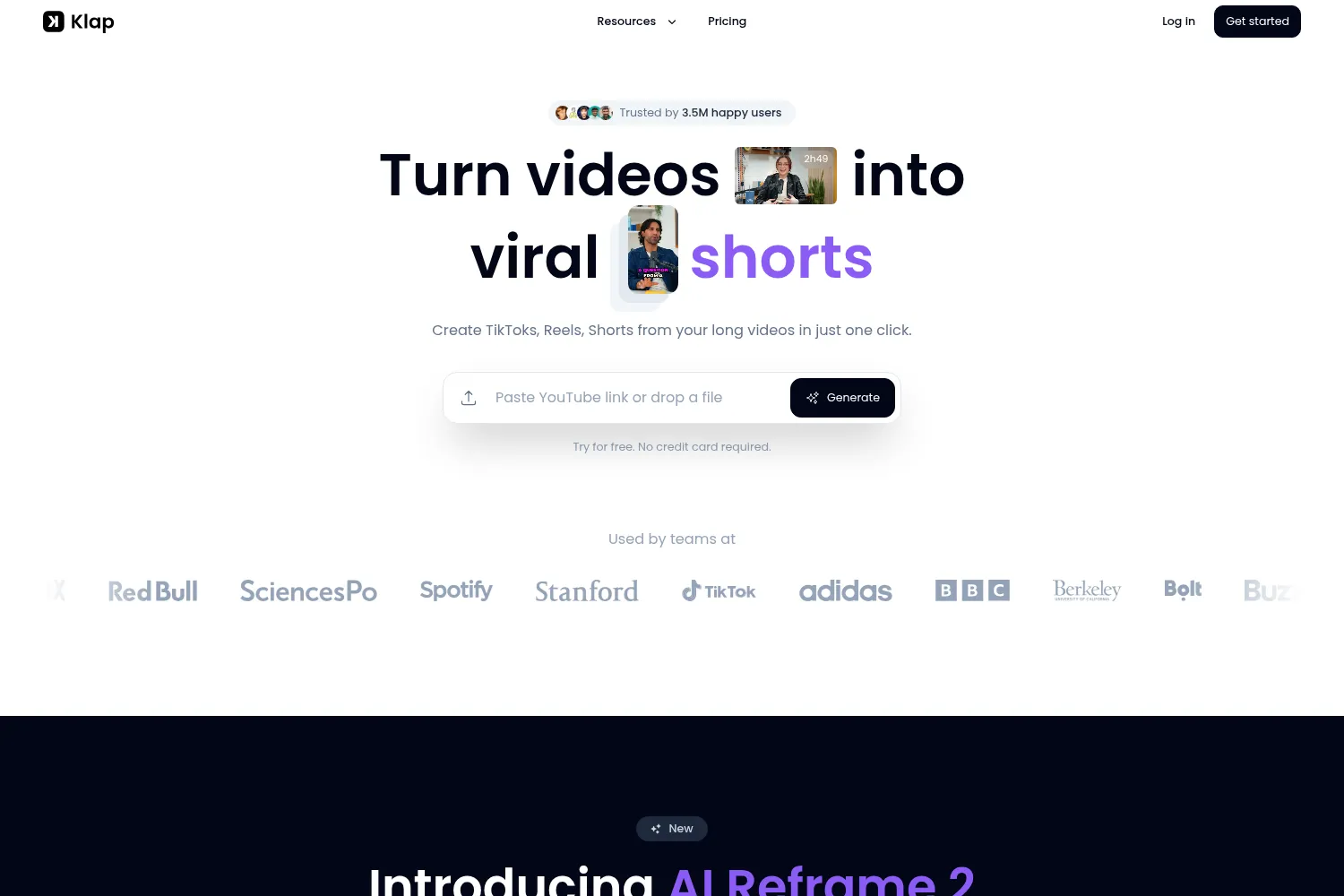
AI-powered tool that turns YouTube videos into TikToks, Shorts, and Reels in one click.
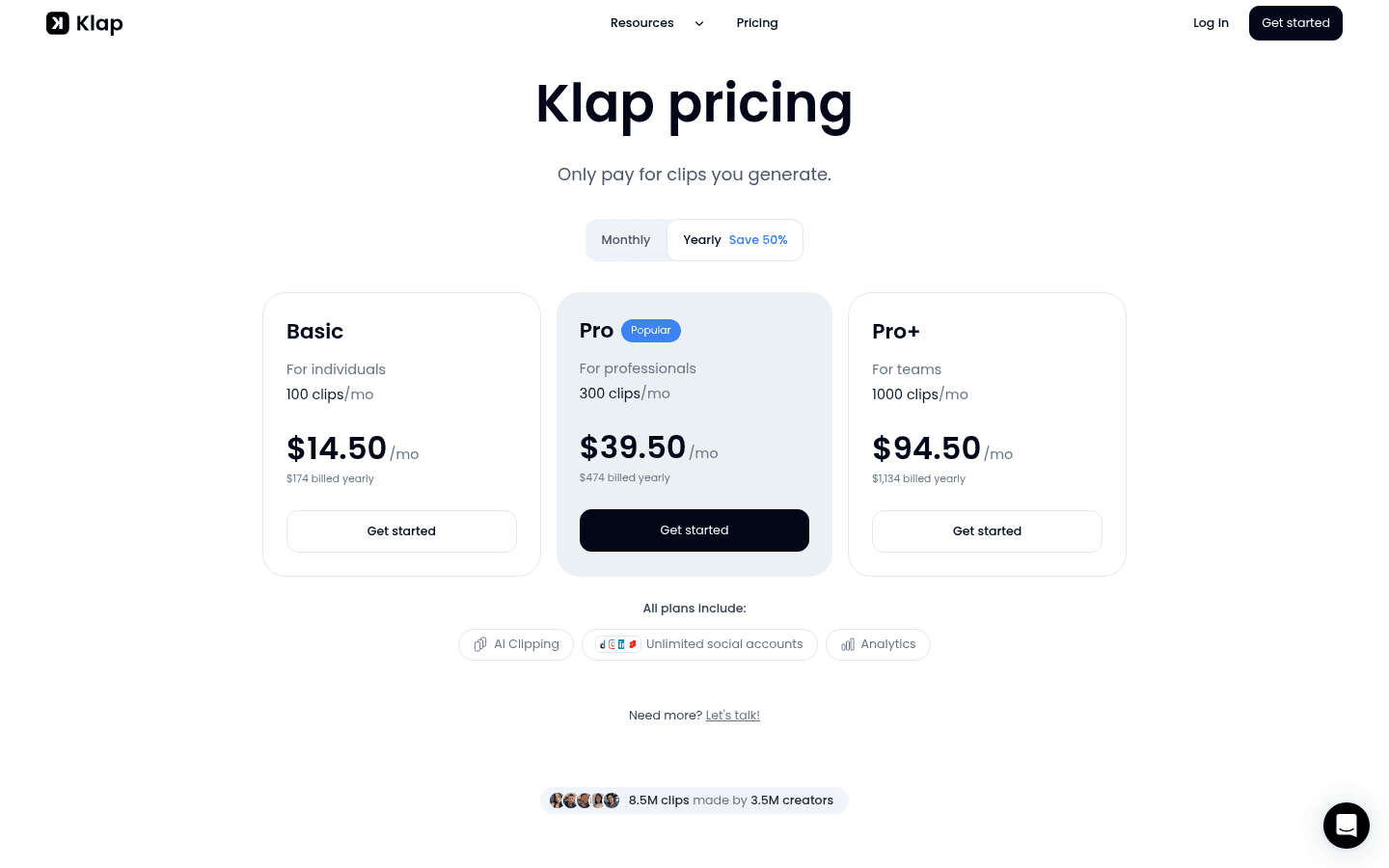
Klap is $29, $79 or $189 a month (Basic, Pro, Pro+) for 100, 300 or 1,000 clips, or half that billed yearly. Unlike Crayo, Klap has a refund policy: on a monthly plan you can ask for a refund at any time in your first month, and on a yearly plan you get a full refund in the first month.
If you only need manual editing
If you cut clips yourself and only want captions and a timeline, you may not need an AI clipper at all. See our list of CapCut alternatives for every creator, or use 
Is Crayo AI worth it?
Crayo is worth it if you clip every day and want AI moments plus a real editor in one tab. At yearly prices, Hobby works out to about 7 cents per AI clip, and Crayo charges per finished clip, not per minute you upload. That suits clippers who feed in long podcasts and streams but only keep a handful of moments.
It is harder to recommend if you are just starting:
- You cannot test the AI before paying, and you cannot get a refund.
- The monthly prices ($29, $59, $129) are much higher than the quarterly prices most people see first.
- Credits do not roll over, so slow months waste money.
- Crayo's own comparison hub admits it has no scheduler, no team seats and no 4K export.
A safe path: try OpusClip or Vizard for free on the same video, check if AI clipping fits your workflow, and only then pay for Crayo's quarterly Hobby plan if you want its editor and per-clip pricing. If you mainly want styled captions rather than clipping,  Submagic is another option Crayo compares itself with in its pricing FAQ.
Frequently asked questions
Is Crayo AI free to use?
No. The Crayo editor and all AI features need a paid plan, and there is no free plan or trial. Only Crayo's 12 browser tools (trimmer, compressor, MP3 converter and others) are free, with no signup and no watermark.
How much is Crayo AI a month?
Hobby is $29 a month, Clipper $59 and Pro $129 when billed monthly. Billed quarterly they are $19, $39 and $79 a month, and billed yearly $16.58, $33.25 and $66.58 a month ($199, $399 and $799 a year).
Is there a free alternative to Crayo AI?
Yes. OpusClip has a free forever plan with 60 credits a month (watermarked), and Vizard has a free plan with 60 credits a month and no watermark. Klap lets you try one video free with no card.
What does Crayo AI do?
Crayo turns long videos into short vertical clips. Its AI finds the best moments, reframes the speaker and adds captions and a title, and you can finish every clip in a browser-based multi-track editor. It also makes Reddit story and fake text videos.
What is a workflow credit in Crayo?
One workflow credit makes one AI clip. AutoClip and the AI Video Editor use 1 credit per clip, and Find Viral Moments uses 1 credit per moment it finds. Cutting clips by hand is free.
Does Crayo AI offer refunds?
No. Crayo's refund policy says all sales are final, with no exceptions for dissatisfaction or accidental purchases. You can cancel at any time and keep your plan until the end of the billing period.
How do I cancel my Crayo AI subscription?
Go to crayo.ai/dashboard, click your profile picture, open Settings and press Cancel. Plans bought in the iPhone app are cancelled in your Apple subscriptions.
Is Crayo AI safe?
Crayo is run by Crayo, Inc., and its official app is published on the App Store under that name. The free browser tools process files on your own device, so nothing is uploaded. The main risk is financial: there is no trial and no refunds.
Is there a Crayo AI app for Android or an APK?
No official Android app exists yet. Crayo says any Android listing using the Crayo name is not made by Crayo, Inc., so avoid "Crayo AI Premium APK" downloads. On Android, use crayo.ai in the browser. The official iPhone app needs iOS 18 or later.
Do unused Crayo credits roll over?
No. Plan credits refill every month and unused ones expire, even on quarterly and yearly plans. Credits from one-time top-ups never expire.