
Prompt Motion (prompt-motion.com) is a free online library of motion graphics videos made with Claude Opus 5.5, shown next to the exact prompt or skill that produced each one. You can browse by style, copy a prompt, or customize one with your own concept, then run it in Claude. No account is needed to browse or copy.
Prompt Motion on Toolfolio. Updated October 29, 2026.
What is Prompt Motion?
Prompt Motion describes itself as "a collection of motion videos made with Claude Opus 5.5, with the prompts and skills behind them." It is curated by the X user @p4nthera_, and every entry links back to the creator's original post. The footer says it plainly: "Videos and prompts belong to their creators, linked on each entry."
The site grew out of the wave of AI motion graphics that hit X after Anthropic released Claude Opus 5.5 on September 22, 2026. People were posting showreels, launch videos and animated explainers, but the prompts were scattered across threads. Prompt Motion collects them in one gallery so you can see the video and the prompt side by side.
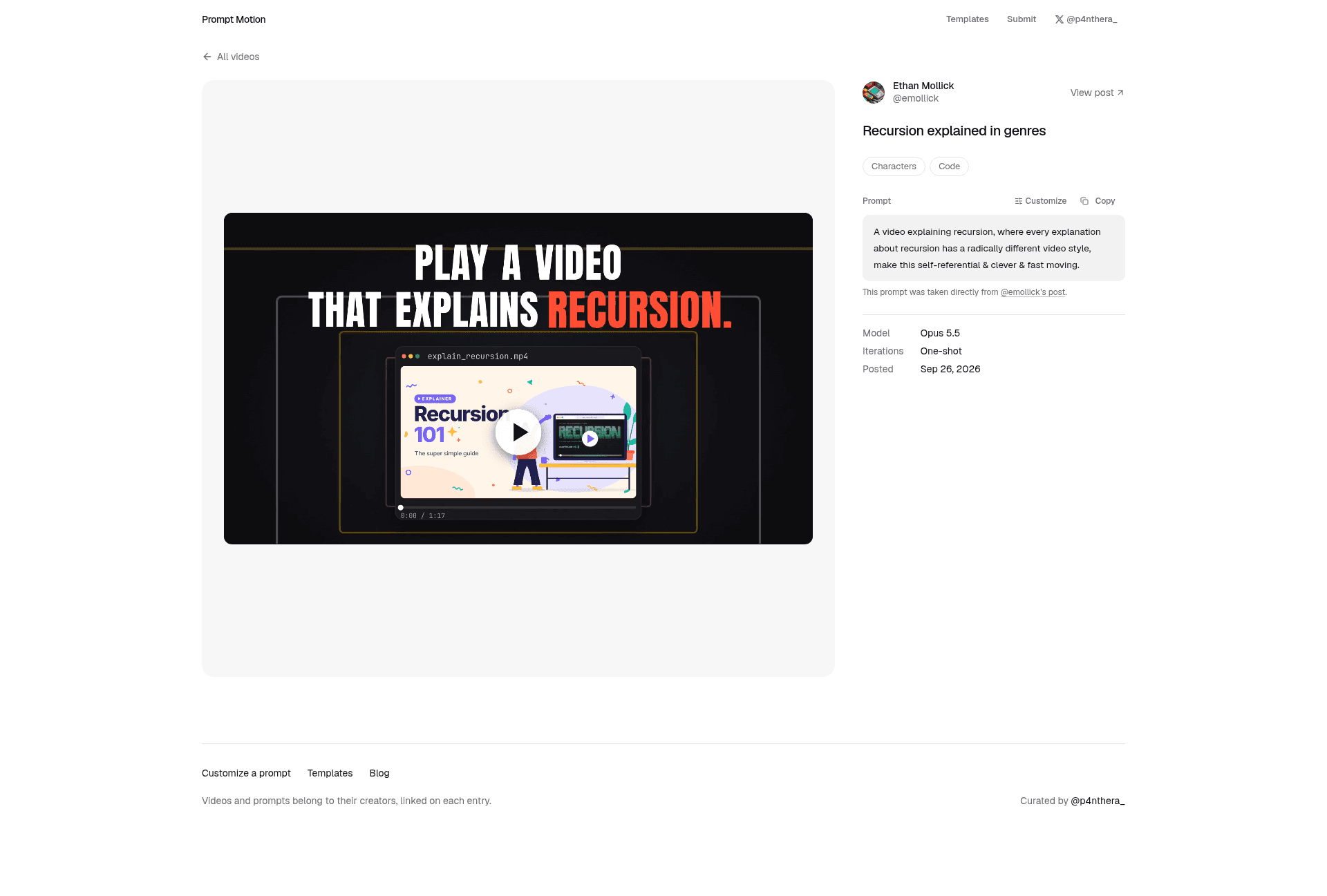
Each entry page shows:
- The video itself, playable in the browser
- The creator's name and a "View post" link to the original post on X
- The prompt, with Copy and Customize buttons (or, for skill entries, an
npx skills addinstall command and a link to the repo) - The model used (Opus 5.5 on the entries we checked), the number of iterations (for example "One-shot") and the date posted
Prompt Motion vs Claude Motion: not the same thing
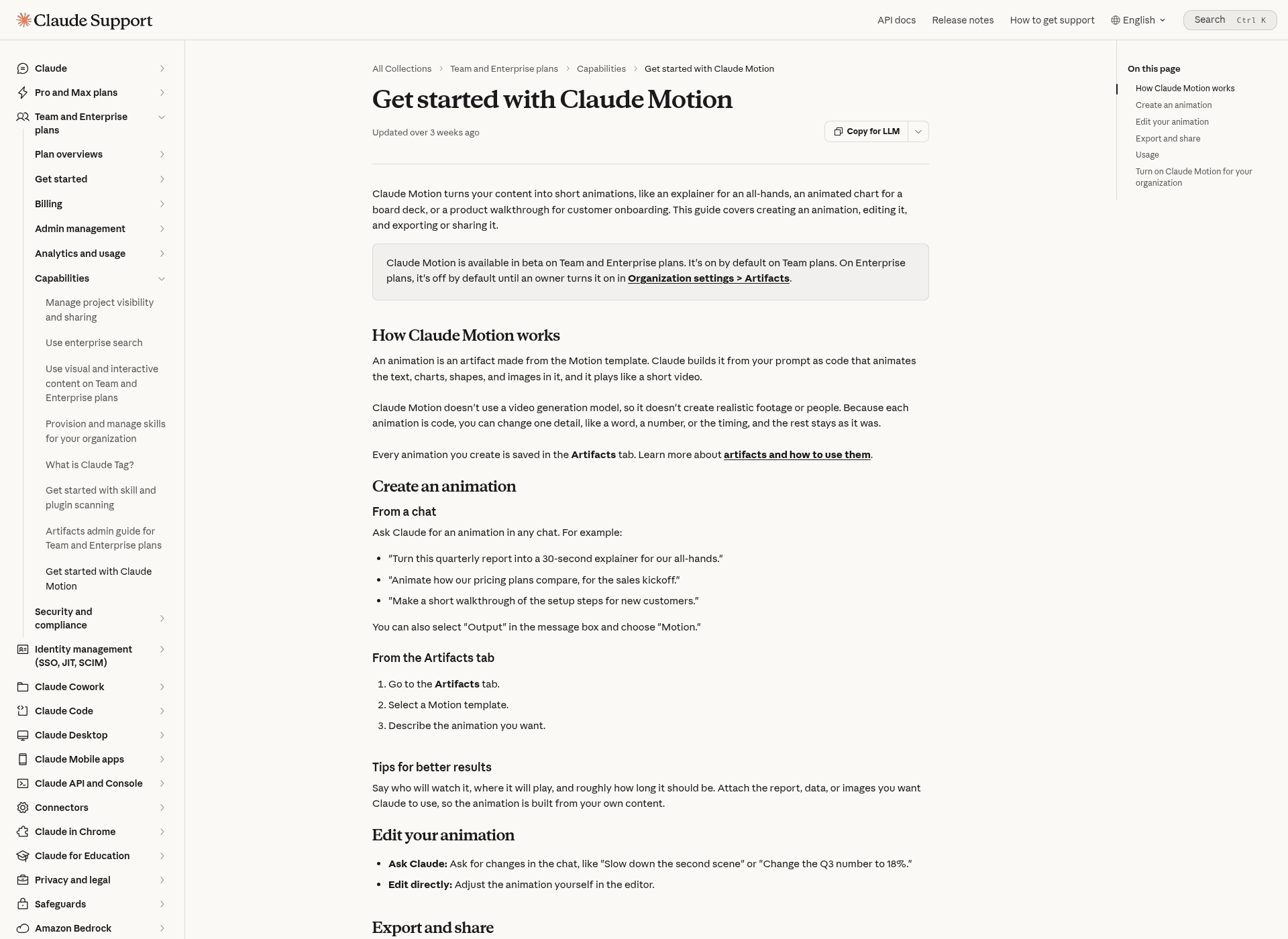
The names are easy to mix up, and Google mixes them up too. Prompt Motion is an independent, community-curated website. Claude Motion is an official Anthropic feature inside the Claude app, launched in beta on October 8, 2026.
| Prompt Motion | Claude Motion | |
|---|---|---|
| What it is | A free gallery of Claude-made motion videos and their prompts | A built-in Claude feature that turns your content into short animations |
| Made by | Independent curator (@p4nthera_), not Anthropic | Anthropic |
| Cost | Free to browse, copy and customize | Beta on Claude Team and Enterprise plans; counts toward plan usage limits |
| Account needed | No | Yes, a Team or Enterprise Claude account |
| Output | Prompts you run yourself in Claude or Claude Code | Animations you edit in Claude's editor and export as MP4 |
| Best for | Learning how people prompt Opus 5.5 for motion design | Explainers, animated charts and product walkthroughs at work |
According to the Claude Help Center, Claude Motion builds each animation "as code that animates the text, charts, shapes, and images in it." It does not use a video generation model, so it does not create realistic footage or people. You can start one from any chat, from "Output" then "Motion" in the message box, or from a Motion template in the Artifacts tab, and you download the result with Export, then MP4. Anthropic's launch post also mentions typing "/motion" in the message box.
The two work well together. Prompt Motion shows you what strong motion prompts look like, and the same ideas (say who will watch, how long it should be, what content to use) apply when you prompt Claude Motion.
Is Prompt Motion free?
Yes. Browsing the gallery, copying prompts and using the Customize tool are free, and you do not need to sign up. The Customize page says: "It's free, and your details stay in your browser." The only form on the site is an optional email signup for new videos and a weekly recap.
The site pays for itself with sponsors rather than user fees. Its sponsor page lists a top sponsor spot at $750 a week and a featured card in the gallery at $350 a week, and reports more than 200,000 visits in the first week after launch, about 20,000 visits a day since, and over 10,000 email subscribers.
What is not free is the AI that runs the prompts. Every entry we checked was made with Claude Opus 5.5, which Anthropic lists on the paid Pro, Max, Team and Enterprise plans.
What you will find in the library
The gallery has two entry types, which you can filter at the top of the page:
- Prompt: a plain text prompt you can paste into Claude.
- Skill: a reusable skill file for a coding agent, installed with an
npx skills addcommand from a GitHub repo.
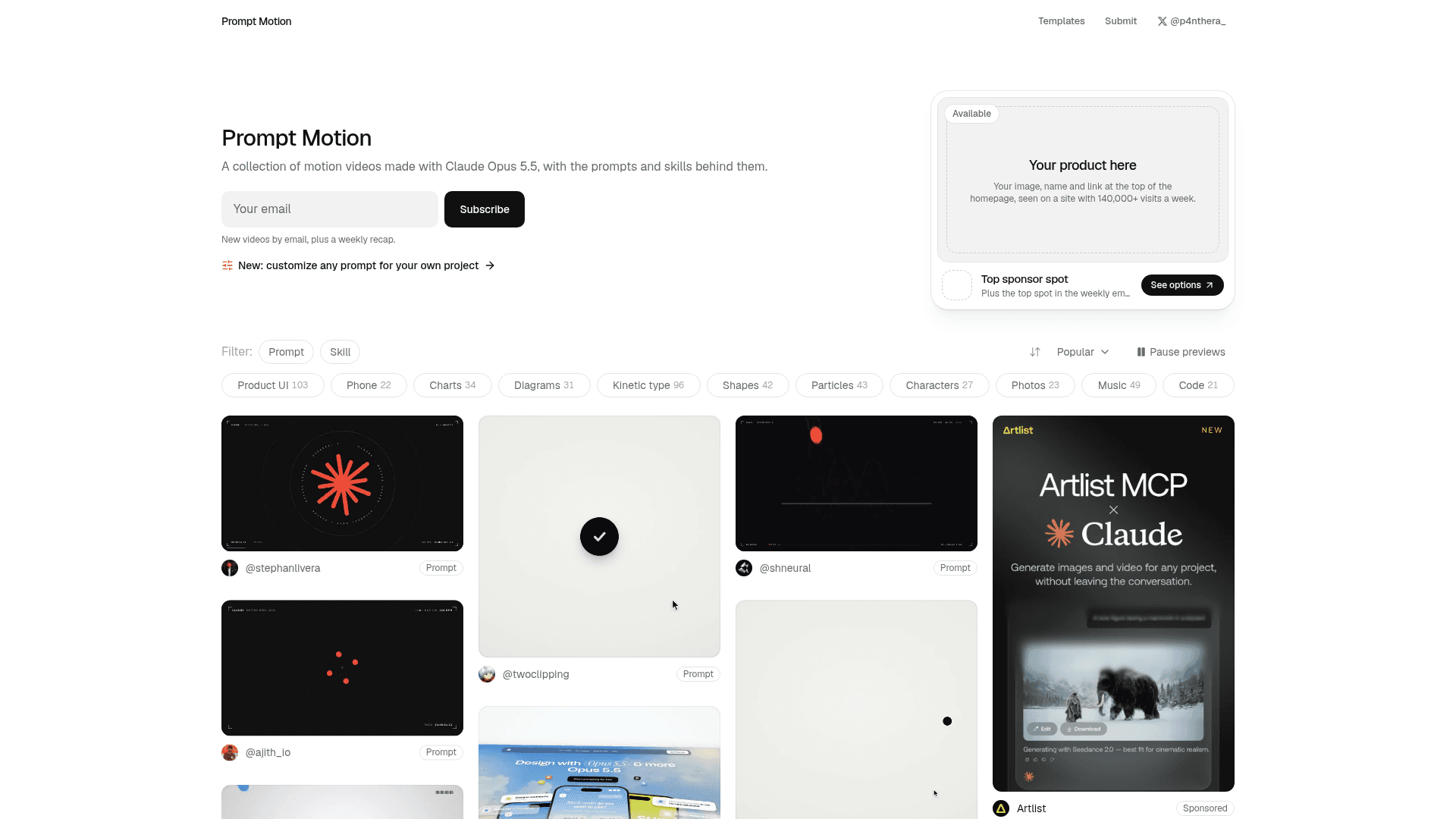
You can also filter by style tag. These are the tags and counts shown on the homepage on October 29, 2026 (one video can have several tags):
| Tag | Entries |
|---|---|
| Product UI | 103 |
| Kinetic type | 96 |
| Music | 49 |
| Particles | 43 |
| Shapes | 42 |
| Charts | 34 |
| Diagrams | 31 |
| Characters | 27 |
| Photos | 23 |
| Phone | 22 |
| Code | 21 |
A sort menu lets you order entries by popularity, and a "Pause previews" button stops the autoplaying thumbnails if they slow your browser down.
How to use Prompt Motion, step by step
1. Find a video close to what you want
Start on the homepage and pick a tag. If you need a SaaS launch video, Product UI and Phone are the best places to look. For a title sequence or quote card, try Kinetic type. For a data story, try Charts or Diagrams.
2. Open the entry and read the details
Click a thumbnail to open its page. Check the Iterations field: "One-shot" means the creator says the video came from a single prompt, while a higher number means they went back and forth with Claude. One-shot entries are the most realistic place to start.
3. Copy the prompt or customize it
Copy puts the prompt on your clipboard as written. Customize opens a version you can adapt to your own project. Prompt Motion also has a Templates section with prompts written to be customized, where "every part you'd change is a field." On October 29, 2026 there were two:
- The showreel prompt: a rewrite of the most used prompt on the site, a one line request asking Opus 5.5 to show off as a motion designer. The site says the original is used in 49 videos.
- The 3D template: a template for real-time three.js pieces.
The site lists an explainer, a product film and a short film template as coming next.
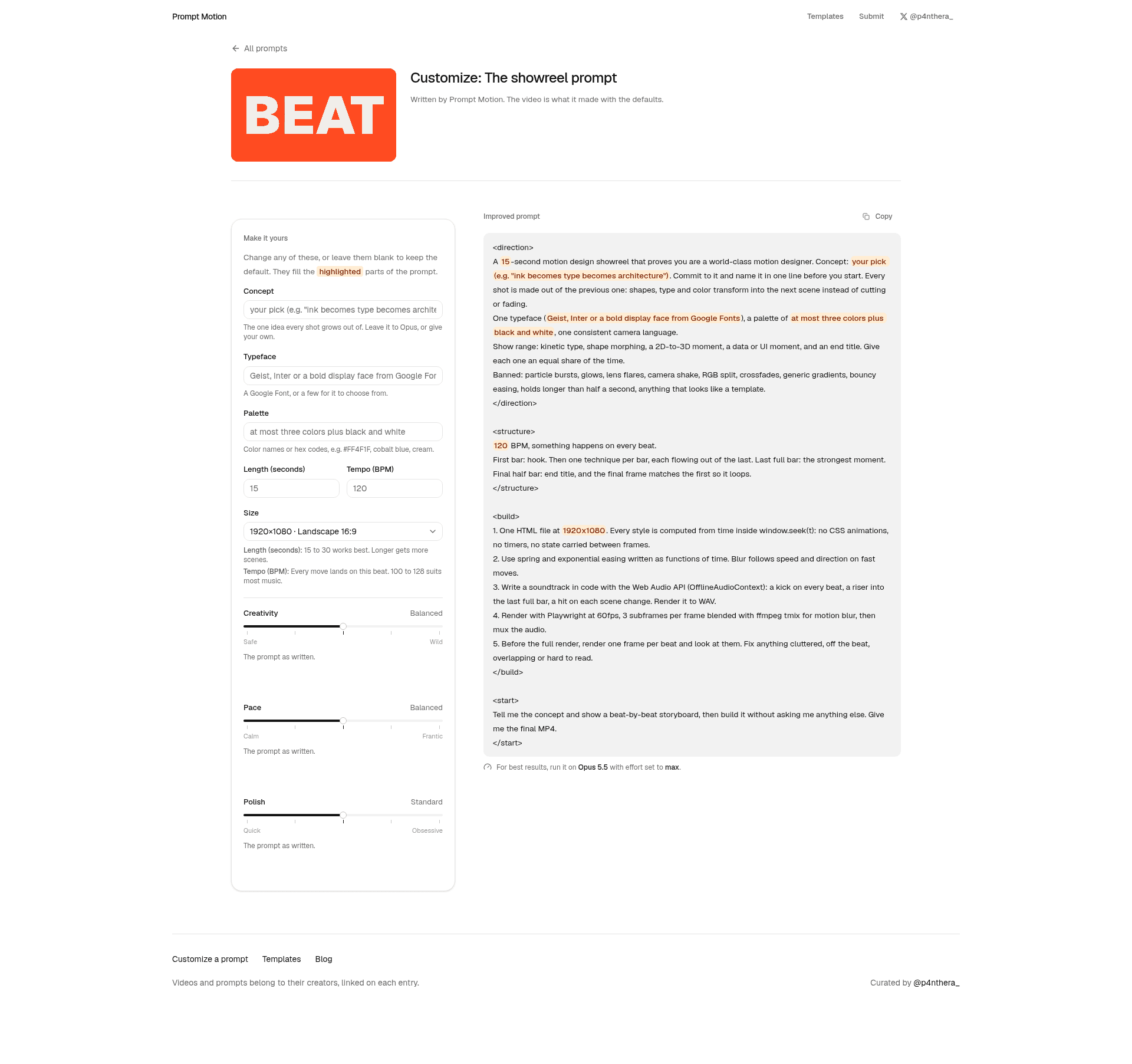
For the showreel prompt, you can set:
| Field | Default or guidance on the page |
|---|---|
| Concept | Your pick, or leave it to Opus (example: "ink becomes type becomes architecture") |
| Typeface | Geist, Inter or a bold display face from Google Fonts |
| Palette | At most three colors plus black and white |
| Length | 15 seconds; "15 to 30 works best" |
| Tempo | 120 BPM; "100 to 128 suits most music" |
| Size | 1920x1080, landscape 16:9 |
| Creativity, Pace, Polish | Sliders from Safe to Wild, Calm to Frantic, Quick to Obsessive |
The page adds one tip: "For best results, run it on Opus 5.5 with effort set to max."
4. Run it in Claude
Paste the prompt into Claude with Opus 5.5 selected. This is where it matters which Claude product you use. Many Prompt Motion prompts do not just ask for an animation. The improved showreel prompt, for example, asks Claude to build one HTML file where every frame is computed from time, write a soundtrack with the Web Audio API, render it with Playwright at 60fps, blend frames with ffmpeg for motion blur, and "give me the final MP4."
That last part needs an AI agent that can run code on a computer, such as Claude Code, because Playwright and ffmpeg have to actually run. In a regular Claude chat, Claude can write the animation code and show it as an artifact, but turning it into a video file is a separate step. If you are on a Team or Enterprise plan, Claude Motion is the simpler path: it builds the animation in the app and exports MP4 directly.
5. Render and export the MP4
If you used Claude Code, it will run the render script and save the video in your project folder. Before the final render, the showreel prompt asks Claude to render one frame per beat and check for anything cluttered or overlapping, which is a good habit for any prompt you adapt.
How Prompt Motion videos are rendered
Claude does not draw video pixels directly. It writes code that draws each frame, and another tool turns that code into an MP4. Prompt Motion published an analysis on October 10, 2026 of the 56 gallery entries whose creators said how they rendered:
| Rendering approach | Entries | What it is mostly used for |
|---|---|---|
| Plain HTML or canvas, captured with a headless browser (Playwright) | 23 | Explainers, launches, UI motion |
| Remotion (React-based video framework) | 13 | Launch videos (10 of 13) |
| HyperFrames (from HeyGen, Apache 2.0 open source) | 10 | Launch videos (6 of 10) |
| Three.js | 5 | 3D scenes |
| Other (Manim, Blender, Python with ffmpeg) | 5 | One each |
All the main approaches work the same way underneath: a headless browser loads the animation, jumps to an exact time, takes a screenshot, and repeats for every frame, then ffmpeg encodes the frames into a video. Prompt Motion's advice is to name your renderer in the prompt, because "without a build method, Claude chooses one each time, and the results are harder to repeat." It also notes that some companies need a paid license to use Remotion commercially.
What the library shows about good motion prompts
Prompt Motion's own October 10 blog post looked at 233 entries from 216 creators posted between September 23 and October 8, 2026. All were made with Opus 5.5, 230 included a prompt, and the median prompt was only 26 words long. The most common kinds of video were launch videos (94), showreels (78) and explainers (27).
A few practical lessons from the site and from Anthropic's own Claude Motion guide:
- Short prompts can work, but structure helps. The famous one line showreel prompt is short; the site's improved version adds direction, a beat structure, banned clichés and build steps.
- Give it a length and a beat. The showreel template suggests 15 to 30 seconds and 100 to 128 BPM.
- Name the build method. Plain HTML with Playwright is the simplest setup according to the site; use Remotion if your product is already built in React.
- Say who will watch it. Anthropic's guide recommends saying who will watch, where it will play and roughly how long it should be, and attaching your own report, data or images.
- Edit small things in place. Because these animations are code, you can ask Claude to change one number or one scene instead of starting over.
Which Claude plan do you need?
| What you want to do | What you need |
|---|---|
| Browse, copy and customize prompts on Prompt Motion | Nothing; the site is free and needs no account |
| Run prompts on Opus 5.5, the model every entry we checked used | A paid Claude plan: Pro, Max, Team or Enterprise |
| Render a prompt to MP4 on your own computer | An agent that can run code, such as Claude Code (included with Pro and Max) |
| Use the official Claude Motion editor and MP4 export | Claude Team or Enterprise (beta) |
On Team plans, Claude Motion is on by default. On Enterprise plans, an owner has to turn it on in Organization settings, then Artifacts. Plans and features change often, so confirm on Anthropic's site before you pay.
Prompt Motion alternatives and related tools
Prompt Motion is a library, not an editor, so the closest alternatives depend on what you need:
- Swishy: turns prompts into motion graphics and kinetic typography without After Effects, with MP4, MOV and GIF export.
- Raylight: a web-based tool for making motion graphic videos without complex software.
- Animos: a free browser tool for animating design mockups from ready-made templates, not AI generated.
- Claude and Claude Code: the model and agent most Prompt Motion entries were built with.
- UX Pilot: if you want free visual effects rather than video, see our guide to UX Pilot Labs' free gradient, ASCII and dither tools.
- ArtCraft: a free, open-source creative suite; read what ArtCraft is and what is free.
If you already design in Canva, our guide on how to connect Claude to Canva covers another way to put Claude to work on visuals.
FAQ
Can Claude make videos?
Yes, in two main ways. Claude Motion, in beta on Team and Enterprise plans, builds short code-based animations in the Claude app and exports them as MP4. On other paid plans, Claude (often through Claude Code) can write animation code with tools like HTML and Playwright, Remotion or HyperFrames and render it to video. Claude does not generate realistic footage of people.
Can Claude make videos for free?
Prompt Motion itself is free, but the prompts in it were made with Claude Opus 5.5, which Anthropic offers on paid plans (Pro, Max, Team and Enterprise). Claude Motion is limited to Team and Enterprise. Free open-source renderers like HyperFrames or Playwright with ffmpeg cost nothing, but you still need a model to write the animation code.
Does Claude do motion design?
Yes. Since Opus 5.5 launched, creators have used it to make showreels, launch videos, kinetic typography and explainers. Prompt Motion collects more than 230 of these with their prompts. Claude writes the animation as code rather than generating video frames with a video model.
Can Claude animate things?
Yes. Claude can write animations in HTML, CSS, SVG, canvas or WebGL, use libraries like Three.js or GSAP, or build scenes for Remotion and HyperFrames. With Claude Motion on Team and Enterprise plans, you can also ask it to animate a report, chart or product walkthrough directly in the app.
Can I export Claude Motion animations to other tools?
Claude Motion exports MP4 files. Anthropic's launch post says you can open animations in Adobe, Descript, HeyGen, Higgsfield, invideo, Luma AI and Runway, with Canva and Captions coming soon.
What does motion prompt mean?
A motion prompt is a text instruction that describes movement for an AI tool: what moves, how fast, in what order and for how long. On Prompt Motion, a prompt is the exact text a creator gave Claude to produce a motion graphics video. The term is also used in AI video research for controlling movement in generated footage, which is a different thing.
Who made Prompt Motion?
Prompt Motion is curated by the X user @p4nthera_. It is not made by Anthropic. Each video and prompt belongs to its creator, and every entry links to the original post.
Is Prompt Motion the same as Motion (motion.so)?
No. Motion at motion.so is a separate AI video agent product. Prompt Motion at prompt-motion.com is a free gallery of Claude-made motion videos and their prompts.
Can I submit my own video to Prompt Motion?
The site has a Submit link in its header. The library is curated by @p4nthera_, so check the submit page for the current rules before you send a video.
How we checked this guide
We did not create any accounts or run any prompts for this guide, so we are not describing hands-on results. Everything here comes from Prompt Motion's public homepage, entry pages, Templates, Customize, Sponsor and Blog pages, Anthropic's "Get started with Claude Motion" help article, Claude's October 8, 2026 launch post for Dashboards and Motion, and Anthropic's Claude Opus pages, all checked on October 29, 2026. We also reviewed Google's results and People Also Ask questions for "prompt motion", "what is prompt motion", "prompt motion claude", "claude motion" and "can claude make videos". Gallery counts change daily as new videos are added.
Details checked October 29, 2026. Toolfolio is not affiliated with Prompt Motion or Anthropic.