Melius is an AI agent canvas for creative work. You describe an image, video or ad, and its agent, Mel, builds a node workflow on an infinite canvas, picks a model for each step (GPT Image, Nano Banana, Seedance, Veo, Kling, ElevenLabs) and runs it. Signup is free, but generating needs credits, with paid plans from $18 a month.
 Melius on Toolfolio. Updated November 26, 2026.
What is Melius AI?
Melius calls itself "AI agents for creative work". It is a node-based canvas for AI images, video, audio and text. Every prompt, reference image, video clip and voice track is a node. You connect nodes with edges, so the output of one step feeds the next. That is how you build a pipeline like reference photo, then product shot, then video, then voiceover, then final cut.
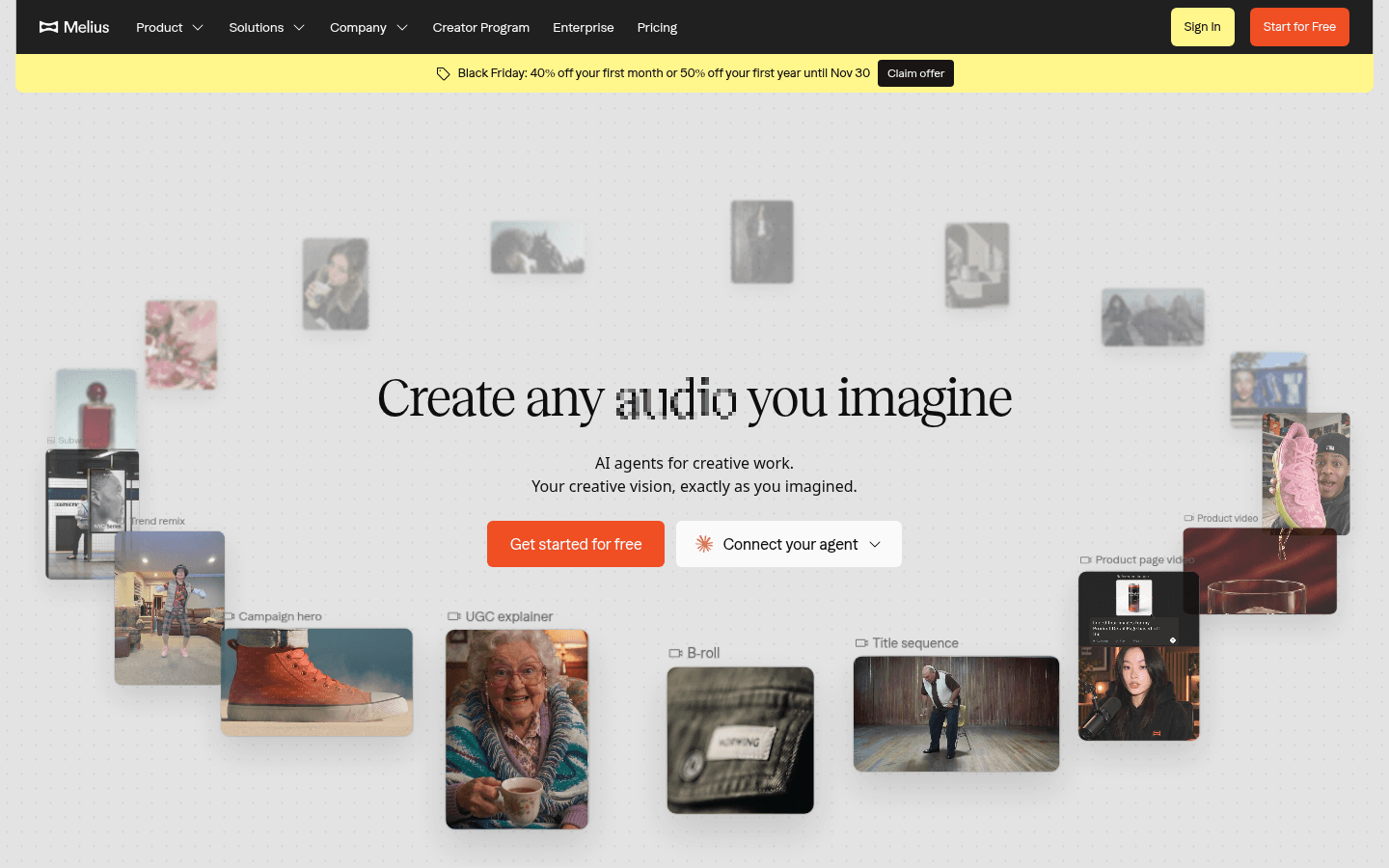
The difference from a single prompt box is that the whole process stays visible and editable. You can change an early step and re-run everything after it, branch to compare two directions side by side, or save a working graph as a template for the next campaign.
Here are the facts Melius publishes about itself, checked on November 26, 2026:
| Fact | Detail |
|---|---|
| What it is | A node-based creative canvas with an AI agent (Mel) that builds and runs workflows |
| Media types | Images, video, audio (speech, music, sound effects) and text |
| Extra tools | Cast (avatar presenter videos from a script) and Ditto (swap people or restyle an existing video) |
| Where it works | Web app, desktop app, a Slack bot, and Claude, ChatGPT or Codex through its MCP server |
| Developer access | MCP server, REST API and the mel CLI |
| Content rights | You own what you make and can use it commercially, subject to each model provider's terms. Melius says it does not train on your work |
| Company | Melius AI, Inc., New York. Co-founded by Joowon Kim (CEO), Young Kim (CTO) and Arnav Ramu (COO) |
| Funding | $25 million announced October 6, 2026: a $5 million seed led by General Catalyst and a $20 million Series A led by CRV |
One naming note: several unrelated products share the name. Melius (melius.com) is not Mellius AI (a video editor), not the Melius daily planner app at getmeliusai.com, and not the Melius compensation software listed on Software Advice. Sites such as wan27.org/melius also use the name but are not the official product, so check the domain before you sign up or pay.
How does Melius work?
Melius gives you two ways to work: you can build the canvas yourself, or you can ask Mel to build it for you.
The canvas: nodes, edges and versions
A project holds one or more canvases. On a canvas you add nodes with the toolbar or the / key:
| Node | What it does |
|---|---|
| Text node | Runs a language model and writes text, such as a script or a prompt |
| Image node | Generates or edits an image |
| Video node | Generates a video clip from a prompt, an image, first and last frames or input footage |
| Audio node | Generates speech, music or sound effects |
| File node | Brings in your own image, video, audio file or PDF |
| Custom text | A fixed block of text other nodes can reference |
Each run creates a new version of the node, so you can flip back to earlier outputs. Drag from one node's output to another node's input to create an edge, and the downstream node receives that output as context. The canvas is multiplayer, so teammates (and AI agents) appear on it in real time, and comments land on a specific node instead of a finished file.
The Mel agent
Instead of wiring nodes by hand, you can describe what you want in chat. Mel wires the nodes, chooses a model for each one and leaves every prompt editable. Team owners can give Mel team-wide context (rules it should always follow) and reusable skills, and Brand kits store each brand's logos, colors, fonts and voice so Mel stays on brand.
Cast and Ditto
Cast turns a script into a video of an avatar saying it, with up to three avatars, a voice, a look and props you choose. It is available on every plan, and creating a Cast avatar is free. Ditto takes a video you already have and swaps the people in it for your avatars, or re-renders the whole video in a new style while keeping the original motion and camera.
Use Melius from your own AI agent
Melius runs an MCP server, so Claude, ChatGPT, Codex or another MCP client can create canvases, add nodes, run generations and download outputs without you opening the app. The recommended connector URL is https://mcp.melius.com/mcp, which signs you in with your Melius account instead of an API key. There is also a REST API and a mel command-line tool. For more creative MCP servers, see our list of the best MCP servers for designers, creators and marketers.
How to use Melius step by step
- Sign up at melius.com (free) and open Projects, then New project. Every project starts with a blank canvas.
- Press
/and add a node, for example an image node. Type a prompt and pick a model, or leave the default. - Click Run or press Cmd+Enter. The node shows its credit cost before you generate.
- Drag a wire from the image to a new video node to animate it, then add an audio node for a voiceover.
- Or skip the wiring: type what you want in the Mel chat, for example "a 3-shot ad for a summer skincare line in 9:16", and let Mel build the graph.
- Re-run any single node to fix one step, branch to try a second direction, and export or share the result.
Failed generations get their credits back. You can check for a Refunded badge in Team settings under Usage, then Generation history.
What models does Melius support?
Melius routes generations through models from many providers and changes the catalog often. These are the main ones listed in the Melius docs on November 26, 2026:
| Type | Models (examples) |
|---|---|
| Image | GPT Image 2.6 (the default), GPT Image 2.5 and 2, Nano Banana 2 and Nano Banana Pro, Ideogram 4.5, Flux 3 Image and Flux 2 Max, Seedream 5.0, Krea 3, Recraft V4.1, Qwen Image 3, Grok Imagine, Stable Diffusion XL |
| Video | Veo 3.1, Kling 3.0 Omni and Kling 3 Pro, Seedance 2.5 and 2.0, Wan 3.0, LTX 2.5, Ray 3.2, Vidu Q3, PixVerse v5.6, MiniMax H3, Grok Imagine Video, plus lipsync and avatar models from HeyGen, VEED and Sync |
| Audio | ElevenLabs v4, v3, Sound Effects and Music, Fish Audio S2.1 Pro, MiniMax Speech and Music, Gemini 3.1 Flash TTS, Qwen3 TTS |
| Text | GPT-6 Astra and GPT-5.6, Claude Opus 5.5 and Sonnet 5, Gemini 3.1 Pro, Grok 4.6, Llama 4 Maverick, Mistral Large 3, DeepSeek V4 Pro |
Every paid plan includes all models. You can import or create custom  ElevenLabs voices on Creator and above. If you mostly use one model, such as
 Nano Banana,
 Kling or
 Runway, going direct can cost less. The value of Melius is having all of them on one canvas with one credit balance.
What can you make with Melius?
Melius's own examples cover UGC ads, product shots, 360 product spins, billboards and subway ads, fashion films, B-roll, title sequences, character swaps and trend remixes. In practice it fits work that takes more than one generation to get right:
- Ad and campaign creative: build one graph per concept, then resize the approved version for every placement and aspect ratio.
- E-commerce visuals: reuse one product photo as a reference node across lifestyle scenes, crops and product videos.
- Short video and UGC: script, avatar, voice and B-roll in one flow with Cast. See our best AI UGC video generators for single-purpose options.
- Film and storyboards: generate shots on parallel branches and assemble takes in the built-in video editor.
- Brand work: pin logos, fonts and references as nodes so later generations stay consistent.
How much does Melius cost?
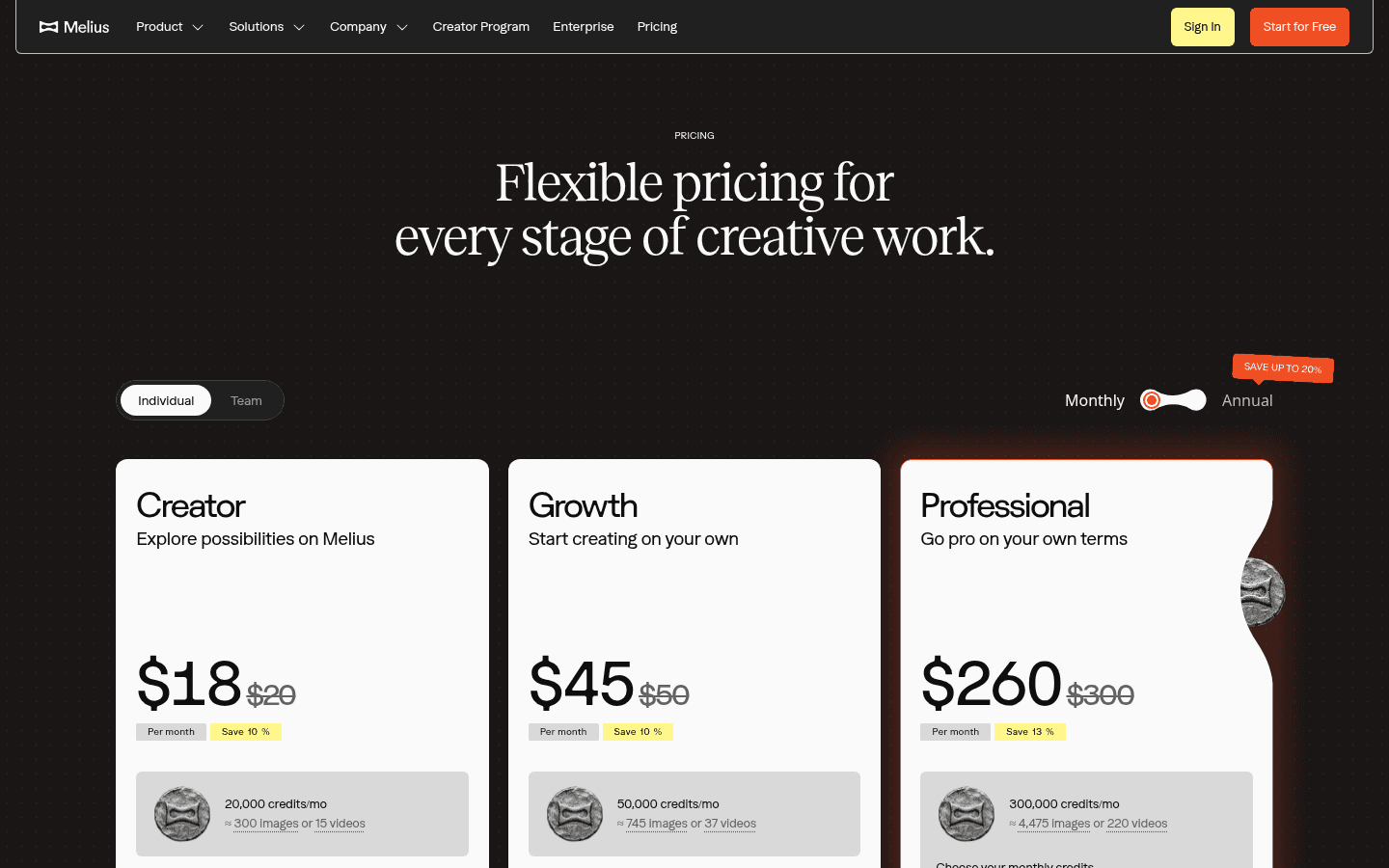
Melius prices plans by monthly credits. Every model shows its credit cost before you run it, and videos cost much more than images. Here is the Melius pricing page with monthly billing selected:
| Plan | Monthly billing | Annual billing (per month) | Credits a month | Plan card estimate |
|---|---|---|---|---|
| Free | $0 | $0 | Limited trial | None |
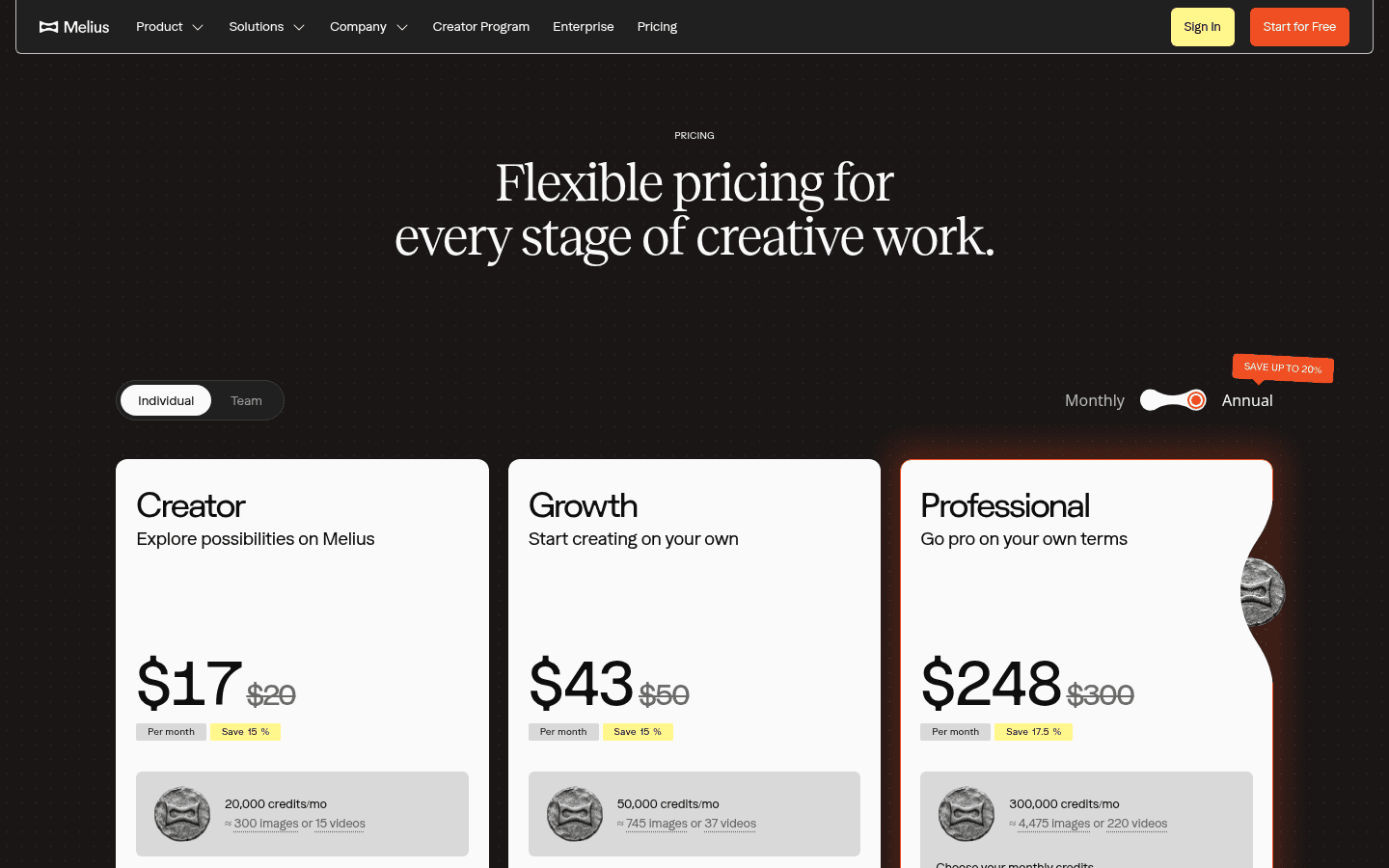
| Creator | $18 | $17 | 20,000 | About 300 images or 15 videos |
| Growth | $45 | $43 | 50,000 | About 745 images or 37 videos |
| Professional | $99 (110K), $260 (300K) or $510 (600K) | $248 for 300K | 110,000 to 600,000 | About 4,475 images or 220 videos at 300K |
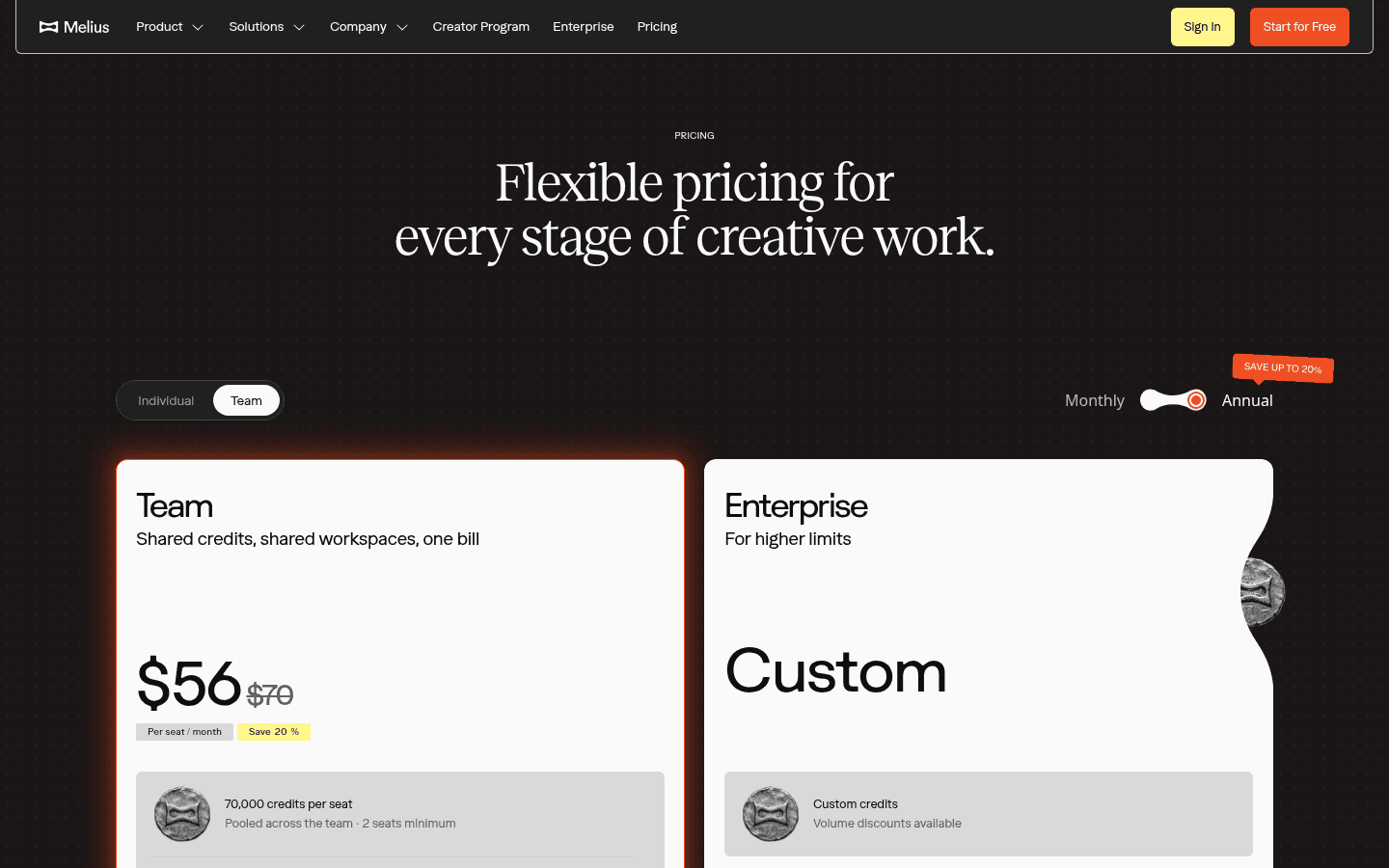
| Team | $63 per seat | $56 per seat | 70,000 per seat, pooled | 2 to 10 paid seats |
| Enterprise | Custom | Custom | Custom | Priority queue |
Two things confuse people on this page. First, the plan cards show crossed-out prices of $20, $50, $300 and $70 next to the real price. Those are reference prices, not what you pay. Second, third-party sites quote $17, $43 and $248, which are the annual prices per month.
What each plan adds
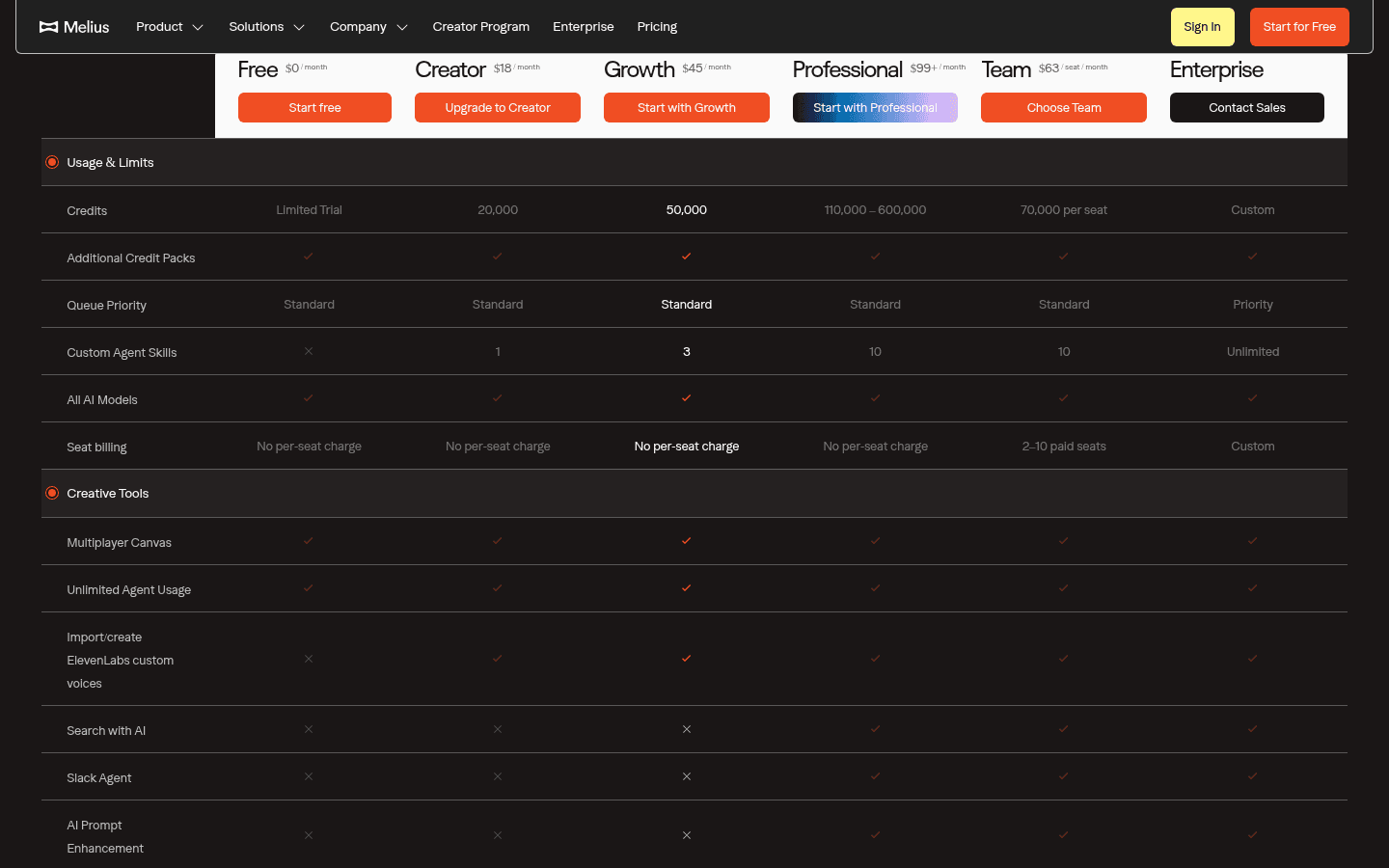
| Feature | Free | Creator | Growth | Professional | Team |
|---|---|---|---|---|---|
| All AI models | Yes | Yes | Yes | Yes | Yes |
| Multiplayer canvas and unlimited agent use | Yes | Yes | Yes | Yes | Yes |
| Custom agent skills | None | 1 | 3 | 10 | 10 |
| Import or create ElevenLabs voices | No | Yes | Yes | Yes | Yes |
| Slack agent | No | No | No | Yes | Yes |
| Search with AI and AI prompt enhancement | No | No | No | Yes | Yes |
| Credit top-ups | Yes | Yes | Yes | Yes | Yes |
Credits, top-ups and cancelling
- Top-ups: you can buy extra credits at any time without upgrading. Topped-up credits do not expire.
- Plan credits: refresh every month, even on annual billing. Unused plan credits expire when the plan ends.
- Cancelling: takes effect at the end of the billing period, and you keep access and your balance until then. Creator, Growth and Professional can be upgraded, downgraded or cancelled at any time, with prorated changes.
- Discounts: discount codes apply to monthly billing on Creator, Growth and Professional only. Until November 30, 2026, the homepage offers a Black Friday deal of 40% off your first month or 50% off your first year.
Is Melius free?
Not for generating. You can create an account and explore the canvas for free, and the Free plan shows a "Limited Trial" of credits. Melius's own FAQ says the only way to get credits is a paid plan or a one-time credit purchase, so plan on paying at least $18 a month (or a top-up) once you start making real assets.
Is Melius good for teams?
Yes, teams are where Melius is strongest. The Team plan costs $63 per seat a month ($56 on annual billing) for 2 to 10 seats, and each seat adds 70,000 credits to one shared balance. Owners and admins can set member credit limits, assign roles and see usage. Shared canvases put feedback on a specific node, and the Slack bot lets anyone @mention Mel in a channel and get results on a canvas. Above 10 seats you move to Enterprise.
Melius vs FLORA, Figma Weave, Krea and Magnific
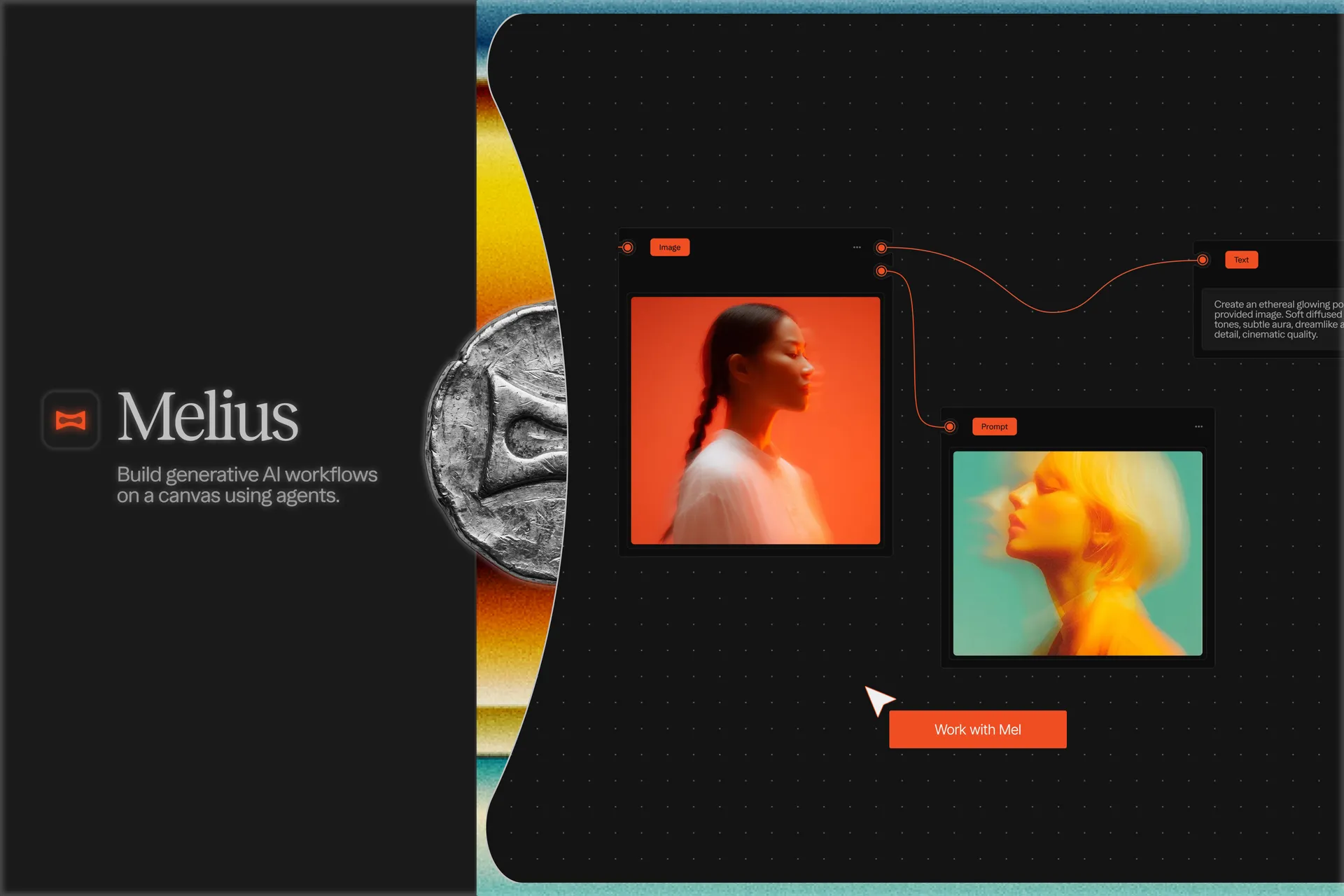
What is Melius AI? A creative workspace where you brief AI agents that build the workflow and every prompt for images, video and ads across many models.
Melius is most often compared with other node canvases. We checked each public pricing page on November 26, 2026:
| Tool | Free option | Paid from | Billing model | Agent or MCP |
|---|---|---|---|---|
| Melius | Free signup, limited trial | $18 a month | Credits, no per-seat charge on individual plans | Mel agent, MCP, API and CLI |
 FLORA | Up to 17 generations | $18 per seat a month (Starter) | Per seat, pooled model usage | API and MCP from Starter |
| Figma Weave (formerly Weavy) | 150 credits a month | $17 a month billed annually | Credits, top-ups $10 per 1,000 | Not checked |
 Krea AI | 100 units a day | Several unit-based plans | Units | Krea Agent, Nodes and MCP |
 Magnific (formerly Freepik) | Not checked | Premium, 240K credits a year | Yearly credits, no monthly resets | Spaces canvas and MCP |
- Pick Melius if you want an agent to build the workflow for you, you make video and audio as well as images, or you need Cast avatar videos and Slack access for a team.
- Pick FLORA if you want a free taste first (up to 17 generations) and per-seat billing for a small studio.
- Pick Figma Weave if your team already lives in Figma and you want a real free monthly allowance.
- Pick Krea AI if you want daily free units, real-time generation and its own Krea 3 model.
- Pick Magnific if you also want stock assets and upscaling, and you prefer a yearly credit pool.
New to canvas tools? Our guide on why creators are switching to node-based AI tools explains the approach, and  Higgsfield or
 Midjourney are simpler choices when you only need single generations.
Is Melius worth it?
Melius is worth it if you produce creative assets regularly and each one takes several steps: ad variations, product visuals, UGC-style videos or multi-shot campaigns. One subscription replaces several model subscriptions, the graph makes good work repeatable, and the Team plan is built for shared review. The $25 million raise and fast release pace (the docs were updated in mid-November 2026) suggest it will keep adding models.
It is less worth it if you generate the odd image now and then. There is no free generation allowance beyond a limited trial, video eats credits quickly (the Creator plan's 20,000 credits are estimated at about 15 videos), and a node canvas adds setup you will not use for one-off prompts. In that case, start with a free tier elsewhere, or buy Creator for one month with the current discount and watch how fast your credits go.
Frequently asked questions
What does Melius AI do?
Melius is an AI canvas where you and its agent, Mel, generate and edit images, videos, audio and text. Each step is a node you can rewire, re-run or reuse as a template. It also includes Cast for avatar presenter videos and Ditto for swapping people or styles in existing videos.
Is the creative AI tool Melius worth it?
For teams and creators who make multi-step assets every week, yes: you get many top models, a reusable workflow and shared review for $18 a month and up. For occasional use, probably not, because generating always costs credits and video uses them fast.
How does Melius work?
You add nodes for text, images, video and audio to an infinite canvas and connect them with edges, so one output feeds the next. Or you describe the result in chat and Mel builds and runs the graph, choosing a model for each node. Every run is saved as a version.
What models does Melius support?
Image models include GPT Image 2.6, Nano Banana Pro, Flux, Seedream, Ideogram and Recraft. Video models include Veo 3.1, Kling 3.0, Seedance 2.5, Wan, LTX and Ray. Audio comes from ElevenLabs, Fish Audio and MiniMax, and text from GPT, Claude, Gemini and Grok. All paid plans include every model.
Is Melius free?
Signing up is free, and the Free plan includes a limited trial. To keep generating you need a paid plan (from $18 a month, or $17 a month billed annually) or a one-time credit purchase.
Does Melius have free credits?
Only the limited trial on the Free plan. Melius does not publish the trial amount. Topped-up credits never expire, while monthly plan credits reset each month and expire when you cancel.
Is Melius good for teams?
Yes. The Team plan pools 70,000 credits per seat for 2 to 10 seats at $63 per seat a month ($56 billed annually), with roles, member credit limits, a multiplayer canvas and the Mel Slack bot.
What can you make with Melius?
Product photos, ad creative in every aspect ratio, UGC and avatar videos, B-roll, title sequences, fashion films, storyboards, voiceovers, music and sound effects. Because the workflow is saved, you can repeat a format for every new product or campaign.
Can I use Melius with Claude or ChatGPT?
Yes. Connect the Melius MCP server at https://mcp.melius.com/mcp and sign in with your Melius account. Claude, ChatGPT, Codex and other MCP clients can then create canvases, run generations and make Cast videos for you.