The best OpenClaw alternative depends on setup effort and security. Self-hosted options such as NanoClaw, Hermes Agent, ZeroClaw and Moltis run on your machine. Hosted tools such as heyclicky, Viktor and Chorus skip the gateway install. OpenClaw itself stays free and open source, and shipped official security releases v2026.10.8, v2026.10.9 and v2026.11.3.
 OpenClaw,
 heyclicky,
 Viktor,
 Chorus and
 Pi on Toolfolio. Updated November 15, 2026. Prices and versions checked on official public pages with no account.
What OpenClaw is, and why people look for alternatives
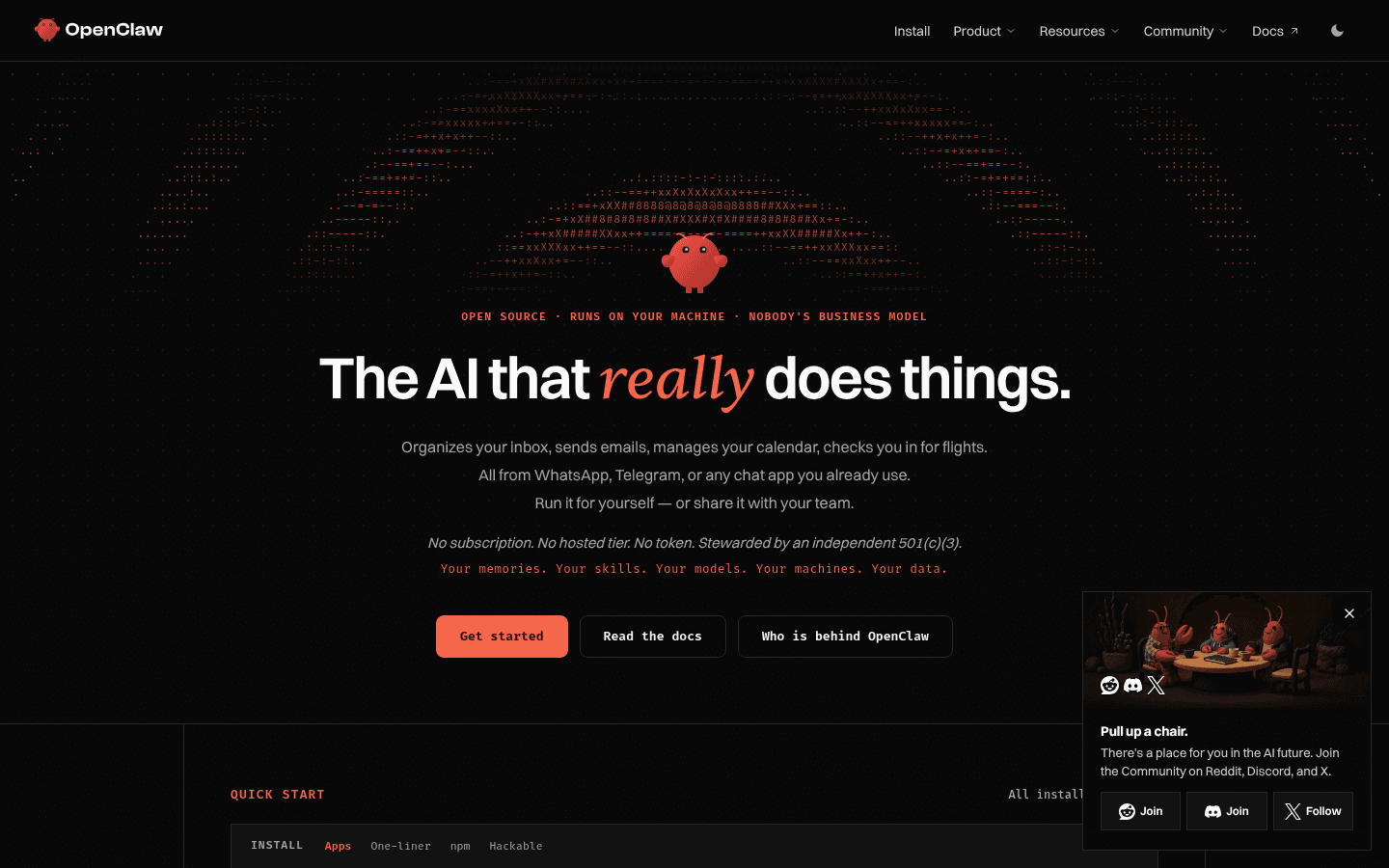
OpenClaw is a free, open-source personal AI assistant that runs on your computer and meets you in the chat apps you already use. The public homepage, checked November 15, 2026, says it can organize your inbox, send email, manage your calendar and check you in for flights from WhatsApp, Telegram or another supported chat app. It lists no subscription, no hosted tier and no token. The project is stewarded by the OpenClaw Foundation, an independent US 501(c)(3) nonprofit, and the software is MIT licensed.
People search for alternatives for a few repeated reasons:
- Setup and upkeep. OpenClaw is powerful, and it is also a gateway you install, update and secure yourself. Desktop apps on the homepage (November 15, 2026) listed v2026.11.3 for macOS, v2026.11.2 for Linux and v2026.11.1 for Windows.
- Security posture. Official docs labeled v2026.10.8 (published October 27, 2026) and v2026.10.9 (published October 29, 2026) as security releases, and v2026.11.3 (published November 10, 2026) is another one.
- A smaller or stricter runtime. Several open-source forks and rewrites (NanoClaw, ZeroClaw, Hermes Agent, Moltis) market a smaller codebase, container isolation or a single binary.
- No self-hosting at all. Hosted products such as heyclicky, Viktor and Chorus give you an assistant in a desktop app, Slack, Teams or your text messages without running a gateway.
This list groups options by how much you have to set up and how the vendor or project describes isolation. It is not a ranked "top 10," and it does not repeat vendor blogs that put their own product first.
How to choose: setup effort and security
Use this as a filter before you pick a name:
- Do you want the agent on your hardware? If yes, start with OpenClaw, NanoClaw, Hermes Agent, ZeroClaw or Moltis. You still pay your own model provider unless you run a local model.
- Do you want someone else to host it? If yes, look at heyclicky (a desktop app), Viktor (an AI employee in Slack or Microsoft Teams) or Chorus (an always-on agent you text).
- How isolated should tools be? OpenClaw documents app-level permissions, pairing and gateway controls, and it has shipped multiple security patches. NanoClaw runs each active session in a Docker container. ZeroClaw and Moltis are Rust binaries that describe supervised actions and sandboxes as the default. Hosted tools move that isolation into the vendor's cloud or a managed VM.
- Are you actually looking for a coding harness? Pi is a minimal CLI agent harness at pi.dev, not a WhatsApp-style personal assistant. OpenClaw's own site points to Pi as an SDK integration. Include it only if you want to customize a developer runtime.
OpenClaw alternatives at a glance


OpenClaw is an open-source personal AI assistant that automates a variety of tasks through popular chat applications. It allows seamless integration with your day-to-day operations while maintaining data privacy and offering full system control.
Prices and plan names below were checked on each project's public pages on November 15, 2026. Self-hosted tools are free to download; you still pay the model provider you connect, unless you run a local model such as Ollama.
| Tool | How you run it | Setup effort | Isolation, as described by the project | Public price on November 15, 2026 | Best for |
|---|---|---|---|---|---|
| OpenClaw | Self-hosted on your machine | Medium to high | App-level permissions, pairing and gateway controls; official security releases in v2026.10.8, v2026.10.9 and v2026.11.3 | Free (MIT). No subscription. You pay model providers. | The full personal-agent platform with many channels and apps |
| NanoClaw | Self-hosted, needs Docker | Medium | One Node host, plus an isolated Docker container per active session; credentials stay in OneCLI's Agent Vault by default | Free (MIT). Provider usage is extra. | A smaller TypeScript codebase with OS-level containers |
| Hermes Agent | Self-hosted, or optional Nous Portal cloud | Medium | Five sandbox backends: local, Docker, SSH, Singularity and Modal | Free (MIT). Optional Nous Portal: Free pay as you go, Plus $20/mo, Super $100/mo, Ultra $200/mo | A learning-loop agent with desktop apps and an OpenClaw importer |
| ZeroClaw | Self-hosted single Rust binary | Lower | Supervised autonomy by default, OS sandboxes and optional HMAC tool receipts | Free (MIT or Apache-2.0). No hosted seat. Provider or local-model costs only. | A lightweight binary with no Node, JVM or Python runtime |
| Moltis | Self-hosted single Rust binary | Lower | Sandboxed by default (Docker, Podman, Apple Container or WASM); SSRF blocks for private IPs | Free (MIT). The project asks you to treat it as alpha. | A security-first persistent agent server |
| heyclicky | Desktop app | Low | Vendor FAQ: it sees your screen only after you press the hotkey, and screenshots are never stored | Free: 25 talk and 25 agent messages a month. Pro $20/mo. Max $100/mo. Yearly billing is 20% off. | A screen-aware buddy on Mac and Windows |
| Viktor | Hosted in Slack, Teams and email | Low | Vendor site: SOC 2, and irreversible actions wait for a human approval | Free with up to $100 in credits (no card). Team $100/mo for 40,000 shared credits (most popular). Other monthly credit amounts are listed. Enterprise is custom. | A shared AI employee for a whole workspace |
| Chorus | Hosted agent you text | Low | Vendor FAQ: memory lives on an encrypted volume in its own virtual machine | Free $0 with a 3-day trial, no card, $10 one-time credits. Pro $20/mo. Max $200/mo. Extra agents $50/mo each. Enterprise is custom. | An always-on assistant in iMessage, WhatsApp, Slack or Teams |
| Pi | Local CLI / SDK harness | Medium | You add your own sandbox, permissions or container via extensions | Free to install. You pay the model providers you authenticate. | Developers who want a customizable agent runtime |
GitHub activity check, November 15, 2026
We re-checked each open-source project's public GitHub repository through the GitHub API on the morning of November 15, 2026. Star counts move daily, so treat them as a snapshot, not a ranking.
| Project | Repository | Stars | Latest stable release | Still active? |
|---|---|---|---|---|
| OpenClaw | openclaw/openclaw | about 394,000 | v2026.11.3 (November 10, 2026) | Yes, beta v2026.11.5 builds landed November 12 and 15 |
| Hermes Agent | NousResearch/hermes-agent | about 263,000 | v0.23.1 (November 10, 2026) | Yes, daily canary builds |
| Pi | earendil-works/pi | about 122,000 | v1.5.2 (November 10, 2026) | Yes |
| ZeroClaw | zeroclaw-labs/zeroclaw | about 33,000 | v0.9.0 (November 12, 2026) | Yes |
| NanoClaw | nanocoai/nanoclaw | about 31,000 | v2026.10.0 (October 9, 2026) | Yes, v2026.11.0 betas landed November 9 to 14 |
| Moltis | moltis-org/moltis | about 3,000 | 20261023.01 (October 23, 2026) | Slower, last push October 23, 2026 |
None of the six repositories was archived. Five show the MIT license on GitHub. ZeroClaw's repository metadata shows Apache-2.0, while its homepage says MIT or Apache-2.0.
Self-hosted, open-source personal agents
These are the closest drop-in answers to "OpenClaw alternatives" on today's Google results: you run the agent, you bring a model, and you talk to it from chat apps.
OpenClaw: the baseline, not just the thing to leave
OpenClaw is an open-source personal AI assistant that automates a variety of tasks through popular chat applications. It allows seamless integration with your day-to-day operations while maintaining data privacy and offering full system control.
Stay on OpenClaw if you want the broadest channel list and a desktop app that installs the gateway, chat, setup and node features for you. The homepage (November 15, 2026) says it works on macOS, Linux and Windows, remembers preferences across conversations, can browse the web, read and write files and run shell commands, and can share one gateway with a team. It lists 29 channels, including WhatsApp, Telegram, Discord, Slack, Signal and iMessage.
On November 15, 2026 the homepage advertised v2026.11.3 for macOS (macOS 15+), v2026.11.2 for Linux (AppImage or Debian package) and v2026.11.1 for Windows 10 and 11 (x64 or ARM64). GitHub published v2026.11.3, the latest stable tag, on November 10, 2026. That release is labeled a security release, so Windows users on v2026.11.1 should update when a newer Windows build appears (see the security section below). The official docs also include a guide for migrating from Hermes into OpenClaw, so switching is not one-way.
Cost: OpenClaw itself is free. There is no paid edition on the official site. You pay Anthropic, OpenAI or whichever provider you connect, or you run a local model.
NanoClaw: smaller TypeScript core, container isolation
NanoClaw is an open-source personal agent (MIT) that keeps a single Node.js host process and runs every active agent session in its own Docker container. The official FAQ, checked November 15, 2026, says credentials route through OneCLI's Agent Vault by default so agents never hold raw API keys. Claude is the default provider; Codex, OpenCode and Ollama can be configured per agent group.
The homepage comparison table (vendor numbers, not independently recounted by us) listed about 29,300 runtime TypeScript lines and 12 direct runtime dependencies for NanoClaw, versus 434,453 lines and 70 dependencies for OpenClaw. It also contrasted "OS container isolation" with OpenClaw's "application-level checks."
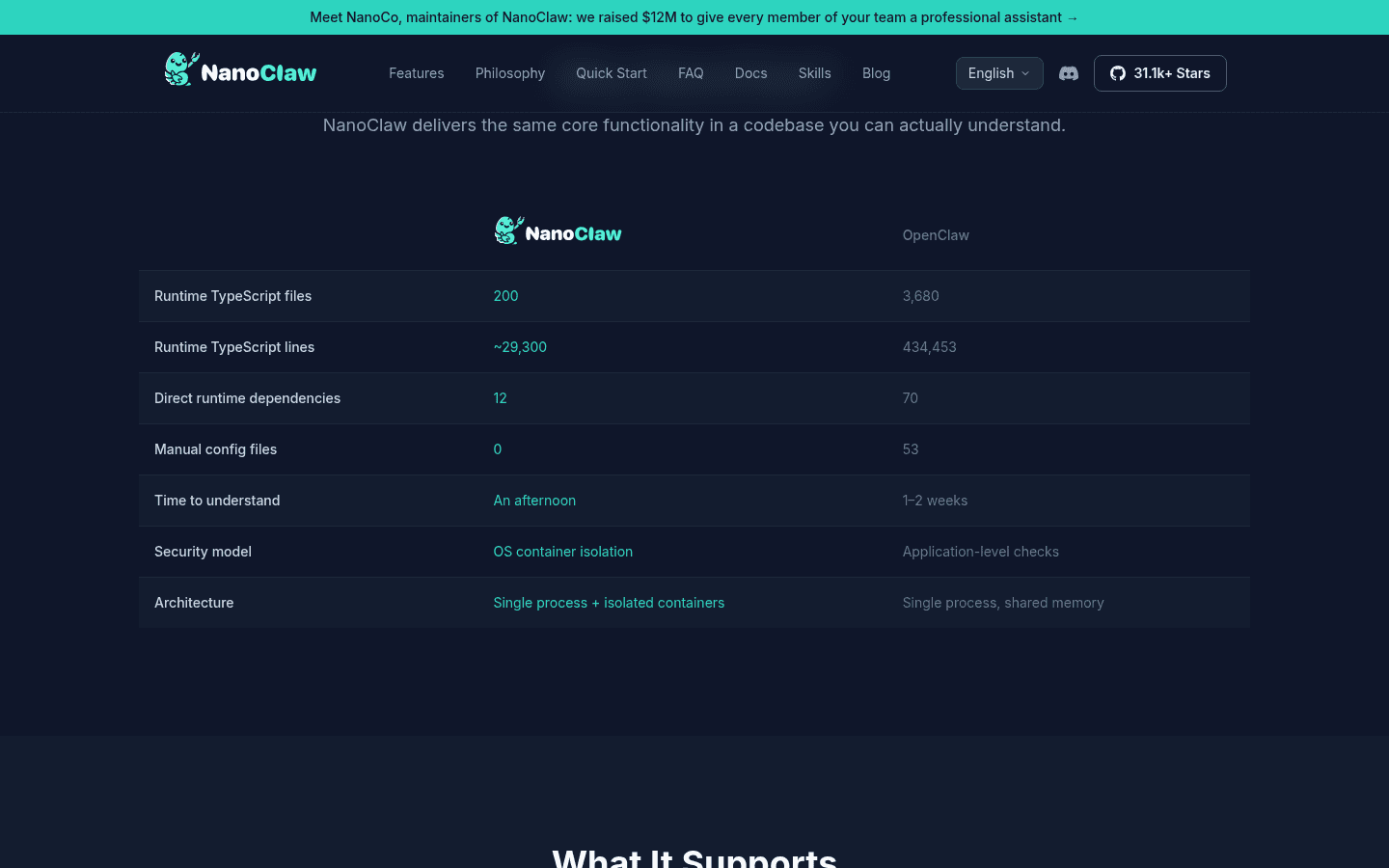
Setup needs macOS, Linux or Windows through WSL2, Node.js 20+, pnpm 10+, Docker, and a Claude or Codex credential. The installer now says it installs Node.js, pnpm, Docker and OneCLI when they are missing. The official install path is to clone github.com/nanocoai/nanoclaw and run bash nanoclaw.sh. The site displayed "31.1k+ stars" on November 15, 2026, and GitHub showed 31,115.
NanoClaw is free. Your model provider may charge for usage. Local Ollama models can run without a hosted-model bill, per the official FAQ.
Hermes Agent: learning loop, desktop apps and an official OpenClaw importer
Hermes Agent is Nous Research's open-source agent (MIT). The official site says it lives on Telegram, Discord, Slack, WhatsApp, Signal, email and the CLI, keeps persistent memory, schedules unattended jobs, delegates to isolated subagents and sandboxes work on five backends: local, Docker, SSH, Singularity and Modal. Desktop apps are listed for macOS 12+, Windows 10/11 and Linux.
Hermes is one of the few projects with a first-party OpenClaw migration path. The docs describe hermes import-agent openclaw (from the agent-importers plugin) and a setup prompt that offers to import ~/.openclaw when it finds that folder.
The agent itself is free. Optional Nous Portal plans, shown on the homepage on November 15, 2026:
| Plan | Price | What the public table lists |
|---|---|---|
| Free | $0, pay as you go | Free models only |
| Plus (marked popular) | $20 / month | Free and paid models, hosted tools, cloud host with 4 GB RAM and 25 GB disk |
| Super | $100 / month | 5x Plus usage, 4 GB RAM and 100 GB disk |
| Ultra | $200 / month | 10x Plus usage, 8 GB RAM and 100 GB disk |
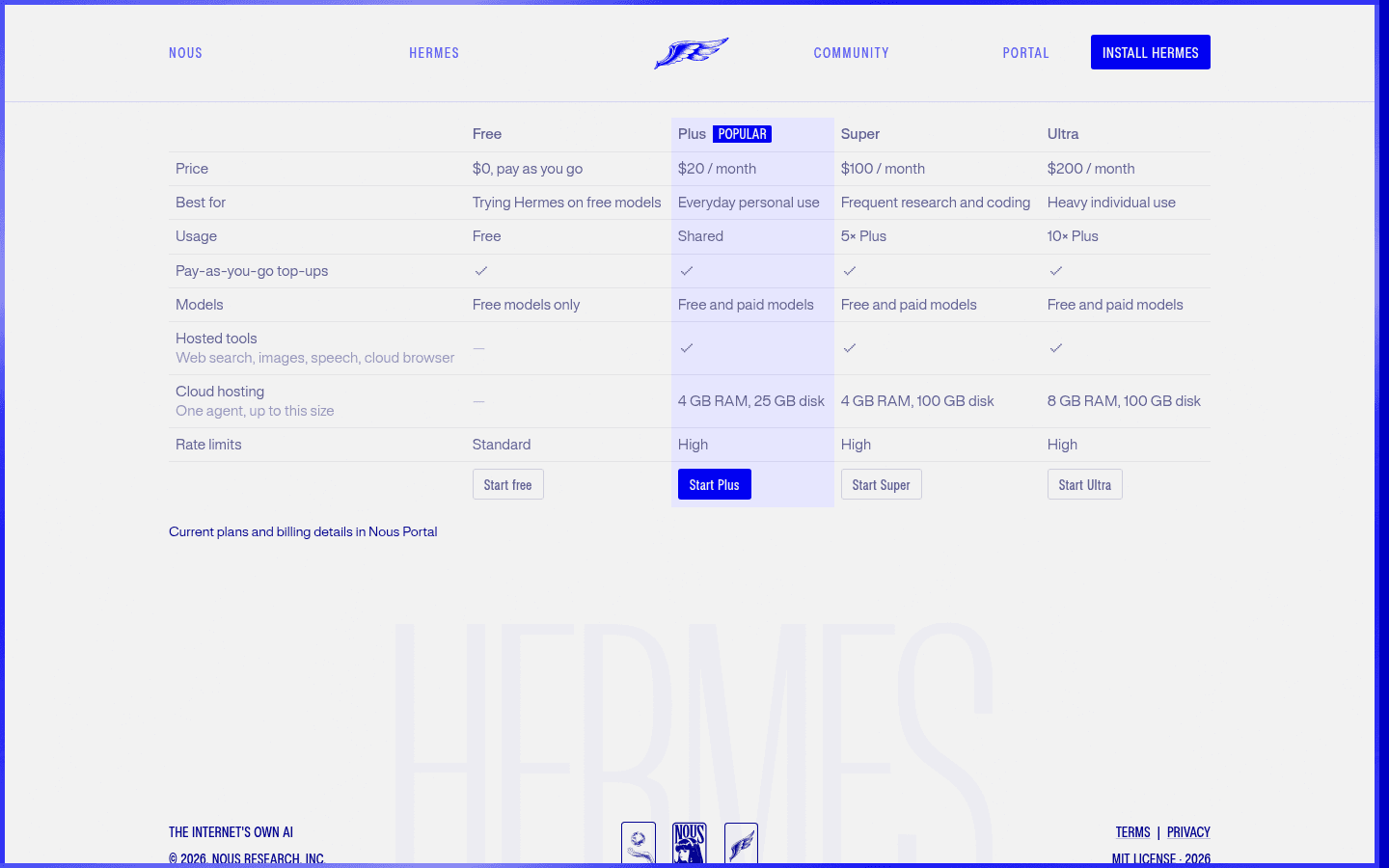
Hosted tools (web search, images, speech, cloud browser) and cloud hosting appear on the paid tiers in that table. Model providers and optional hosted services have their own pricing, which the official FAQ also states.
ZeroClaw: one Rust binary, supervised actions, tool receipts
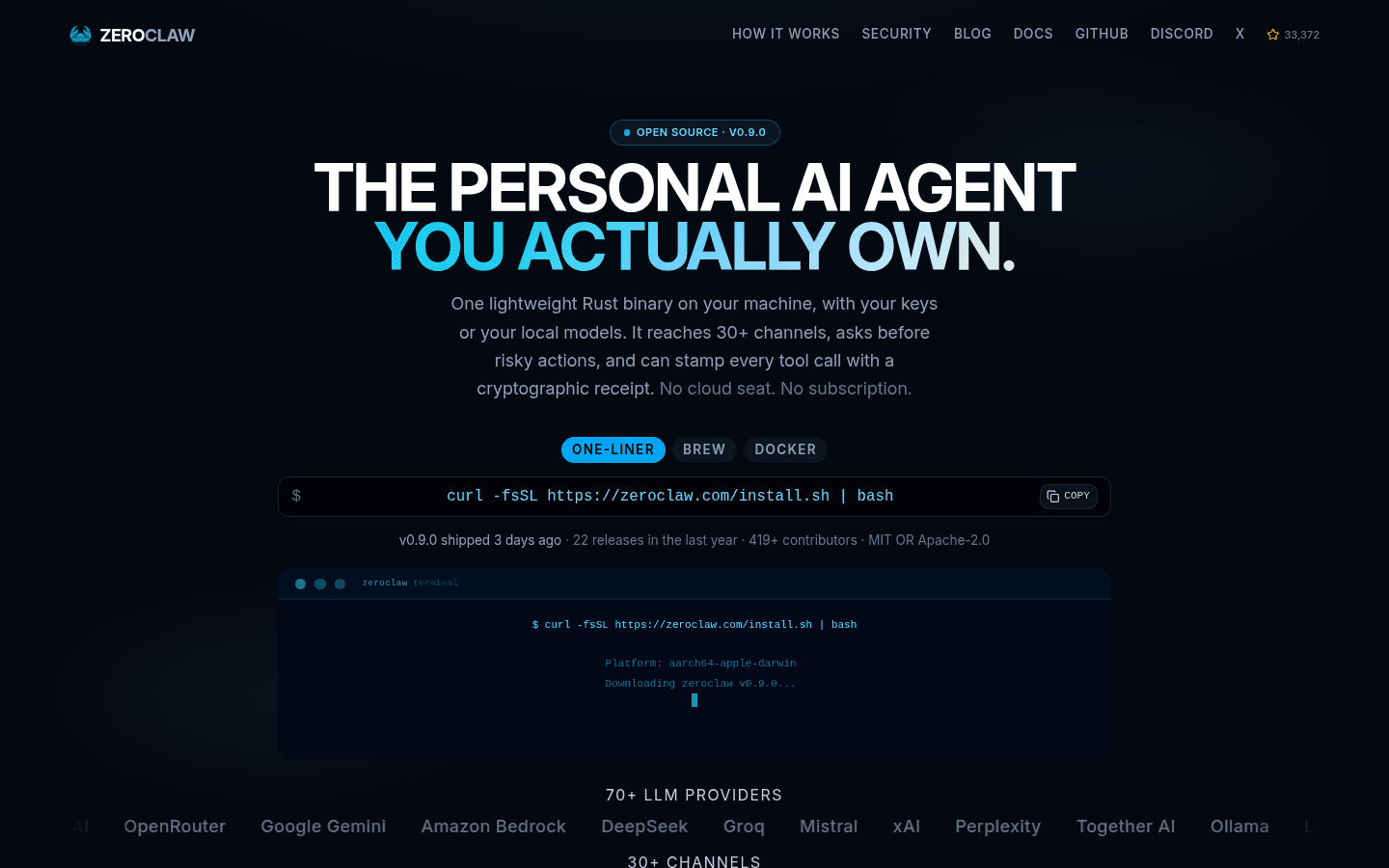
ZeroClaw is a personal agent runtime packaged as a single Rust binary. The homepage on November 15, 2026 advertised version v0.9.0 (GitHub release dated November 12, 2026), dual-licensed MIT or Apache-2.0, with no cloud seat and no subscription. It claims 70+ LLM providers and 30+ channels, including Telegram, Discord, WhatsApp, Slack, Signal, iMessage, email and Matrix.
Security, as ZeroClaw describes it: autonomy starts in supervised mode (medium-risk actions need approval, high-risk actions are blocked), OS sandboxes such as Landlock, Bubblewrap, Seatbelt or Docker contain what the process can touch, and optional HMAC-SHA256 tool receipts stamp successful tool calls so a fabricated run is detectable. YOLO mode is described as opt-in.
Install options listed on the site include a one-liner (curl -fsSL https://zeroclaw.com/install.sh | bash), Homebrew and Docker. The site said v0.9.0 "shipped 3 days ago" and listed 22 releases in the last year and 419+ contributors. GitHub showed 33,372 stars on November 15, 2026.
ZeroClaw is free. You pay only the LLM provider you choose, or nothing extra if you point it at a local model such as Ollama, LM Studio, llama.cpp or vLLM.
Moltis: Rust agent server, sandboxed by default, still labeled alpha
Moltis calls itself a secure, persistent personal agent server: one Rust binary, no plugin marketplace, sandboxed by default. The public comparison page contrasts it with OpenClaw (TypeScript gateway plus apps) and Hermes Agent (Python CLI and gateway). Moltis lists Docker, Podman, Apple Container and WASM sandboxes, password plus passkey plus API-key auth, built-in channels (web UI, Telegram, WhatsApp, Discord, Slack, Matrix, Nostr and Teams) and a read-only OpenClaw import.
The same site is explicit about maturity: "Treat Moltis as alpha: run it carefully, review tool permissions, and avoid giving broad system access you do not need." That is the project's own warning, not ours.
Install options on November 15, 2026 included curl -fsSL https://www.moltis.org/install.sh | sh, Homebrew, Docker and OS packages. Moltis is MIT licensed. You bring your own provider key, or use listed OAuth options such as GitHub Copilot. The homepage also offers a "Try it in the cloud" option, but says the full experience is running it on your own Mac, VM or dedicated host. The latest GitHub release on November 15, 2026 was 20261023.01 (October 23, 2026).
Hosted personal agents with less setup
These are not OpenClaw forks. They answer a different question: "I want a personal or team agent without running a gateway." They showed up less often on the "openclaw alternatives" SERP than NanoClaw, Hermes and ZeroClaw, but they are the low-setup group we can document from public pages and existing Toolfolio tool pages.
heyclicky: a screen-aware buddy on Mac and Windows


heyclicky is an AI assistant that enhances productivity by offering contextual help and task management right next to your cursor.
heyclicky lives on your computer. You press a hotkey, it sees what is on screen, talks you through the task, and can run agents that do the work. This is a different shape from OpenClaw's chat-gateway model: there is no self-hosted WhatsApp bridge to configure.
Important change since our earlier heyclicky pricing article: Windows is no longer waitlist-only. The official changelog says HeyClicky for Windows shipped in version 1.1.1 on October 23, 2026, for Windows 10 and 11. The Windows page and the November 6, 2026 1.1.3 / 1.1.5 notes cover Windows installs, updates and notch behavior. macOS still requires Sonoma 14.2 or later, on Apple silicon and Intel.
Pricing on heyclicky.com, monthly view, November 15, 2026:
| Plan | Monthly price | What the cards list |
|---|---|---|
| Free | $0 | Free forever, no card needed. 25 talk messages a month, plenty of dictation, 25 agent messages a month |
| Pro (popular) | $20 per month, billed monthly | Unlimited talk, unlimited dictation, 150 agent messages a month |
| Max | $100 per month, billed monthly | Unlimited talk, unlimited dictation, 1,000 agent messages a month |
Yearly billing is advertised at 20% off. A student note on the same page offers 50% off the first month on Pro if you show a school email or student ID.
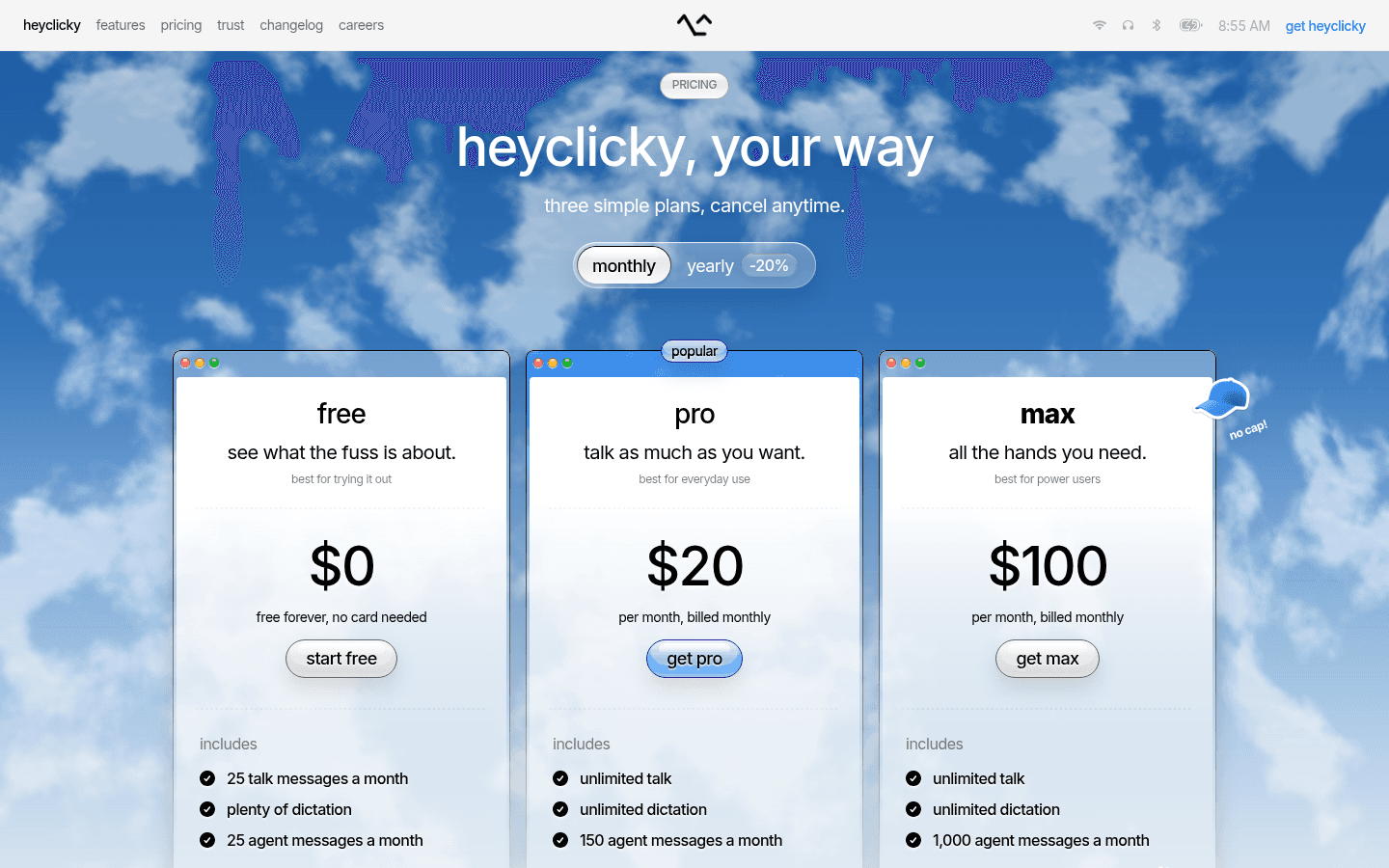
The official FAQ says heyclicky only sees your screen when you press the hotkey, screenshots are never stored, and it keeps basic text summaries for context. You can delete your account and its data in settings.
Viktor: an AI employee in Slack and Teams


Viktor is an AI employee designed to automate and enhance productivity by integrating seamlessly with various tools like Slack and Microsoft Teams. It tasks itself with reporting, analyzing, and performing project work, ensuring teams can focus on what matters.
Viktor is a hosted AI employee that works in Slack, Microsoft Teams and email. The public site (November 15, 2026) says it connects to 9,800+ tools, drafts reports and other artifacts, and waits for a human before irreversible actions. Pricing is per workspace, not per seat.
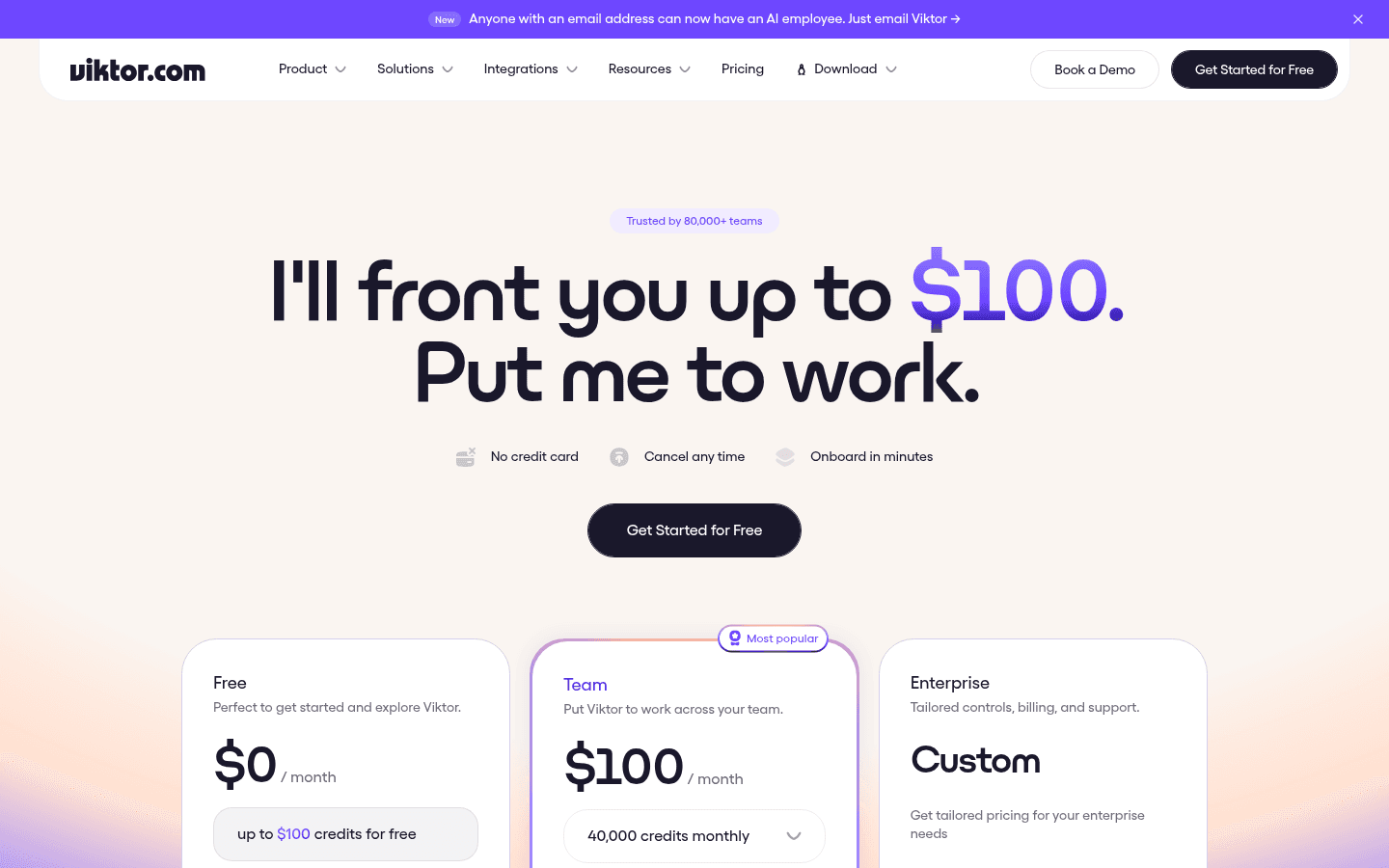
From viktor.com/pricing on November 15, 2026:
- Free, $0 a month: up to $100 in credits, no credit card, every feature and integration. Free credits never expire.
- Team, shown as $100 a month (most popular): 40,000 shared credits each month. A dropdown lists other monthly credit amounts. The same public page also lists $50 a month for 20,000 credits and $200 a month for 80,000 credits, among higher tiers.
- Enterprise: custom pricing, invoicing, DPA, SLA and dedicated onboarding.
Unused monthly plan credits roll over for one month, per the pricing FAQ. Free trial and bonus credits never expire. The site states SOC 2 compliance and "Trusted by 78,000+ teams." Those are vendor figures.
Toolfolio has two Viktor rows. This article links the canonical Viktor page (viktor.com), not the affiliate duplicate.
Chorus: an always-on agent you text


Chorus is an agent platform that allows users to perform various tasks through a text-based interface. It can execute real work, like design or research, while integrating with multiple tools seamlessly.
Chorus is a hosted agent platform you message from iMessage, WhatsApp, Slack or Microsoft Teams. The personal assistant page describes trip planning, group-chat coordination, calendar checks and follow-ups, with memory that carries across conversations. The FAQ says Chorus sees only the conversations where you include it, and that memory and files live on an encrypted volume scoped to its own virtual machine.
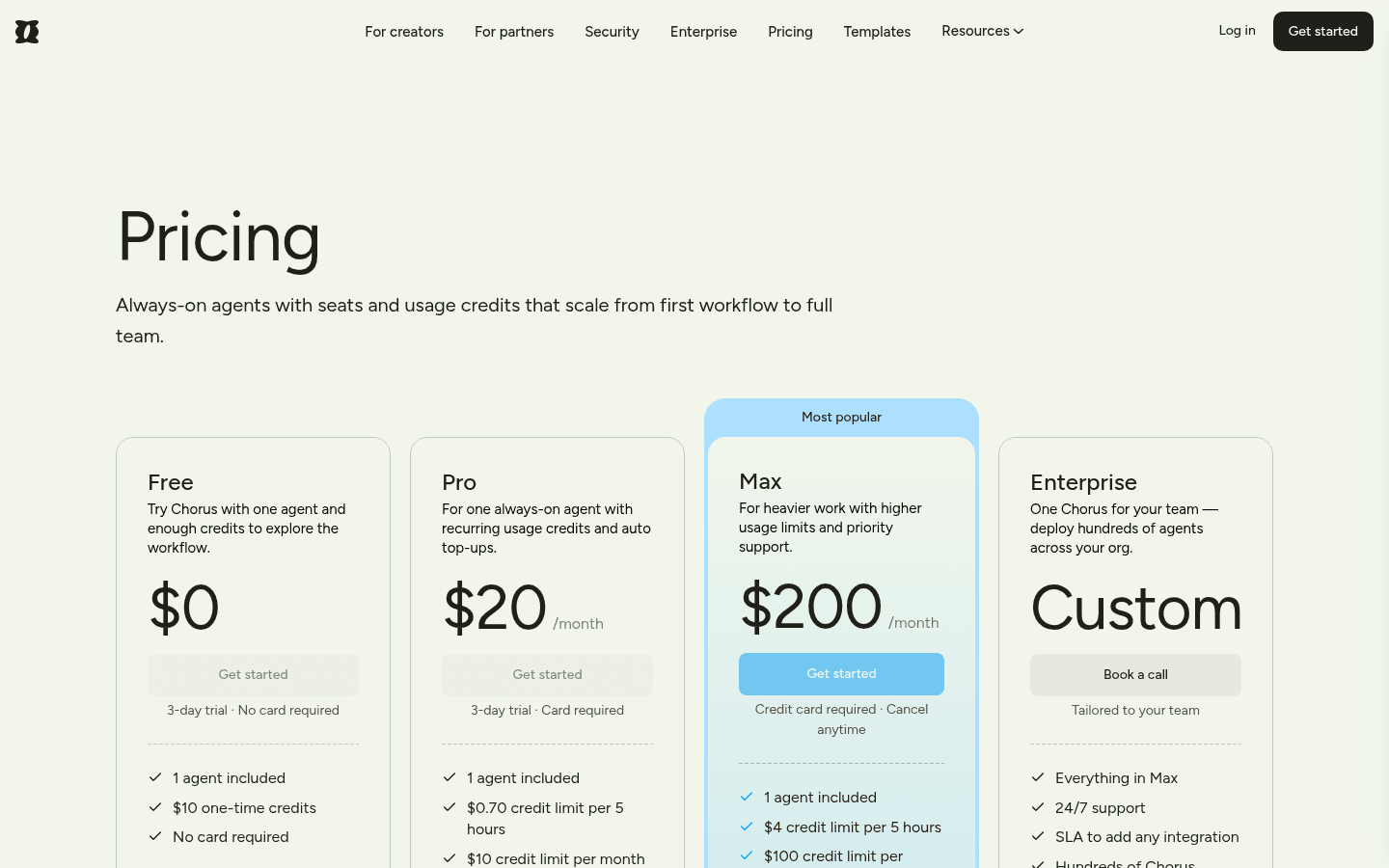
From chorus.com/pricing on November 15, 2026:
- Free, $0: 3-day trial, no card required, 1 agent, $10 one-time credits.
- Pro, $20 a month: 3-day trial, card required, 1 agent, $0.70 credit limit per 5 hours, $10 credit limit per month, auto top-ups at $1 per credit, extra agents $50 a month each.
- Max, $200 a month (marked most popular): card required, cancel anytime, 1 agent, $4 credit limit per 5 hours, $100 credit limit per month, same extra-agent price.
- Enterprise: custom, with 24/7 support and an SLA to add integrations.
Credits pay for model tokens and similar provider usage "at the same cost that Chorus is charged," according to the pricing page.
A developer harness: Pi
Pi at pi.dev is not a messaging personal assistant. It is a minimal coding-agent harness you install with a curl script, PowerShell or npm (@earendil-works/pi-coding-agent). The homepage describes extensions, skills, prompt templates, tree-structured session history and four modes: interactive, print/JSON, RPC and SDK. It also says "See OpenClaw for a real-world integration," which is why Pi belongs here as a complementary runtime rather than a WhatsApp-style replacement.
Pi ships without baked-in sub-agents, permission popups or plan mode. You add those with extensions, or you run Pi inside a container you control. It talks to 15+ providers (Anthropic, OpenAI, Google, Azure, Bedrock, OpenRouter, Ollama and others) via API keys or OAuth.
This is the Toolfolio pi row, not Inflection's conversational chatbot of the same name.
If your day-to-day work is wiring models into editors and terminals, also see our MCP servers guide and the 21st.dev Magic MCP setup article. For a browser your coding agents can drive, compare ego (lite) in our AI browsers list.
OpenClaw security releases in October and November 2026
OpenClaw is an open-source personal AI assistant that automates a variety of tasks through popular chat applications. It allows seamless integration with your day-to-day operations while maintaining data privacy and offering full system control.
If security is why you are shopping, read the official notes before you switch or stay.
v2026.10.8 is labeled a security release. GitHub published the tag on October 27, 2026. Official docs say it adds remediations for the eMudhra certificate compromise in the secret egress proxy and its exported trust bundle, and that you should restart the Gateway to apply the change. Apps with independent trust stores and bypass tunnels need their own updates. The same notes also describe fixes that stopped sandboxed child agents from launching a CLI model outside the sandbox, blocked a browser-proxy bypass through the generic Nodes tool, stopped POSIX exec allowlists from automatically trusting test -v predicates, and stopped Fish Audio and Gradium errors from exposing an API key.
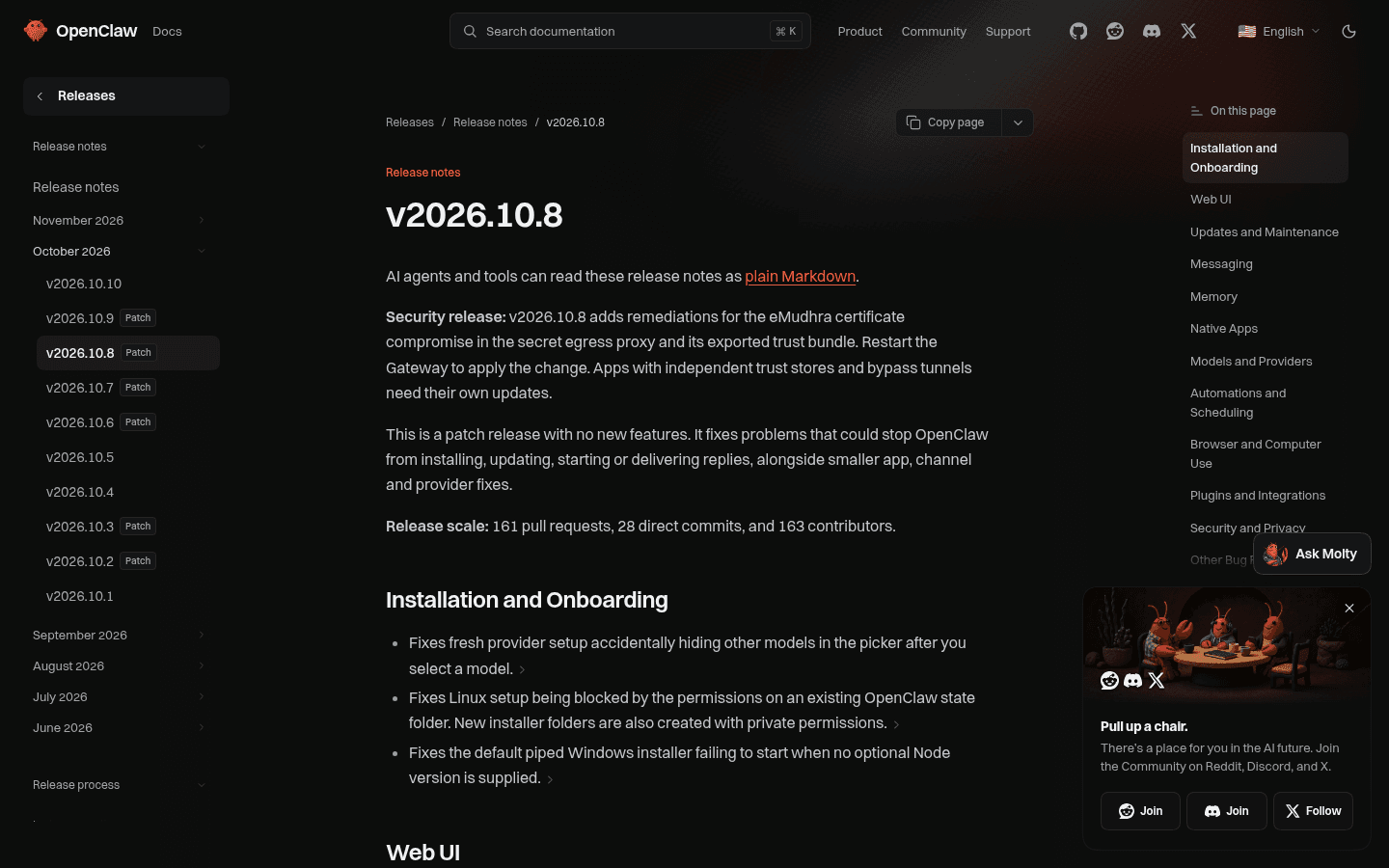
v2026.10.9, published October 29, 2026, is also labeled a security release. Official docs list remediations for vulnerable dependencies (including fast-uri 4.2.3 for MCP URI validation, Nodemailer 10.1.4 for IMAP sender spoofing, and MSAL Node 7.1.1 for Microsoft Teams and affected Azure sign-ins), workspace-only enforcement on Gateway-built delegation and media tools, credential redaction in MCP CLI inspection, and masking of Google sign-in client secrets in console and log-tail output.
v2026.11.3, published on GitHub on November 10, 2026, is the newest security release. The official notes say it fixes certificate verification for worker transfers with blank fingerprints, keeps required-sandbox image previews within allowed folders and reduces credential exposure. The same patch release fixes problems that could leave the Gateway stopped after an update or block backups on slow storage, and it adds no new features.
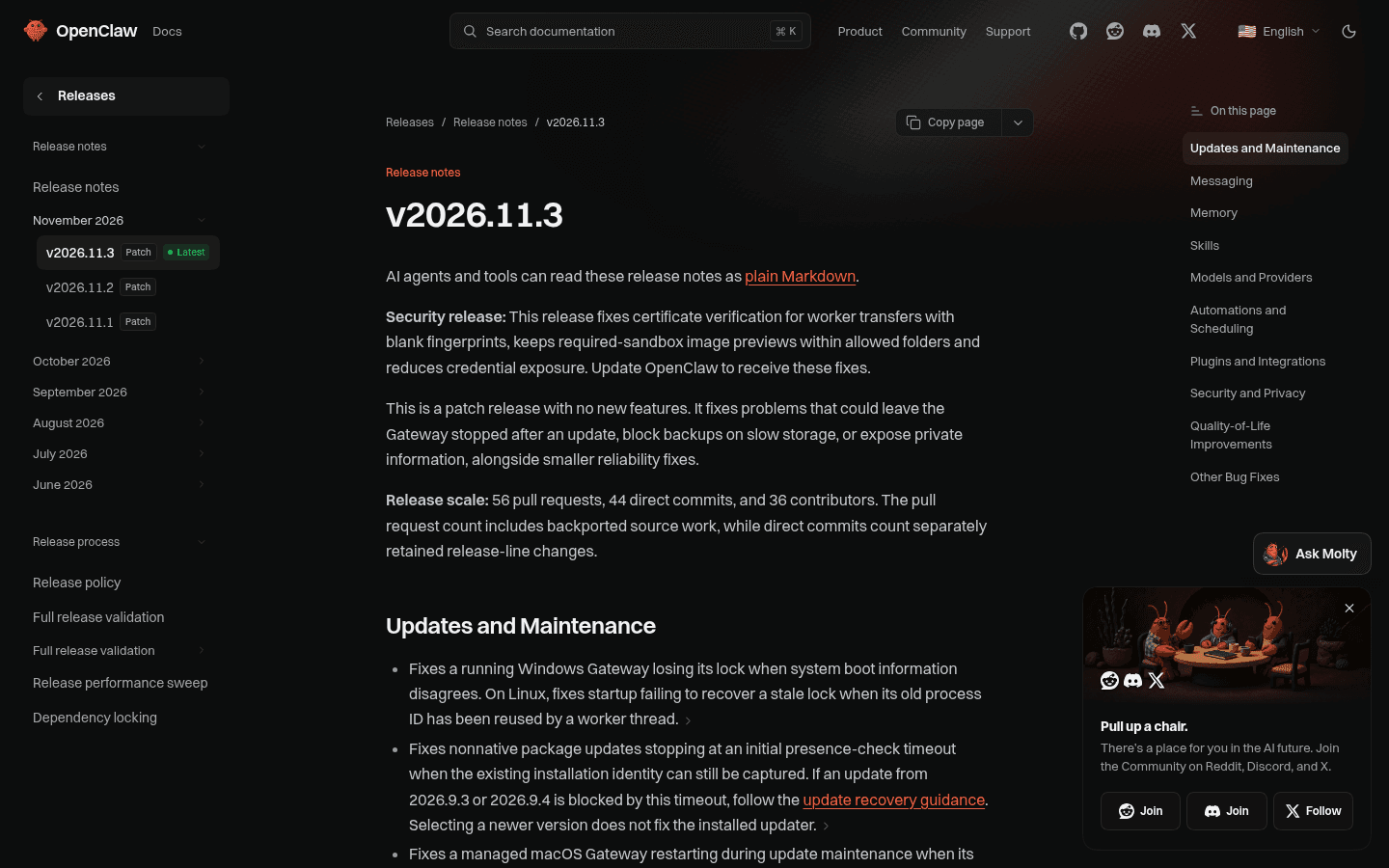
Between those releases came v2026.10.10 (November 3, 2026), a large feature release, and the v2026.11.1 (November 5) and v2026.11.2 (November 8) reliability patches. GitHub's latest stable tag on November 15, 2026 was v2026.11.3, with v2026.11.5 beta builds in testing. If you stay on OpenClaw, update through the documented release channel rather than pinning an October build forever.
These are summaries of public release notes, not a penetration test. We did not independently reproduce the issues.
Which OpenClaw alternative should you pick?
- Keep OpenClaw if you want the widest channel list, official desktop apps and a nonprofit-stewarded MIT project, and you are willing to install updates (including the October and November 2026 security releases).
- Choose NanoClaw if you want a smaller TypeScript codebase and Docker isolation around each session.
- Choose Hermes Agent if you want desktop apps, a learning loop and a first-party importer for an existing OpenClaw home directory.
- Choose ZeroClaw if you want one Rust binary, supervised tool use and optional cryptographic receipts, without a Node or Python runtime.
- Choose Moltis if you want a Rust agent server that is sandboxed by default, and you accept the project's own alpha warning.
- Choose heyclicky if you want a screen-aware desktop assistant on Mac or Windows and do not want to run a messaging gateway. See is heyclicky free for the plan math, and note that Windows is now publicly shipping.
- Choose Viktor if your team already lives in Slack or Microsoft Teams and you want one shared AI employee with workspace credits.
- Choose Chorus if you want to text an always-on hosted agent from iMessage, WhatsApp, Slack or Teams.
- Choose Pi if you are building or embedding a coding-agent harness, not replacing a WhatsApp personal assistant.
Pynchy is another self-hosted personal-agent project that appears in some roundups. Its public site did not load (HTTP 504 on November 8, then a timeout on November 15, 2026), so we did not include unverified details.
FAQ
Is NanoClaw better than OpenClaw?
It depends on what you mean by better. NanoClaw's own site argues for a smaller, easier-to-audit TypeScript core and OS-level container isolation for every active session. OpenClaw offers a much larger product: official desktop apps, a wider documented channel and plugin surface, and a nonprofit steward. NanoClaw needs Docker. Neither project publishes an independent, side-by-side quality benchmark on the pages we checked.
What are the top open-source OpenClaw alternatives?
The open-source options we could verify from official public pages on November 15, 2026 are NanoClaw, Hermes Agent, ZeroClaw and Moltis, plus OpenClaw itself. Hermes and Moltis also document importers for an existing OpenClaw setup. Hosted tools such as heyclicky, Viktor and Chorus are alternatives to self-hosting, not open-source OpenClaw rewrites.
Is OpenClaw free?
Yes. The official site says there is no subscription, no hosted tier and no paid edition. You still pay the model provider you connect, unless you run a local model. The OpenClaw Foundation describes itself as a 501(c)(3) that has nothing to sell you.
Is OpenClaw safe?
It is as safe as the version you run and the permissions you give it. OpenClaw can read files, browse and run shell commands, and the official site says full access or sandboxed is your choice. The project shipped three labeled security releases between October 27 and November 10, 2026 (v2026.10.8, v2026.10.9 and v2026.11.3), so staying updated matters. If you want isolation by default, NanoClaw, ZeroClaw and Moltis describe container or OS sandboxes as their starting point. We did not run a security audit of any of them.
What is OpenClaw used for?
The official homepage describes a personal (or team) assistant that lives in your chat apps and can handle inbox, email, calendar, travel check-in, browsing, files and shell commands. Community examples on the same page include daily briefings, production fixes and multi-agent setups. Those examples are user stories published by OpenClaw, not tests we ran.
What is the difference between Claude and OpenClaw?
Claude is a model (and a set of Anthropic apps). OpenClaw is an open-source agent runtime that can call Claude, GPT or other models and then act through tools and chat channels. Many OpenClaw alternatives, including NanoClaw and Hermes Agent, can also use Claude as a provider. You are comparing a model to a harness, not two chatbots.
Which AI model is best for OpenClaw?
OpenClaw does not name a single required model on the homepage we checked. It says you can bring hosted, subscription-backed, gateway or local models. NanoClaw defaults to Claude. Hermes lets you switch providers and also offers Nous Portal. ZeroClaw and Moltis list many cloud and local options. The "best" model depends on the tasks you give the agent and on what you are willing to spend; we did not run a model bake-off.
Are there OpenClaw alternatives for Windows?
Yes. OpenClaw itself lists a Windows desktop app for Windows 10 and 11 (the homepage showed v2026.11.1 on November 15, 2026, behind the v2026.11.3 macOS build). Hermes Agent lists Windows 10/11 desktop downloads through the Microsoft Store or an .exe. NanoClaw supports Windows through WSL2. ZeroClaw and Moltis publish Windows binaries or packages. If you want a Windows desktop assistant without a self-hosted gateway, heyclicky now ships for Windows 10 and 11.
Is there a hosted OpenClaw alternative that needs no terminal?
Yes. heyclicky is a downloadable desktop app, Viktor is added inside Slack or Teams, and Chorus is added as a contact you text. All three have public free or trial tiers described above. They will not import your ~/.openclaw directory the way Hermes or Moltis document.
How are people using OpenClaw?
The official site collects user stories about email triage, calendar and school deadlines, voice-guided production fixes and control of mail, messages and passwords from one chat. Related Google searches also point to Windows, price, GitHub and "is it free" questions. Reddit threads about setup time and upkeep appear next to those results; those are opinions, not official docs.